API Builder
What API Builder Does
API Builder lets you define a custom REST API by composing the services you have already generated in DreamFactory. You describe an endpoint's path, the backing requests it makes, and the shape of its response. DreamFactory runs that definition at request time.
The difference from event scripts is where the logic lives. An event script attaches code to an existing endpoint. API Builder creates a new endpoint that did not exist, assembled from one or more calls to your existing services, with no code at all.
A typical use: your mobile app needs a customer record with their last five orders and their account manager's name. That is three tables across two databases. Without API Builder the client makes three round trips and stitches the result. With API Builder you define one endpoint, GET /customer-portal/customers/{id}/summary, and the client makes one call.
Finding API Builder
In the admin interface, go to API Generation & Connections → API Types → API Builder.
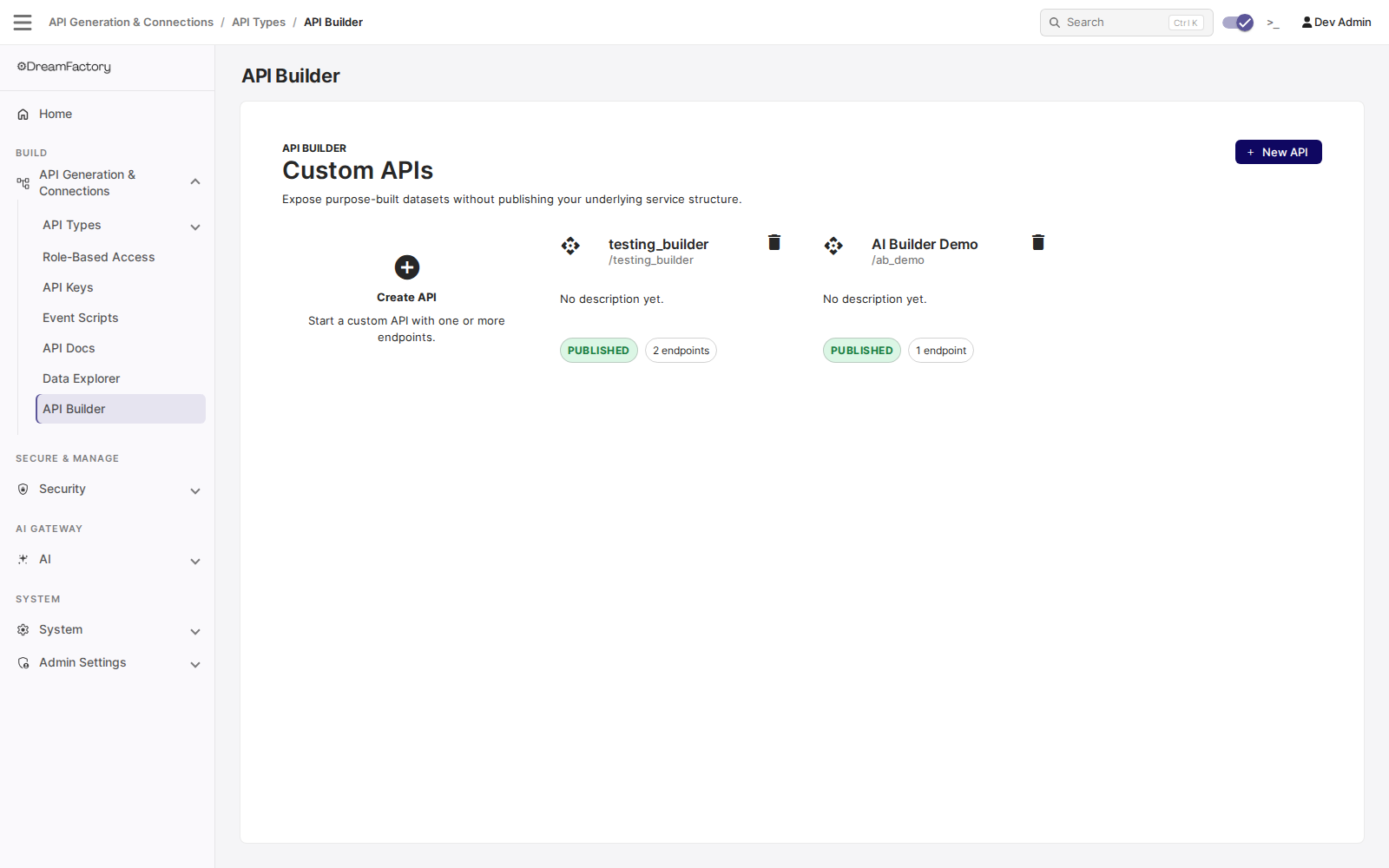
Each card is one custom API. The card shows its base path, whether it is published or still a draft, and how many endpoints it has. New API starts an empty one.
Building an API in the Admin UI
Step one: choose the data sources
Opening an API lands you on its detail page. The Data sources panel is the list of services this API is allowed to read from. Endpoints can only use sources listed here, so this is the boundary you draw before you build anything.
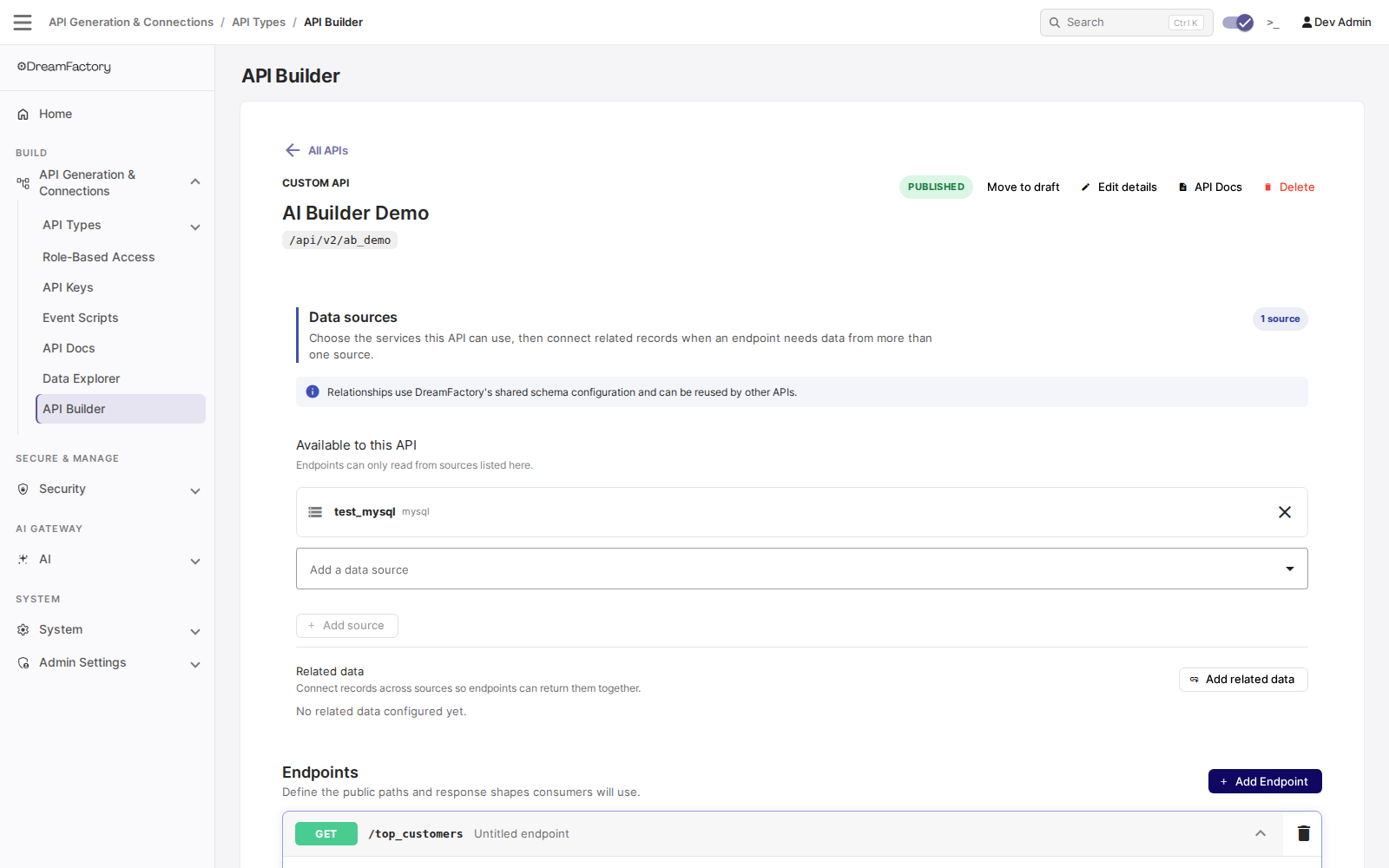
Related data underneath lets you connect records across those sources, so a single endpoint can return them together. Relationships use DreamFactory's shared schema configuration, so anything you define here is reusable by other APIs.
Step two: build the endpoint
Adding or expanding an endpoint opens a guided builder. You do not write the execution plan by hand.
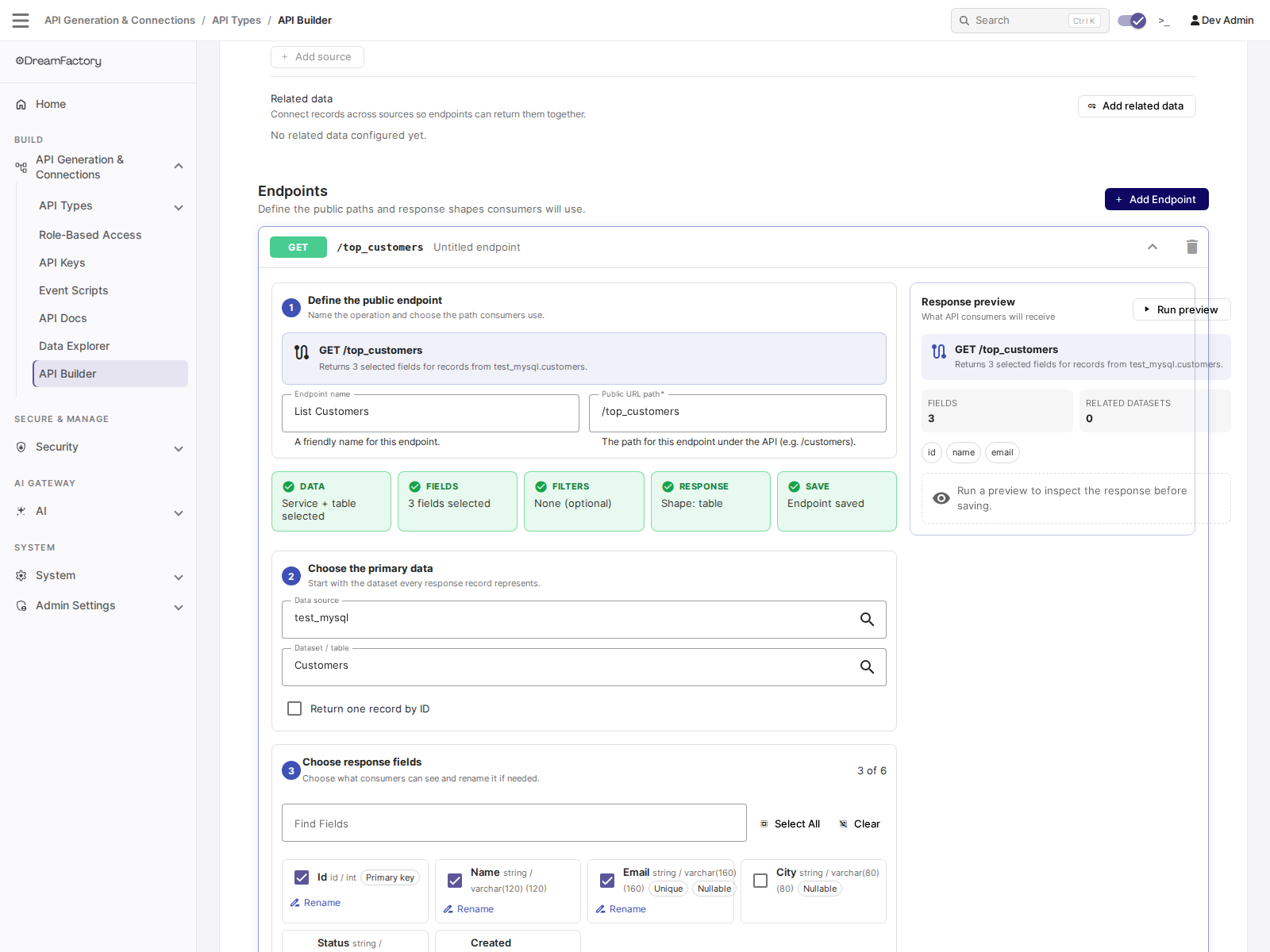
The steps run in order:
- Define the public endpoint. The friendly name and the public URL path consumers will call, such as
/top_customers. - Choose the primary data. The data source and table each response record represents. Return one record by ID switches the endpoint from a collection to a single record.
- Choose response fields. Tick the columns consumers can see. Each one can be renamed, so your API does not have to leak internal column names.
- Add related data. Pull in related resources through the relationships defined on the API.
Below the numbered steps, two more sections finish the endpoint: Filter records, simple rules limiting what it returns, and Response options, the default sort, row limit, and response wrapper.
The chips across the top (DATA, FIELDS, FILTERS, RESPONSE, SAVE) track which parts are complete. The Response preview panel on the right summarises the shape consumers will receive, and Run preview executes the endpoint so you can inspect a real response before saving.
Advanced tools at the bottom exposes the same endpoint three other ways: an Inspector showing the resolved execution steps and response fields, Advanced JSON for editing the definition directly, and a Test tab.
The rest of this page documents that underlying definition, which is what the Advanced JSON tab edits and what the REST API accepts.
How a Built API Is Published
Every custom API you create is published as its own service at its own base path:
/api/v2/{base_path}/{endpoint path}
The api_builder service itself is the designer and management backend. It never appears in the URL of a running endpoint. An API with a base path of customer-portal is called at /api/v2/customer-portal/..., and it shows up in the service list, the API Docs, and role-based access control exactly like a generated database API does.
This matters for permissions. Because a built API is a real service, you grant access to it with a role the same way you grant access to anything else, and you call it with a standard API key and session token.
The Anatomy of a Custom API
The API definition
An API definition holds the identity and lifecycle of the API:
| Field | Notes |
|---|---|
name | Unique internal name, up to 64 characters |
label | Display name shown in the admin UI |
description | Free text |
base_path | Unique. This becomes the service name in the URL. Letters, digits, underscores and hyphens only |
status | One of draft, published or archived. New APIs start as draft. Setting an API to archived deactivates its service, so it stops routing and disappears from the access list and the OpenAPI spec |
version | Defaults to 0.1.0 |
name accepts the same character set as base_path. Renaming base_path moves the API to a new service name and removes the old one.
The endpoint definition
Each endpoint belongs to one API and is unique on the combination of API, method, and path. So one API can expose GET /orders/{id} and DELETE /orders/{id} as two separate definitions.
| Field | Notes |
|---|---|
method | The HTTP verb this endpoint answers |
path | Path template. {token} segments become path parameters |
label | Becomes the operation summary in the generated OpenAPI spec |
description | Becomes the operation description in that spec |
is_active | Inactive endpoints are skipped during matching |
execution_plan | The ordered steps that produce the data. See below |
response_mapping | Optional. When set, it is resolved against the step context to build the final response. When empty, the endpoint returns the last step's result |
policy | Execution policy. See Permissions |
The definition also carries request_schema, response_schema and docs columns. These are stored and returned by the management API, but the runtime does not read them in this release. Do not rely on them to validate input or shape output.
Path templates are matched literally except for {token} segments. Every literal part of the template is escaped before matching, so an admin-authored path cannot inject regular-expression metacharacters.
Execution Plans
An execution plan is an ordered list of steps. Each step is keyed, and later steps can read the output of earlier ones through a context path such as {steps.customers.resource}.
A plan is capped at 25 steps, because each step dispatches a real request to a backing service.
service_request steps
A service_request step calls one of your existing DreamFactory services.
The service, resource, and method are authored by the administrator and static. Only params and body resolve values from the caller's request. A caller cannot redirect a step to a different service or a different table by manipulating input.
Allowed verbs are GET, POST, PUT, PATCH and DELETE.
transform steps
A transform step reshapes data already in memory. It makes no backing request, so an endpoint can shape its response without a script:
{
  "id": "shaped",
  "type": "transform",
  "from": "{steps.customers.resource}",
  "ops": [
    { "op": "pick", "fields": ["id", "name", "email"] },
    { "op": "rename", "map": { "name": "customer_name" } },
    { "op": "limit", "count": 25 }
  ]
}
Operations run in the order listed. The available ops are:
pick · omit · rename · defaults · filter · sort · first · limit · count · wrap · unwrap
Each op handles a resource-wrapped list, a bare list, or a single record, so you do not have to unwrap DreamFactory's resource envelope before working with it.
Two ops take extra arguments:
{ "op": "filter", "field": "status", "cmp": "eq", "value": "shipped" }
{ "op": "sort", "by": "total", "dir": "desc" }
Comparison operators for filter are eq, ne, gt, gte, lt, lte, contains and in.
Testing an Endpoint
POST /api/v2/api_builder/test runs an endpoint definition against input you supply:
{
  "endpoint_id": 1,
  "path_params": { "id": 42 },
  "query": {},
  "body": {}
}
dry_run defaults to true. As written above, that call resolves and validates every step and dispatches nothing to your backing services, so no data is read and nothing is written. Pass "dry_run": false to execute for real.
The safe default is deliberate: it lets you check a plan that writes data without writing any. Just know that a test returning no rows may mean the plan never ran, not that the query found nothing.
Add "trace": true to get a per-step breakdown instead of just the result:
{
  "ok": true,
  "dry_run": true,
  "result": { "...": "mapped response" },
  "trace": [
    { "key": "customers", "type": "service_request", "service": "db",
      "resource": "_table/customers", "method": "GET", "ok": true,
      "preview": "25 row(s)", "ms": 11 }
  ]
}
Each trace entry records the step key, its target, whether it succeeded, a short preview of its output, and its duration in milliseconds. On a dry run the preview reads dry-run: GET db/_table/customers rather than a row count, which is how you tell the two apart.
When a step throws, the response comes back as {"ok": false, "error": "...", "trace": [...]} with the trace ending at the step that failed. That is the fastest way to debug a multi-step plan.
Without trace, the raw result is returned unchanged, for callers written before the envelope existed.
The test endpoint is rate limited per client IP.
Security Model
API Builder composes requests to other services, so it is deliberately constrained.
Only data services can be targeted
A plan step may only dispatch to a service in the database, file or remote service groups. It cannot call system or admin services, scripted services, authentication services, email services, or API Builder itself. That closes the path from a composed endpoint to remote code execution or privilege escalation.
Data sources narrow it further
The Data sources you attach to an API in the admin UI are also a security boundary, not just a convenience list. Once an API has at least one data source, a step targeting any service outside that list is rejected, even if the service is an otherwise-allowed type. This is the composition boundary you drew when you built the API.
An API with no data sources attached falls back to the service-type allowlist alone, which is far broader. Attaching sources is the recommended way to scope a custom API.
Over the REST API these attachments are managed at api_builder/services, and the internal name for the set is the API's workspace. You will see that word in error messages: a rejected step reports Execution step service 'x' is not in this API's workspace.
Management is administrator-only
Creating, editing, testing and publishing APIs is restricted to system administrators. Non-admin callers to api_builder/apis, api_builder/endpoints, api_builder/test and the other management resources are rejected outright.
The runtime path is not gated this way. End users call published endpoints under their own role, like any other service.
Permissions and the caller identity
By default, every step in a plan is checked against the calling user's permissions. If the caller has no read access to the customers table, a step that reads customers fails for that caller, even though an administrator authored the plan.
An endpoint can opt out with a policy of {"privileged": true}. That runs its steps as a gateway, bypassing the per-caller permission check. Use it deliberately: it is how you expose a narrow, safe slice of data the caller could not otherwise read, and it is also how you accidentally expose data they should not see. Prefer role-based access on the built API service plus default (non-privileged) execution.
Management Resources
The api_builder service exposes these resources for administrators:
| Resource | Purpose |
|---|---|
apis | Create and manage API definitions |
endpoints | Create and manage endpoint definitions |
services | The data sources attached to an API. Filter by ?filter=api_id={id} |
relationships | Relationships between the resources being composed |
test | Run an endpoint definition. Dry run unless you pass dry_run: false |
docs | OpenAPI documentation for the built APIs |
Each built API also generates its own OpenAPI specification, so custom endpoints appear in API Docs alongside your generated ones.
Related Reading
- Creating and Managing APIs
- Event Scripts: for logic on an existing endpoint
- Role-Based Access
- API Keys