Identity Passthrough to the Database
When an AI agent or app calls DreamFactory on behalf of a signed-in user, DreamFactory always knows who that user is. What the database sees depends on how the database service is configured. There are two ways to run it.
| Service account (default) | Per-user credentials (lookups) | |
|---|---|---|
| Database connection opened as | The credentials saved on the DreamFactory service | Each user's own database account |
| Who enforces access | DreamFactory roles (tables, verbs, row filters) | The database's own grants and row-level security, with DreamFactory roles on top |
| Database audit log shows | The service account | The actual end user |
| End user recorded in | DreamFactory logs | The database audit log and DreamFactory logs |
DreamFactory does not forward the identity provider's token (SAML, OAuth, OIDC) to the database. It authenticates the user, then decides which database credentials to connect with.
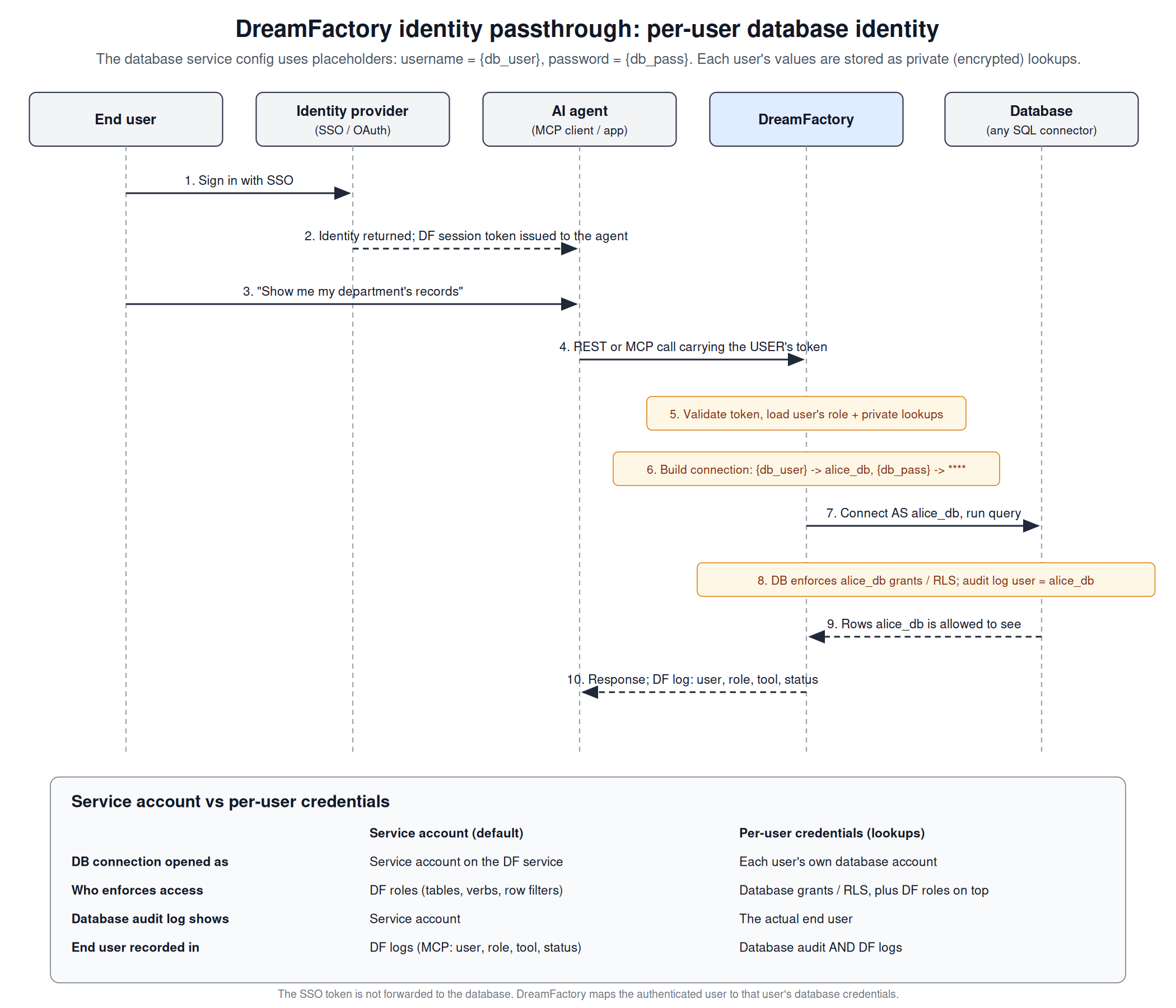
Service account (default)
- The user signs in through any DreamFactory auth service (OAuth/OIDC, SAML, Azure AD, LDAP/AD, or a DreamFactory account). See Authentication APIs.
- The agent or app calls DreamFactory with that user's session token, over REST or MCP.
- DreamFactory validates the token and applies the user's role: which services, tables and verbs are allowed, plus any role filters (for example
owner = {user.email}). See Role Based Access Control. - DreamFactory connects to the database with the username and password saved on the service.
This is the right choice when DreamFactory roles are your access model and the DreamFactory log is an acceptable audit trail. It needs no database accounts per user.
Per-user credentials (lookups)
Use this when the database itself must enforce each user's permissions, or when your auditors need the end user in the database's own audit log.
DreamFactory replaces {placeholders} in a service's configuration on every request, using lookups that belong to the current user. Lookups resolve in this order, with later levels overriding earlier ones:
- System
- App
- Role
- User
Private lookups are stored encrypted, and the API returns them masked.
Setup
-
Create database accounts. Give each user (or each group, if group-level audit is enough) a database login with the grants you want.
-
Use placeholders on the service. In API Generation & Connections, edit the database service and set:
- Username:
{db_user} - Password:
{db_pass}
- Username:
-
Add private lookups to each user. In Users, edit the user and add lookup keys
db_useranddb_passwith that user's database credentials, marked Private. Or use the System API:curl -X PATCH "https://your-df-host/api/v2/system/user/12" \
-H "X-DreamFactory-Session-Token: <admin token>" \
-H "Content-Type: application/json" \
-d '{
"lookup_by_user_id": [
{ "name": "db_user", "value": "alice_db", "private": true },
{ "name": "db_pass", "value": "<alice password>", "private": true }
]
}' -
Test with two users. Call the same endpoint as two different users and check the database's connection or audit log. Each request should connect as that user's database account, and a user without a grant should be refused by the database.
Things to know
- Every caller needs the lookups. If a user calls the service without
db_user/db_passdefined at any level, DreamFactory tries to log in with the literal placeholder and the connection fails. Set a role or app level default if some callers should fall back to a shared account. - Schema is cached per database user. After you change a user's grants in the database, clear the service cache so they see the change:
DELETE /api/v2/system/cache/<service_name>. - No grant looks like no table. Many databases hide tables a user cannot access, so a user with no grant at all gets
404 Table does not existinstead of a permission error. - Turn off debug in production. With
APP_DEBUG=true, database errors return SQL and internal host details in the response. - Credentials live in DreamFactory. Private lookups are encrypted at rest with your
APP_KEY. Keep that key safe and consistent across nodes.
Other connector fields
Placeholders work in any field of the service configuration, not only username and password. For example, on Snowflake the key, role and warehouse fields accept lookups too, so you can connect with a per-user key pair, or with one service user and a Snowflake role chosen per DreamFactory role ({sf_role}). In the second case Snowflake enforces that role's grants, but its query history shows the service user.
Auditing on the DreamFactory side
In both setups, DreamFactory records the end user. Every MCP tool call is written to the MCP request log with the user, role, app, tool name, status and duration, whether the call was allowed or denied.
AI agents and MCP
MCP clients (Claude, VS Code, Kiro and others) sign in to DreamFactory with OAuth, and the MCP daemon calls DreamFactory with that user's session token. Everything above applies unchanged: the agent can only reach what the user's role allows, and with per-user credentials the database sees the user, not the agent.