Data Masking
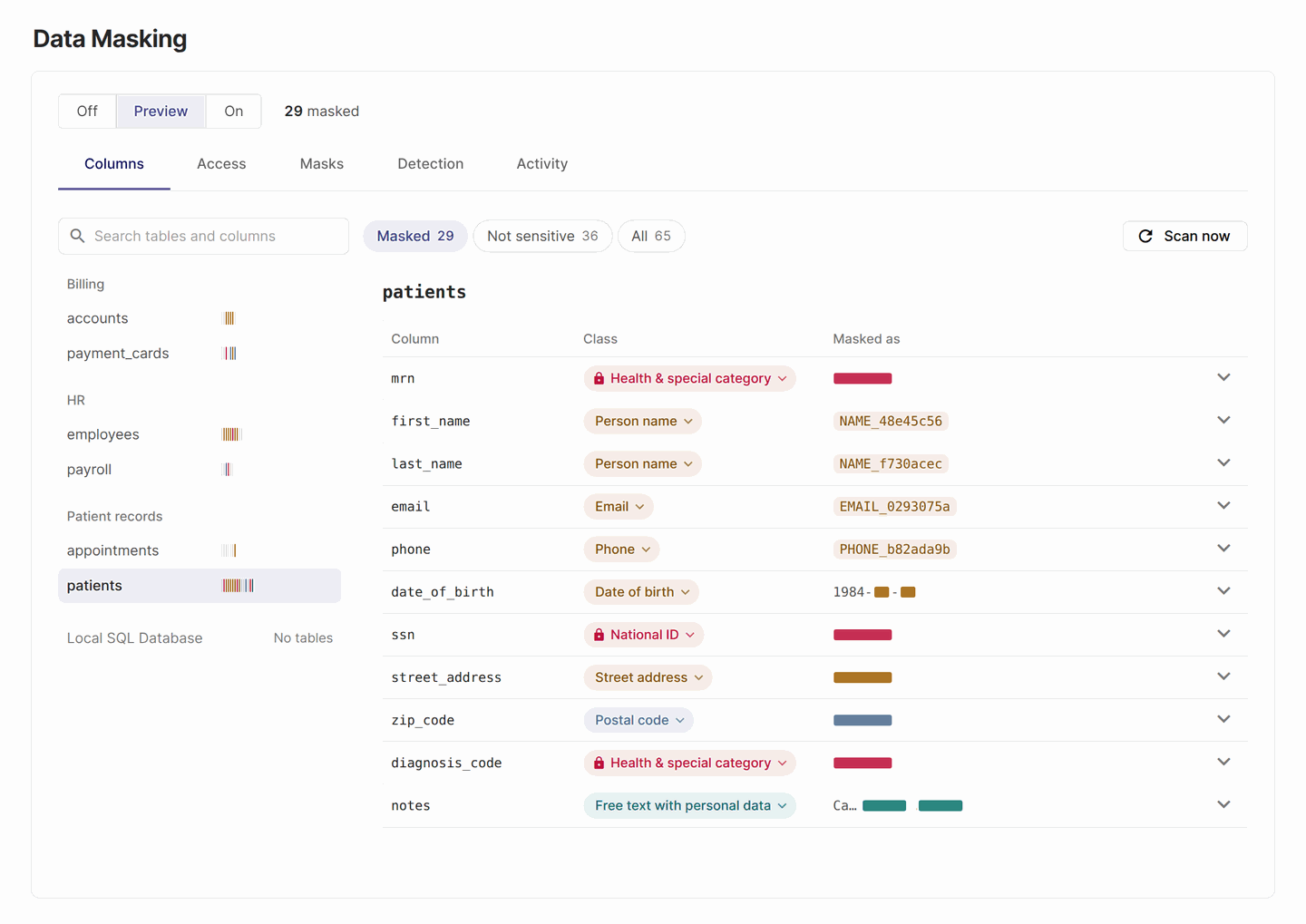
Data Masking finds the sensitive columns in the SQL databases you have connected as DreamFactory services, such as national IDs, card numbers, emails and diagnosis codes. It then masks their values in API responses. The data in your databases does not change. What changes is what each caller gets back.
Once masking is On, apps, roles, and AI and MCP sessions get masked values. So do admins, in the admin app too, until someone gives them access. You decide per admin, per role and for AI sessions who sees real values.
Data Masking starts Off. While it is Off, API responses are byte-for-byte the same as on an instance without it. You turn it On yourself once a scan has found columns, ideally after a review and a Preview period, so nothing changes for your apps by surprise.
Data Masking and Compliance baselines require a DreamFactory commercial license (Gold). They ship in the dreamfactory/df-masking package. If Security > Data Masking shows the upgrade page on a Gold instance, the package is not installed: contact DreamFactory support.
Quick reference
| Concept | Description |
|---|---|
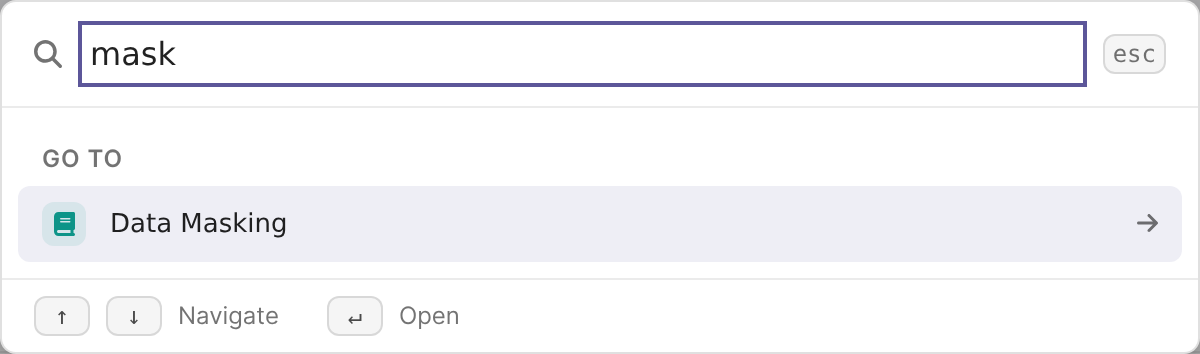
| Admin UI path | Security > Data Masking, with the tabs Columns, Access, Masks, Detection and Activity. In the command palette (Ctrl/Cmd-K), type mask, pii, phi or pci. |
| System API | /api/v2/system/data_masking and /api/v2/system/security_baseline, for full system administrators only |
| CLI | php artisan df:masking with the actions status, scan, mode, grant, revoke, baseline and setup |
| Modes | Off (default), Preview, On |
| Default access | Once masking is On, everyone gets masked values: apps, roles, AI and MCP sessions, and admins |
| Covered services | SQL database services built on DreamFactory's SQL connector: MySQL, MariaDB, PostgreSQL, SQL Server, Oracle, SQLite, Snowflake and others |
| Classes | 23 classes of sensitive data in 4 tiers: Restricted, Identity, Quasi-identifiers and Free text |
| Response headers | X-DreamFactory-Masked-Fields and X-DreamFactory-Masking-Rewrites, in mode On only |
| Verified on | DreamFactory 7.8.0 |
To find the page quickly, open the command palette with Ctrl-K (Cmd-K on a Mac) and type mask.
How it works
Data Masking works in five stages. The first time, you go through them in order. After that, Data Masking scans on its own when you add or change a database service and when new tables or columns appear. It does not rescan existing columns on a schedule: click Scan now to pick up new kinds of data in them.
-
Scan. Data Masking reads the table and column names of each covered database and samples up to 256 rows per table: the first 128 and the last 128 by key. Scans only read. On PostgreSQL, MySQL and MariaDB, each sample read runs in a read-only transaction that is always rolled back. On SQL Server it uses snapshot isolation when the database allows it, so it takes no shared locks on your rows. Sampled values stay in memory. The system database stores verdicts, evidence text and examples that are already masked, never raw values. Once any scan has run, new and changed database services are scanned automatically.
-
Classify. Each column gets a score from 0 to 100 and, when it looks sensitive, a class such as Email or National ID. The classifier is deterministic and uses no machine learning. It combines column-name tokens (
ssn,email_addr,dob), validators run on the sampled values (card checksums, SSN rules, IBAN checksums, email syntax, phone shapes) and table context, such as whether the table holds people. A score of 70 or more means masked, 40 to 69 means to review, and below 40 means not sensitive. Columns classified from their names only, without sampled values, go to review from a score of 15. Custom rules and Compliance baselines can add detections the built-in rules miss. -
Review. Columns the classifier was unsure about wait under To review. An admin picks Keep masked, Not sensitive or another class. Decisions stick: later scans, rules and baselines only ever add masking, and they never undo an admin's decision. See Review columns.
-
Preview. The first scan that finds columns switches the mode from Off to Preview, unless someone already chose a mode. Preview changes no response. The Activity tab records "Would mask N columns" for each caller and table, at most once an hour, so you can see which apps will be affected before anything changes for them. See Activity log.
-
On. An admin turns masking On. Every caller without access to real values gets each masked column in its class's format, for example a token such as
EMAIL_e4a7daa0, the last 4 digits of a card number, the year of a date of birth, or••••••••. Columns still to review are masked too: Data Masking fails closed. See Classes and mask formats.
Where masking happens
Masking runs inside DreamFactory's API pipeline, on the responses of covered services: table records including related records (_table), stored procedures and functions (_proc, _func), and the sample data in schema responses (_spec). It runs before event scripts, caching, logging and response formatting. Event scripts, the request log and JSON, XML and CSV output all get masked values.
In mode On, Data Masking also guards the request. Conditions, sorts and groupings on masked columns are changed so that they cannot reveal a value. A filter such as ssn like '123%' matches no rows, and a sort on email is ignored. Updates never write masked values back, and inserts of masked values are refused. See What changes for apps before you turn masking On for existing apps.
No client can switch masking off. Data Masking reads no request header of its own and decides on the server what each caller gets.
Modes
| Mode | API responses | Response headers | Activity |
|---|---|---|---|
| Off (default) | Unchanged, byte for byte | None | Settings changes, scans and refused settings changes |
| Preview | Unchanged | None | As in Off, plus "Would mask N columns" per caller and table, at most once an hour |
| On | Masked for every caller without access, including columns to review | X-DreamFactory-Masked-Fields and X-DreamFactory-Masking-Rewrites | As in Off, plus the filters, sorts and writes Data Masking changed or blocked |
- On needs a scan first. On is refused until a completed scan has found at least one column. The API answers 409
Scan your databases before turning masking on.A scan of empty databases, such as the built-indbon a new install, does not count. - The first scan picks Preview. The first scan that finds columns moves the mode from Off to Preview, unless someone already chose a mode. An Off chosen before the first scan stays Off.
- Lowering from On needs the super admin. Other admins get 403
Only the super admin can lower the masking mode.Raising the mode, and switching between Off and Preview, are always allowed. On the server,php artisan df:masking mode preview(oroff) always works. - On fails closed. If Data Masking cannot check a request or mask a response in mode On, for example because the system database cannot be read, it withholds the response with a 500 error. In Preview the request passes through unchanged and the error is logged. See Troubleshooting and limits.
The super admin is the df-compliance root admin. Without df-compliance, or when no root admin is designated, every full system admin is the super admin.
Who sees real values
| Caller | Once masking is On | How to give real values |
|---|---|---|
| Admins (full system admins) | Masked, in the admin app too | The super admin sets admins to No one, Selected or All admins. With Selected, each admin gets a grant for 1 hour, 8 hours, 24 hours, 7 days or until turned off. |
| Roles: users with a role, and apps through the role of their API key | Masked | The super admin turns the role on, for All classes or All except restricted |
| AI and MCP sessions | Always masked | The super admin can set them to Same as admins |
| Callers without a session: scheduler tasks without a run-as app, queue workers, MQTT and AMQP listeners | Masked | Give a scheduler task a run-as app whose role has real values. The others stay masked. |
- Only the super admin can loosen access. Any full system admin can tighten it. Two changes loosen masking without touching access, and any full system admin can make them: marking a column Not sensitive, and switching a class to a less strict mask format.
- Admins with a role (restricted admins) are treated like role users. They cannot open Data Masking or Compliance.
- A request that carries
X-DreamFactory-Trace-Idcounts as an AI session. DreamFactory returns that header on every response, so a client that copies it into later requests gets AI-session masking.
See Who sees real values for the Access tab, grants and the recovery commands.
What is covered and what is not
Covered:
- Every SQL database service built on DreamFactory's SQL connector (df-sqldb): MySQL, MariaDB, PostgreSQL and AlloyDB, SQLite (including the built-in
db), SQL Server, Oracle, Snowflake and the other SQL connectors. - Warehouses that bill per query (Snowflake, Databricks, Trino, Dremio and BigQuery) are classified from column names only, so a scan reads none of their rows. Sampling them is opt-in:
php artisan df:masking scan --sample, or"sample": truein the body ofPOST /api/v2/system/data_masking/scan.
Not covered:
- Other database services are not masked. MongoDB, Cassandra, CouchDB, DynamoDB, Salesforce and other non-SQL database services return real values to people and apps. AI and MCP sessions get 403
Data Masking blocks AI access to services it cannot mask.from them while masking is On. The Columns tab lists them under "Not covered". - Services that are not databases (files, remote web services, scripts, email) are out of scope. AI sessions are not blocked from them.
- Scripts that open their own database connections bypass the API, so their results are not masked. Internal
_speccalls from server-side scripts are not masked either. - Filters added by event scripts are not checked. A
pre_processscript runs after Data Masking's request check, so a filter, sort or grouping it adds on a masked column runs on real values. Limit who can edit event scripts. - Names inside free text are not detected. In free-text columns, span masking hides emails, phone numbers, card numbers, national IDs, IBANs, IP addresses and credentials.
- Masking settings are not part of package export. Re-apply them, or apply the same baseline, on the target instance.
Data Masking protects the API responses of covered SQL services only. If the same personal data also lives in a MongoDB collection, a file service or a database your scripts query directly, those paths return real values. Keep the data in covered services, or restrict access to the other paths with roles.
Data Masking and other DreamFactory features
Several features hide or restrict data. They work at different levels and can be combined.
| Feature | What it controls |
|---|---|
| Role-Based Access | Which services, tables and HTTP verbs a role can call, and which records it can reach. Data Masking works inside that access: it decides which values a caller sees in the columns its role can already read. |
| Hiding a column (a database view, or an event script that removes the field) | Whether a column appears in the response at all. Data Masking keeps the column, masks its value and reports it in a response header, so existing apps keep the response shape they expect. |
| AI Gateway PII redaction | What the AI Gateway stores in its prompt logs. It does not change what a model reads from your databases. Data Masking does. |
| Private lookups | Secrets stored in lookups, which the admin UI and the System API return as **********. Not related to Data Masking. |
| Role verb masks | The verb_mask and requestor_mask bit masks in the role API. Not related to Data Masking. |
Pages in this section
| Page | What it covers |
|---|---|
| Data Masking (this page) | How it works end to end, modes, who sees real values, coverage and licensing |
| Get started: mask your first database | A tutorial: scan, review, Preview, turn On and verify with curl |
| Review columns | The Columns tab: filters, scores and evidence, decisions, rescans and new columns |
| Classes and mask formats | The 23 classes, the Masks tab and what each format returns |
| Custom rules | The Detection tab: rules by column name or by value, with examples |
| Who sees real values | The Access tab: admins and grants, roles, AI and MCP sessions, and the super admin |
| What changes for apps | Filters, lookups, writes, errors and the response headers in mode On, with a checklist |
| Activity log | The Activity tab: what is recorded, Preview rows and blocked requests |
| Install and operate | Availability, setup, Docker, several nodes, upgrades, removal and configuration |
| API and CLI reference | Every system/data_masking and system/security_baseline endpoint and df:masking command |
| Troubleshooting and limits | Symptoms, causes and fixes, a FAQ and the current limits |
| Compliance baselines | Security > Compliance: HIPAA, PCI DSS, GLBA, CJIS, GDPR, SOC 2 and ISO 27001 checks and evidence export |