Rate Limiting
DreamFactory's Limits feature caps how many API requests can be made in a time window. Limits protect backends from overload, keep a single caller from monopolizing the instance, and return HTTP 429 Too Many Requests when a caller is over quota.
There are no default limits. Nothing is throttled until you create a limit.
Quick Reference
| Concept | Description |
|---|---|
| Admin UI path | Security → Rate Limiting |
| REST API | /api/v2/system/limit |
| Required fields | name, type, rate, period |
| Periods | minute, hour, day, 7-day, 30-day |
| Over-limit response | HTTP 429 (TooManyRequestsException) |
| Not limited | System administrators, and requests made from event scripts |
Limit types
Each limit has a type that decides which requests it counts. Types combine instance, user, role, service, and endpoint:
| Type | Counts requests… |
|---|---|
instance | across the whole instance |
instance.user | for one specific user (user_id) |
instance.each_user | separately for every authenticated user |
instance.role | for every caller in a role (role_id) |
instance.service | against one service (service_id) |
instance.user.service | for one user against one service |
instance.each_user.service | per user, against one service |
instance.service.endpoint | against one service endpoint (endpoint) |
instance.user.service.endpoint | for one user against one endpoint |
instance.each_user.service.endpoint | per user, against one endpoint |
A specific-user limit (instance.user…) overrides the matching each_user limit at the same level. You can also attach an HTTP verb (GET, POST, and so on) so the limit only counts that method.
Endpoint paths are bucketed before they are keyed. Numeric IDs become :id, UUIDs become :uuid, and long hex hashes become :hash. That keeps /api/v2/db/_table/orders/1 and /api/v2/db/_table/orders/2 in the same bucket, so changing the record id cannot bypass the limit.
There is no per-API-key limit type. The closest fits are instance.role (the role the API key is bound to) or instance.user if the caller is a user.
Creating limits in the admin UI
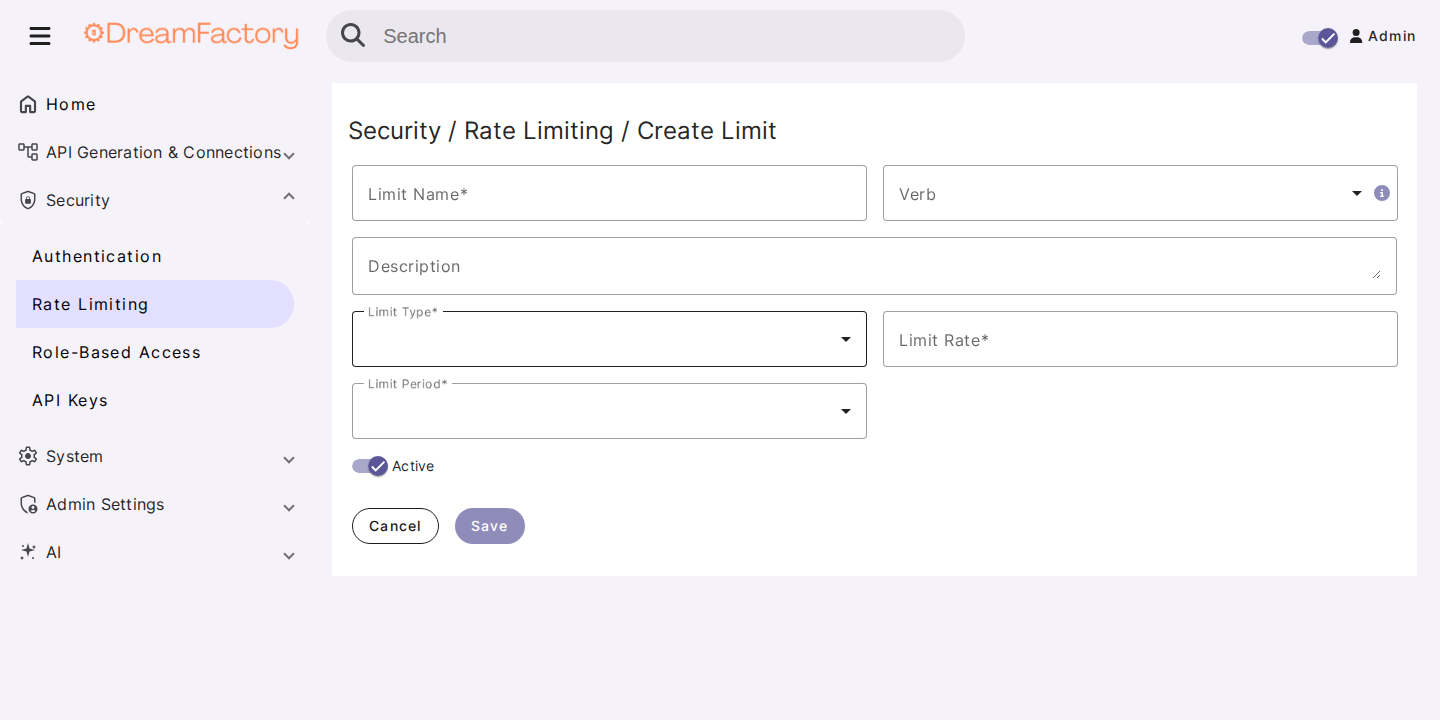
- In the left sidebar open Security, then Rate Limiting.
- Click the + button.
- Set a name, type, rate (number of requests), and period.
- Fill in the type-specific fields (
user_id,role_id,service_id,endpoint,verb) as required. - Leave Active enabled and save.
Creating limits via the System API
curl -X POST "https://your-dreamfactory-instance.com/api/v2/system/limit" \
  -H "X-DreamFactory-Api-Key: YOUR_ADMIN_KEY" \
  -H "Content-Type: application/json" \
  -d '{
    "name": "1000 requests per minute, whole instance",
    "type": "instance",
    "rate": 1000,
    "period": "minute",
    "is_active": true
  }'
Per-service example:
curl -X POST "https://your-dreamfactory-instance.com/api/v2/system/limit" \
  -H "X-DreamFactory-Api-Key: YOUR_ADMIN_KEY" \
  -H "Content-Type: application/json" \
  -d '{
    "name": "db reads, 100 per minute per user",
    "type": "instance.each_user.service",
    "rate": 100,
    "period": "minute",
    "service_id": 5,
    "verb": "GET",
    "is_active": true
  }'
| Field | Required | Description |
|---|---|---|
name | Yes | Label shown in the admin UI |
type | Yes | One of the types in the table above |
rate | Yes | Maximum requests allowed in the period |
period | Yes | minute, hour, day, 7-day, or 30-day |
user_id | When type includes a specific user | User the limit applies to |
role_id | When type is instance.role | Role the limit applies to |
service_id | When type includes a service | Target service |
endpoint | When type includes an endpoint | Resource path, for example _table/employees |
verb | No | Restrict the limit to one HTTP method |
description | No | Optional notes |
is_active | No | Defaults to active; set false to disable without deleting |
List limits with GET /api/v2/system/limit. Reset counters with the system/limit_cache resource. Deleting a user, role, or service also deletes the limits that pointed at it.
Periods and counters
period is a named window, not a number of seconds:
| Period | Window |
|---|---|
minute | 60 seconds |
hour | 1 hour |
day | 24 hours |
7-day | 7 days |
30-day | 30 days |
Counters live in DreamFactory's cache store (Redis or Memcached in production; the file/database cache on smaller installs). The same cache backend used for the rest of the instance holds the hit counts.
Over-limit responses
When a caller exceeds an active limit, DreamFactory returns HTTP 429 with a TooManyRequestsException body. The 429 response includes:
| Header | Meaning |
|---|---|
X-RateLimit-Limit | Maximum requests in the current window |
X-RateLimit-Remaining | Requests left in the window (0 when exceeded) |
Retry-After | Seconds until the window reopens |
X-RateLimit-Reset | Unix timestamp when the window reopens |
System administrators and script-initiated calls skip limit checks.
Related
- Role-Based Access Control — who can call which endpoint
- API Keys — keys are bound to roles, which you can limit with
instance.role - AI Usage Monitoring & Cost Allocation — AI Connection RPM is a separate per-user cap on AI calls