AI Usage Monitoring & Cost Allocation
Every request that passes through a DreamFactory AI Connection — direct chat and completion calls, AI Chat sessions, Data Chat queries, and OpenAI-compatible endpoint traffic — is metered as a row in the ai_usage_log table: input and output token counts, estimated USD cost, and latency, attributed to the calling application (API key), user, role, service, provider, and model. Because metering happens server-side in the gateway, you get per-team and per-agent cost visibility without adding any instrumentation to client applications.
This page covers what gets metered, how spend is attributed, the admin console's AI Usage analytics page, reading the same data over the API, and how to turn per-app attribution into chargeback, showback, and budget enforcement.
AI usage metering and analytics require a DreamFactory commercial license (Gold or Platinum).
What Gets Metered Per Request
Each AI provider call writes one usage-log row. The most important columns for cost work:
| Column | Description |
|---|---|
input_tokens | Tokens consumed by the request |
output_tokens | Tokens generated in the response |
cost_usd | Estimated cost, computed at log time from the configured token rates |
latency_ms | Round-trip time in milliseconds |
tool_call_count | Number of tool calls in agentic loops (AI Chat, Data Chat) |
status | success, partial (streaming client disconnected — tokens consumed so far are still counted), or error |
request_id | UUID correlating the usage row with prompt-log and audit events |
See AI Gateway Analytics for the full ai_usage_log schema, including attribution and error-classification columns.
Two behaviors matter for accurate accounting:
- Fallback chains: when a primary provider fails and DreamFactory retries against a fallback provider, each attempt logs its own row, so cost and latency remain attributable per provider rather than being merged into one entry.
- Streaming disconnects: partial deliveries are logged with
status=partialand the token counts consumed up to the disconnect, so streamed traffic is not undercounted.
How Attribution Works
DreamFactory's per-app API keys and roles are the identity fabric for cost attribution. When a request arrives, the platform already knows which application (API key), user, and role are making the call — the same session context that drives access control. The usage logger captures app_id, user_id, role_id, and service_id automatically from that session, alongside the provider and model that served the request.
The practical consequence: issue one API key per agent, team, or application, and every dollar of AI spend is attributed to that consumer with no client-side changes. An agent calling the OpenAI-compatible endpoint with its own API key shows up in the analytics under its own app, exactly like a web application calling the REST chat endpoint.
The AI Usage Analytics Console Page
The admin console ships a stock analytics page for this data: navigate to AI → Usage in the admin interface.
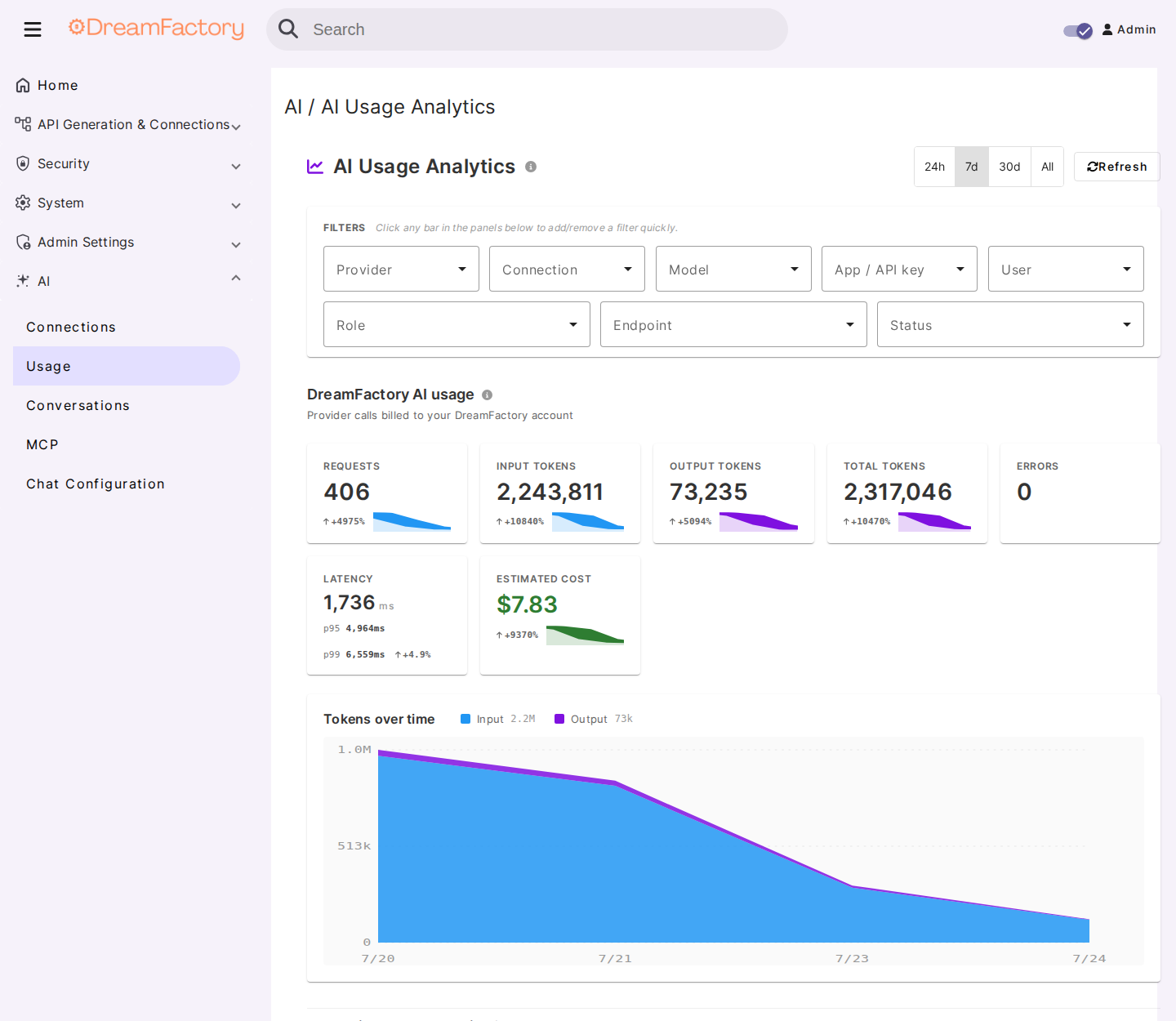
The page provides:
- KPI tiles: total requests, input/output/total tokens, errors, latency p95/p99, and estimated cost for the selected window.
- Filter bar: narrow every panel by provider, AI Connection, model, application (API key), user, role, endpoint, and status.
- Time ranges: 24 hours, 7 days, 30 days, or all time.
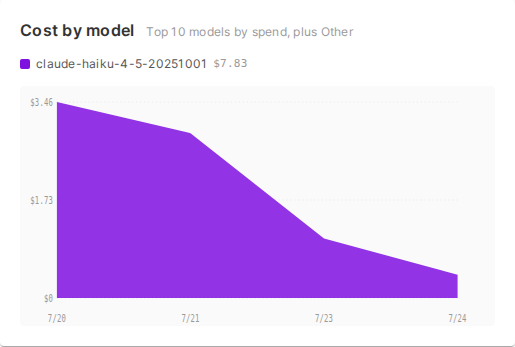
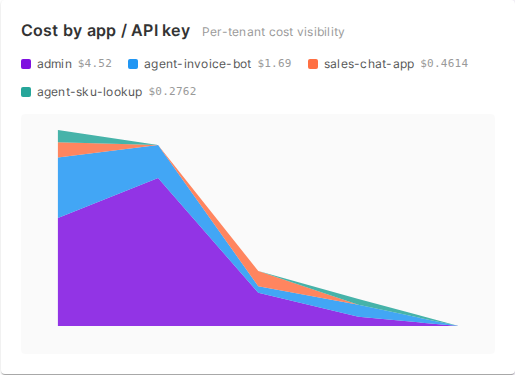
- Stacked spend-over-time panels: cost over time broken down by model, provider, user, and application.
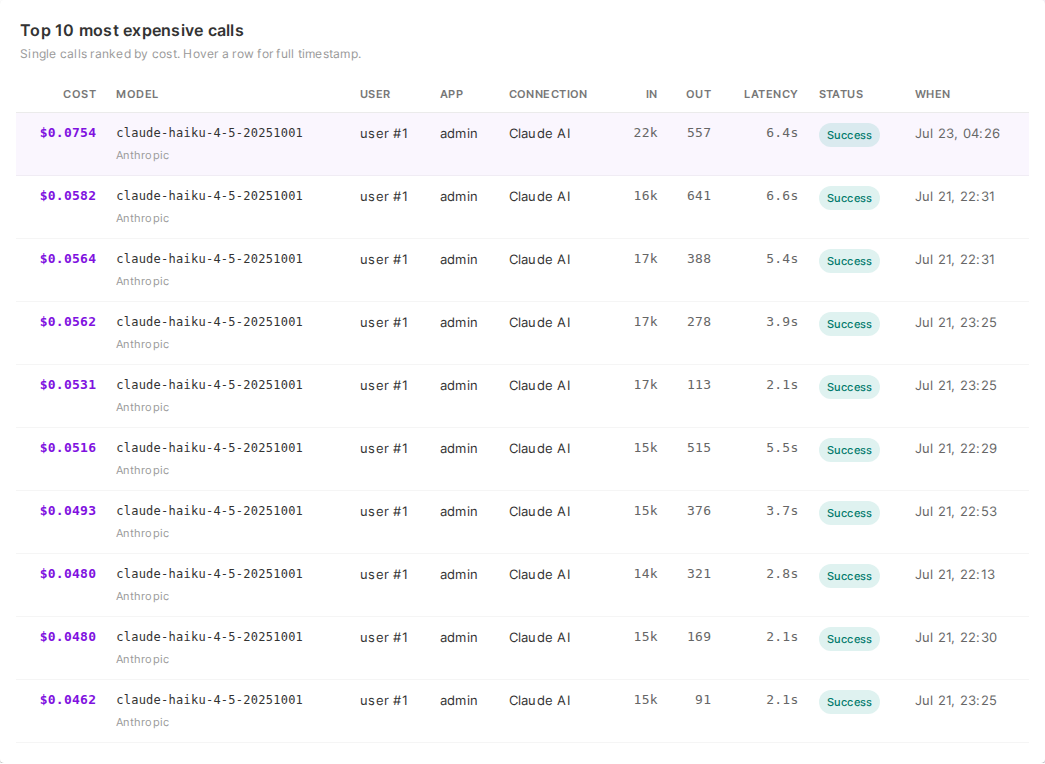
- Most expensive calls: a per-request ledger of the top 10 costliest individual calls in the window, so outliers are visible rather than hidden in averages.
Spend by Model and Provider
The by-model breakdown shows where tokens and dollars actually go — useful for deciding whether a premium model is earning its rate, or whether high-volume traffic should move to a cheaper model.
Spend by Application
The by-app panels are the chargeback view: because each application is an API key, this is spend per consumer.
Per-Request Ledger
The most-expensive-calls table lists individual requests with their attribution, token counts, and estimated cost — the drill-down level for "what was that spike?" questions.
Estimating a task before you run it
The task cost estimator answers the forward-looking question: what would one agent task cost? Rather than quoting a price, it calibrates against your own metered history and projects a range.
It reads per-call average input and output tokens from a window of your real usage, then multiplies them by the observed number of provider calls one routed task fans out into — a plan step, one or more tool calls, and a final answer. That fan-out is a range of 3 to 6 calls, which is why the result is a range rather than a single number, and why token figures are rounded to the nearest hundred: the arithmetic does not support more precision than that.
Calibration needs a minimum number of metered requests in the window before it will project anything. If the window is too thin, widen it or run more traffic first.
Given an optional budget, the estimator also judges the projected range against it, and after a real run it classifies actual spend against what was projected — so the estimate can be checked rather than trusted.
Reading Usage via the API
The console page consumes an admin analytics endpoint that you can call directly for reporting, finance exports, or embedding in your own dashboards:
GET /_internal/ai/usage (admin session required)
The response includes totals, breakdowns by service, user, role, app, provider, and model, daily time series, latency percentiles (p50/p95/p99), and the most-expensive-calls list. Use ?period= to set the window (for example 7d, 30d) and ?compare=1 to include the same metrics for the immediately preceding window for period-over-period deltas.
{
  "period": "30d",
  "total_requests": 15420,
  "total_input_tokens": 2345670,
  "total_output_tokens": 890120,
  "total_cost_usd": 47.23,
  "latency_p95_ms": 3200,
  "by_app": [
    {"app_id": 12, "app_name": "invoice-bot", "requests": 5210, "cost_usd": 21.80},
    {"app_id": 15, "app_name": "support-assistant", "requests": 3120, "cost_usd": 11.42}
  ],
  "by_model": ["..."],
  "series_by_app": ["..."],
  "most_expensive_calls": ["..."]
}
See AI Gateway Analytics for the complete parameter and response reference.
Cost Rates
The cost_usd value is an estimate computed at log time using a three-tier rate lookup, from most to least specific:
- Per-model rate sheet configured on the AI Connection — a JSON array of per-model input/output prices per 1,000 tokens.
- Service-level flat rates —
cost_per_1k_inputandcost_per_1k_outputon the AI Connection. - Built-in provider defaults maintained by DreamFactory.
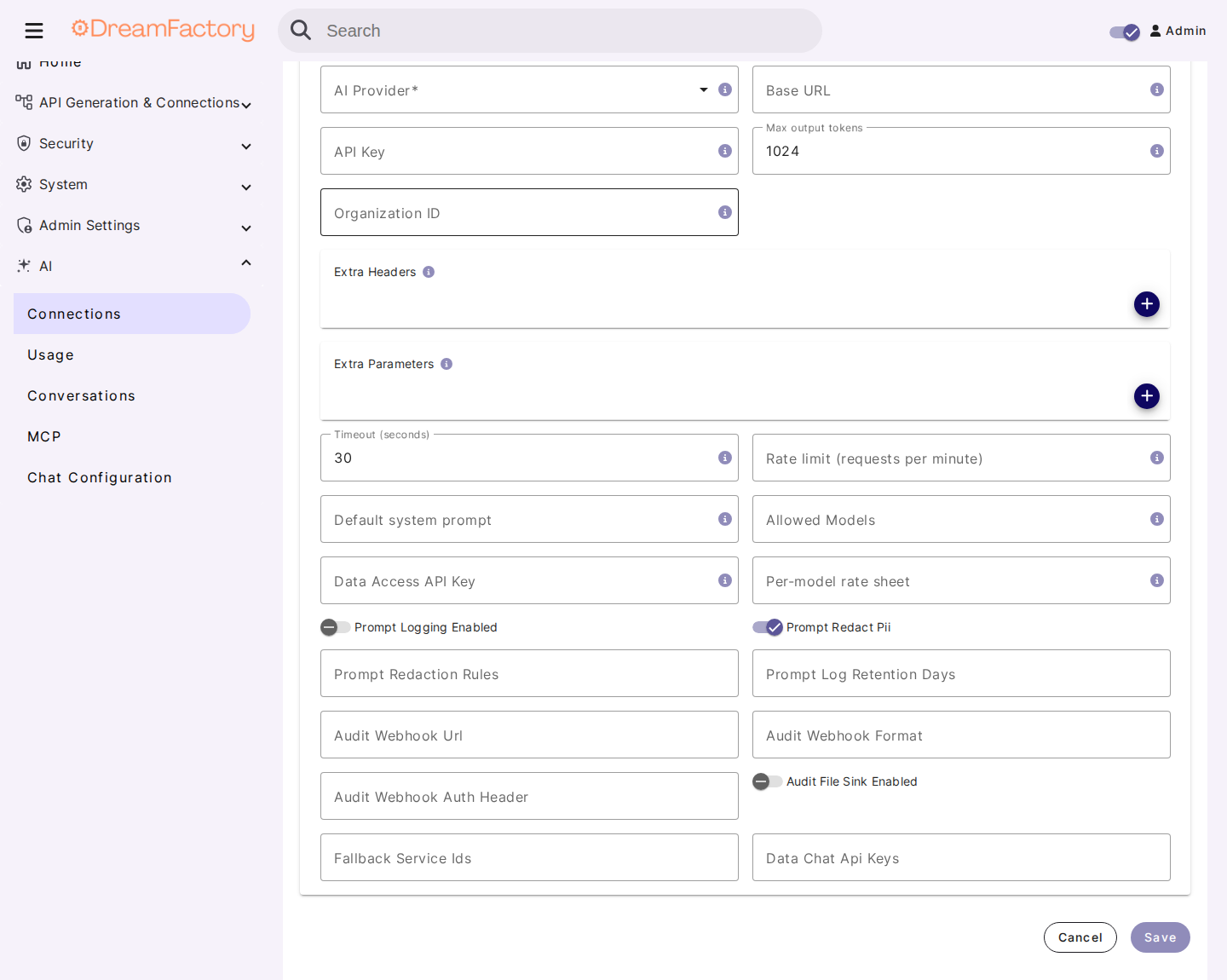
Because cost is computed and stored when the request is logged, later rate changes do not rewrite historical spend data.
Chargeback & Showback Patterns
The primitives above — per-app keys, automatic attribution, and the by-dimension breakdowns — compose into standard FinOps reporting patterns.
Per-App Showback and Chargeback
Issue one application (API key) per consumer you want to bill or report on: one per internal team, one per AI agent, one per customer-facing product. The monthly by_app breakdown from GET /_internal/ai/usage?period=30d (or the console's by-app panel over a 30-day window) then is the chargeback report — requests, tokens, and estimated cost per consumer, with no additional bookkeeping.
Per-Role Cost Centers
Roles group consumers by function, so the by_role breakdown maps naturally to cost centers: for example, all engineering apps under one role and all support tooling under another. Because the role is captured automatically per request, reorganizing cost centers is a role-assignment change, not a client change.
Exporting the Ledger
For finance systems or long-term retention outside DreamFactory, pull the audit stream: GET /_internal/ai/audit-stream returns NDJSON events suitable for Logstash, Splunk, or any pull-based pipeline. See the SIEM section of AI Gateway Analytics and the ELK Stack & Logstash guide for pipeline setup.
Controlling Spend: Budgets & Rate Limits
Metering tells you where the money went; budgets and rate limits keep it inside the lines.
Budgets
Budget rules (the ai_budget table) can be scoped to five dimensions — global, service, role, user, or app — with a monthly period:
- Hard-stop budgets (
hard_stopenabled) block requests with HTTP 429 ("AI budget exceeded") once the period's spend reaches the cap. The check runs before the provider call, so no tokens are consumed on blocked requests. - Soft budgets are observability-only: they fire webhook alerts as spend crosses 50%, 80%, and 100% of the cap, once per threshold per period.
Separately, each AI Connection supports a monthly_budget_usd value used for spend projection ("on track / projected overshoot") in the analytics. See the budget management section of AI Gateway Analytics for field-level details and the alert webhook payload.
Rate Limits
Two layers of rate limiting apply:
- Per-AI-Connection RPM: the Rate limit (RPM) field on an AI Connection caps requests per minute per user. Exceeding it returns HTTP 429 before the provider is called, so no tokens are consumed.
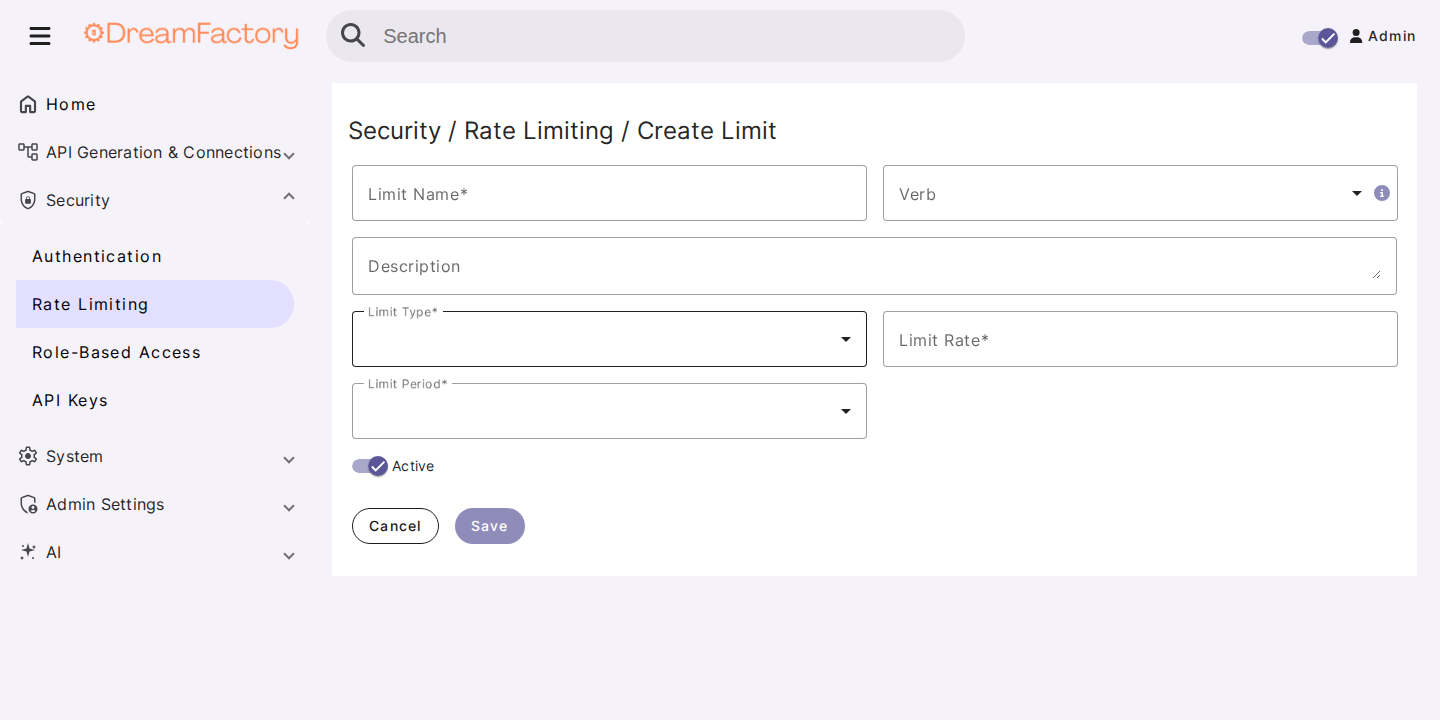
- Platform limits: DreamFactory's general rate-limiting system supports instance, per-user, per-each-user, per-service, per-role, and per-endpoint limit types, configurable from the admin console's Rate Limiting section. These apply to AI services like any other DreamFactory service.
Retention
Usage logs are pruned with php artisan ai:prune-usage-logs (default retention: 90 days). Schedule it via cron in high-volume deployments, and export the ledger (above) first if you need spend history beyond the retention window.
Related Documentation
- AI Gateway Analytics — full usage-log schema, analytics API reference, budgets, prompt logging, and SIEM integration
- AI Connection — provider setup, cost-tracking fields, rate limits, and fallback chains
- AI Chat — session-based chat with per-session token and tool-call tracking
- ELK Stack & Logstash Integration — platform-wide API consumption monitoring and dashboards
- API Keys — creating and scoping the per-app keys that drive attribution