Review columns
The Columns tab of Security > Data Masking lists every column that Data Masking knows in the SQL databases it covers. For each column it shows the class detection gave it, the verdict, and an example of how the values come back masked. This is where you check what a scan found, decide the columns detection was unsure about, and correct a class.
Detection is deterministic. It reads column names, a sample of values and the table context, then scores each column from 0 to 100. Nothing on this tab changes data in your databases. A decision only changes how DreamFactory returns that column's values to callers without real-value access while masking is On.
Quick reference
| Concept | Description |
|---|---|
| Admin UI path | Security > Data Masking, Columns tab (the default tab) |
| Verdicts | Masked, To review and Not sensitive. In mode On, columns to review are masked too. |
| Score bands, values sampled | 70 or more: masked. 40 to 69: to review. Below 40: not sensitive. |
| Score bands, name only | 70 or more: masked. 15 to 69: to review. Below 15: not sensitive. |
| Decisions | Keep masked, Not sensitive, or another class from the class picker |
| Who can decide | Any full system admin, including for Not sensitive. AI and MCP sessions cannot. |
| Undo | An Undo toast for 8 seconds after you mark a column that had a class not sensitive |
| Sticky decisions | Rescans, detection rules and Compliance baselines never change a column an admin decided |
| Scans | Scan now scans every active SQL database. Scans only read data. |
| REST API | PATCH /api/v2/system/data_masking/column/{service.table.column}, POST /api/v2/system/data_masking/scan |
| Deep links | ?filter=review, ?filter=masked, ?filter=clear, ?filter=all |
The Columns tab
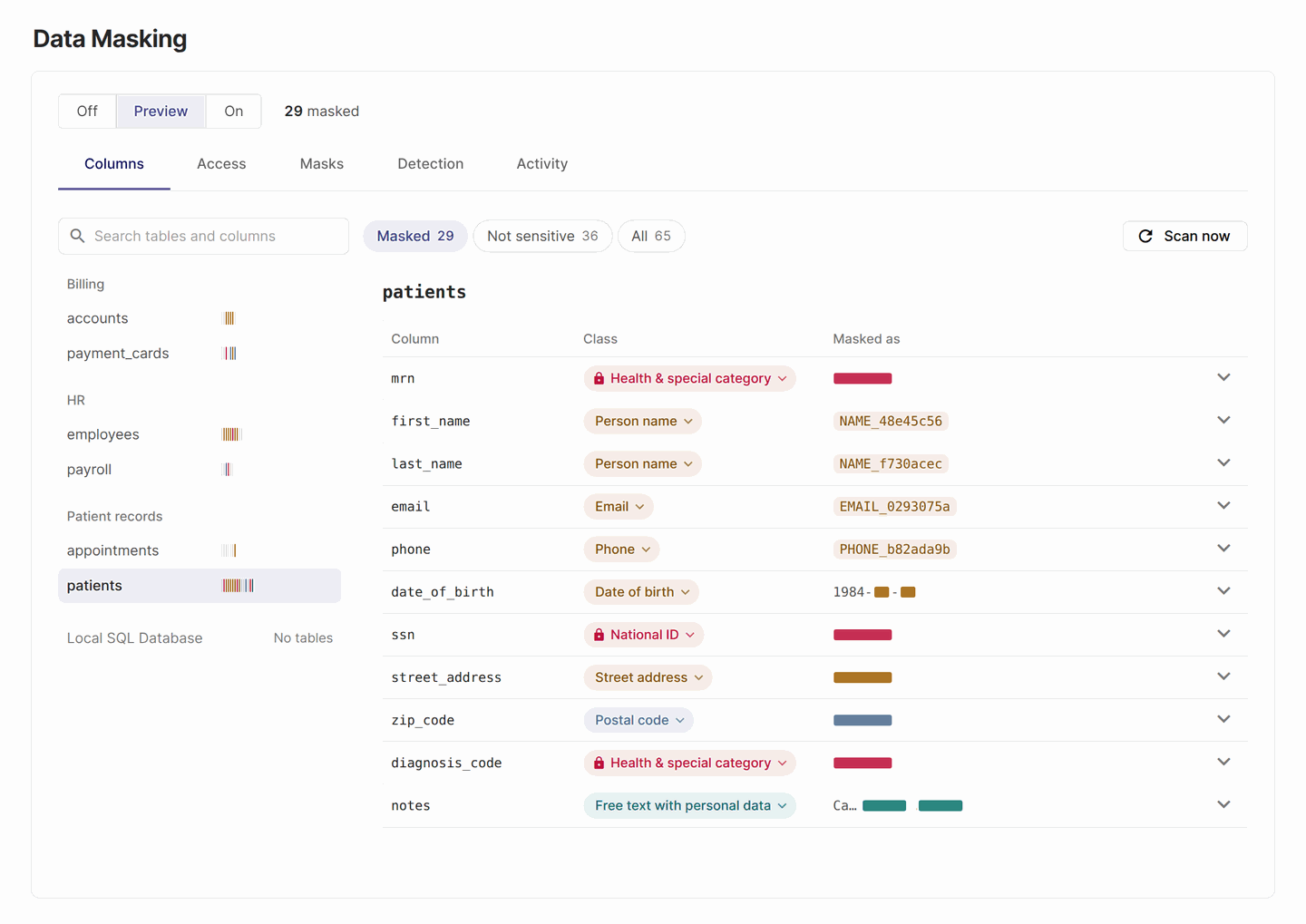
The tab has a toolbar, a rail of databases and tables, and the column table.
Toolbar
- Search tables and columns matches case-insensitively. When you type a table name, it shows all of that table's columns. Otherwise it matches column names.
- The filter chips To review, Masked, Not sensitive and All each carry a count. The first three counts never overlap and add up to All. After the first Acme Health scan they read 1 + 28 + 36 = 65.
- The To review chip hides when nothing is left to review, as in the screenshot above, unless it is the selected filter (then it reads 0). The tab opens on To review when something waits, and on Masked otherwise.
- Scan now starts a scan of every covered database. While a scan runs, the button reads "Scanning 42%" (or "Scanning…"), fills with progress and ignores clicks.
Rail
- There is one group per covered database, headed by its label. Each table shows a sensitivity strip: one tick per column, colored by tier, hollow for columns to review and faint for columns not sensitive. Hover the strip to see the sensitive column names.
- A badge on the table counts its columns to review. Under To review, a check mark shows the tables you finished.
- A table appears only when at least one of its columns passes the current filter and search.
- Below the tables, the rail lists:
- Couldn't scan: databases the last scan could not read. The reason is in a tooltip, and Retry scans that database again.
- Not scanned yet: databases added since the last scan, each with a Scan button.
- Databases with nothing under the current filter, as Nothing sensitive (click it to see all of its columns) or No tables. The built-in
dbservice of a new install shows as "Local SQL Database" with No tables. - Not covered: databases Data Masking can't mask, such as MongoDB. Its tooltip reads "Data Masking can't mask this database. AI tools can't read it while masking is on." See What changes for apps.
Column table
- The headers are Column, Class and Masked as. The chevron at the end of a row opens the evidence.
- Class is a chip colored by tier. Restricted classes carry a lock icon. A column to review has a dashed chip. A masked column without a class reads "Choose a class".
- Masked as is always a masked example and never the real value, even for an admin who sees real values. It shows
—for a column that is not sensitive, and the word "Redact" for a masked column without a class. - Rows to review carry the Keep masked and Not sensitive buttons. Rows an admin decided show a person icon: hover it to see who decided and when.
- Under To review, the table's other columns follow the queue in muted rows, so you can judge a column next to its neighbours. They are not part of the queue.
- When a table has nothing left to review, its header shows a Next table button, or "All reviewed" once every table is done.
At 760 px wide or less, the rail becomes a Table select and Scan now becomes an icon.
Deep links
The page reads two query parameters on its URL, #/api-security/data-masking:
| Parameter | Values | Effect |
|---|---|---|
filter | review, masked, clear, all | Opens Columns on that filter. clear is Not sensitive. The parameter is applied once, then removed from the URL, so a refresh doesn't keep it. |
tab | access, masks, detection, activity | Opens that tab. The Columns tab has no value. |
For example, #/api-security/data-masking?filter=review opens the review queue. The counts in the page header ("28 masked · 1 to review") are links to the same filters. The Fix links of Compliance baselines use ?filter=review and ?filter=clear.
Verdicts and scores
Every column has one of three verdicts:
| Verdict | Filter chip | Mode Preview | Mode On |
|---|---|---|---|
| Masked | Masked | Real values. Activity notes what would be masked. | Masked |
| To review | To review | Real values. Activity notes what would be masked. | Masked until you decide (fail closed) |
| Not sensitive | Not sensitive | Real values | Real values |
In mode On, a column to review is masked exactly like a masked column, with the format of its proposed class. The "Turn on masking?" dialog counts both. A column to review without a class is masked with Redact as if it were Restricted, so even a role with "All except restricted" access gets •••••••• until you choose a class.
Score bands
A scan scores each column from 0 to 100 for the class it most likely holds. The bands that turn the score into a verdict depend on whether values were sampled:
| How the column was classified | Masked | To review | Not sensitive |
|---|---|---|---|
| Column name and sampled values (a normal scan) | 70 or more | 40 to 69 | Below 40 |
| Column name only | 70 or more | 15 to 69 | Below 15 |
Name-only classification applies in two cases:
- Warehouses that bill per query. A scan reads Snowflake, Databricks, Trino, Dremio and BigQuery services from column names only, unless you ask it to sample them (see Scans).
- Columns no scan has read yet. Tables and columns created after the last scan are classified from their names the first time a request reads them, until their scan finishes (see Automatic scans).
Because the review band starts at 15, a name-only database puts more columns in To review. The evidence of such a column includes the line Classified from the column name only; values were not sampled, and its meter has the review notch at 15.
When a detection rule masks a column, its score is raised to at least 70. See Custom rules.
Read the evidence
Click the chevron at the end of a row, or press Enter on a focused row, to open its evidence ledger.
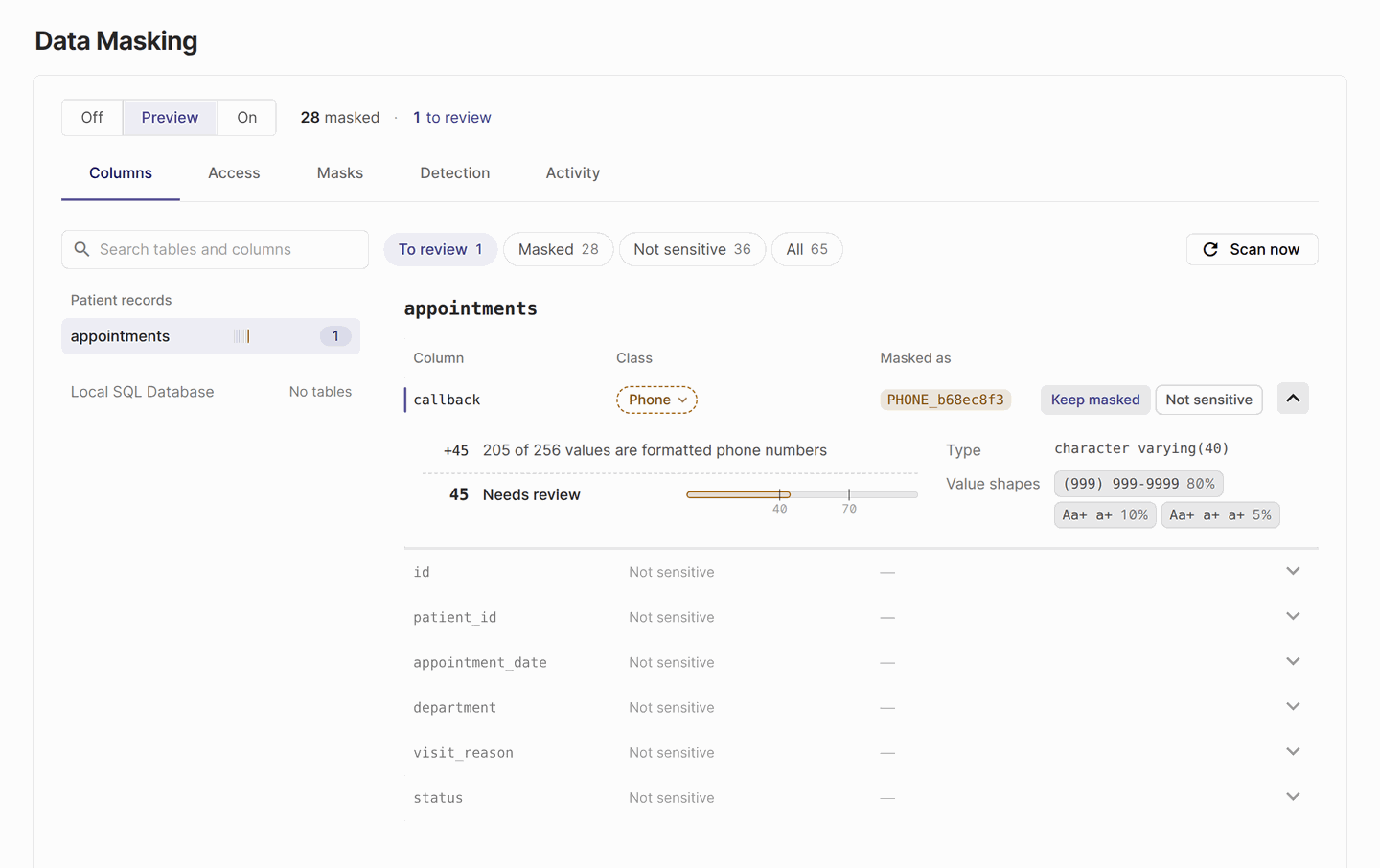
The ledger reads like a receipt:
- Lines. Each line shows the points it added or removed, and why. Lines worth 0 points are hidden while the other lines add up to the total. They appear when they explain a gap.
- Total. The score, the verdict detection reached ("Masked", "Needs review" or "Not sensitive"), and a 0 to 100 meter with notches at the review and mask thresholds: 40 and 70, or 15 and 70 for a name-only column.
- Type. The column's database type, for example
character varying(40). - Value shapes. Up to three shapes of the sampled values, with their share. In a shape,
9is a digit,Aandaare an uppercase and a lowercase letter,A+anda+are runs of them,Aa+is a capitalized word, and punctuation and spaces stay as they are.(999) 999-9999 80%means that 80% of the sampled values are formatted like US phone numbers. Columns that detection found not sensitive show no shapes. - Decision. Who decided the column and when, for example "Set by Alex Rivera just now". It appears only after an admin decides.
The ledger never shows a real value. A scan keeps sampled values in memory only. What it stores are counts, percentages, shapes and masked examples.
These are lines you will meet:
| Line (example) | Meaning |
|---|---|
+70 Column name "user_email" | The column name matches a class's vocabulary. "in a person table" is added when the table holds people and that raised the score. |
+75 103 of 103 values are valid email addresses | Sampled values passed a class's validator. |
+45 205 of 256 values are formatted phone numbers | The same, with weaker support. 45 points puts callback in review. |
0 Column name "status" matches no class | The name says nothing about personal data. |
0 "server ip" rules out ip address | A phrase in the name excludes a class. |
0 Key column, never classified | Surrogate key columns are skipped. |
Only 3 non-null values sampled | Too few values to judge from. |
Values don't fit the class | Negative points: the values contradict what the name suggested. |
Personal data inside the text in 12 rows | Free text that holds emails, phone numbers and similar. |
Classified from the column name only; values were not sampled | The name-only bands apply. |
Values could not be read (SQLSTATE <code>); masked until a scan reads them or an admin decides | The scan couldn't read this column's values. A column its name alone didn't mask goes to review. |
Custom rule ^member_ref$ | A custom column name rule masks the column. |
Custom value rule ^\p{L}{3}\d{9}$: N of M values match | A custom value rule masks the column. |
Baseline rule <pattern> (hipaa) | A rule added by a Compliance baseline masks the column. |
Also matches: <rule> | Another rule matched too, but a stricter class won. |
An earlier scan classified this as Phone (review); automatic rescans never remove masking (mark it not sensitive to clear it) | A rescan found weaker evidence. The column keeps its earlier verdict. |
Masked as <Class> by a detection rule that no longer matches; automatic changes never remove masking (mark it not sensitive to clear it) | The rule that masked the column was deleted or changed. |
Built from: email, ssn | A computed field. See Computed fields. |
Not scanned yet: personal data in its values is masked until a scan reads them | A new text column that no scan has read yet. |
The verdict on the ledger's total line is what detection concluded, not what an admin decided. After Alex keeps callback masked, its ledger still reads "45 Needs review", and the Decision line records the choice.
Decide a column
- Open Security > Data Masking. The Columns tab opens on To review when columns wait for a decision.
- Pick a table in the rail. Its badge counts the columns to review.
- Expand a row and read the evidence.
- Decide the column:
- Keep masked confirms the class detection proposed. The column becomes Masked. There is no toast: the row settles and the counts move.
- Not sensitive stops masking the column for every caller.
- Click the class chip to choose another class.
- When the table has nothing left to review, click Next table. Repeat until the header reads "All reviewed".
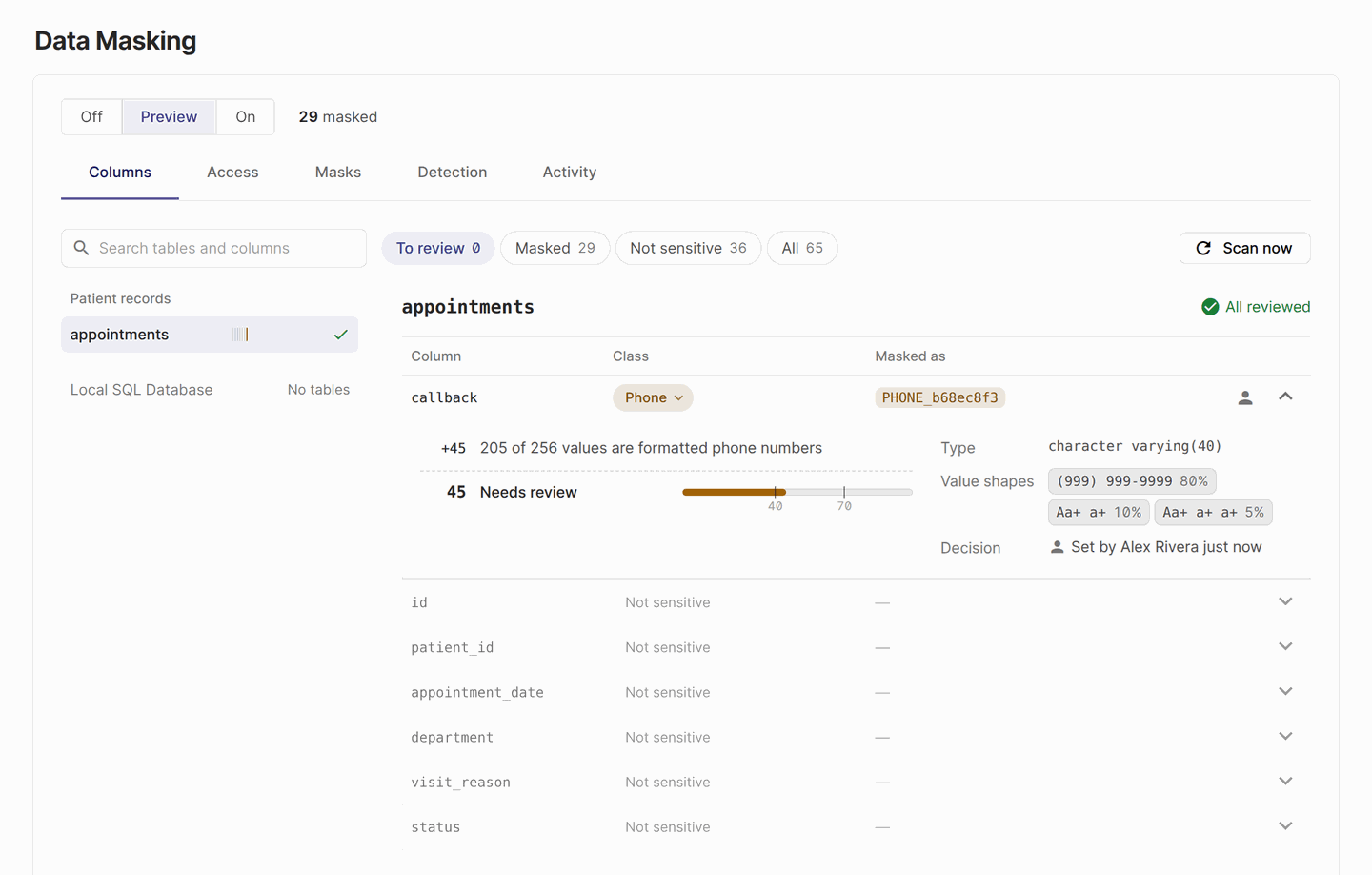
Each decision is saved immediately and recorded in the Activity log under Changes, with the column as the target and your name as the actor:
| Action | Request body | Activity text |
|---|---|---|
| Keep masked | the proposed class, for example {"class": "phone"} | Kept masked as Phone |
| Another class from the class picker | that class | Set class to Health & special category |
| Not sensitive, from the button or the picker | {"class": null} | Marked not sensitive |
Keep masked appears only when detection proposed a class. When a column to review has no class, its chip reads "Choose a class": pick the class from the chip.
If the server refuses a decision, the row returns to its last saved state and a toast shows the server's message.
Choose another class
Click a column's class chip to open the class picker.
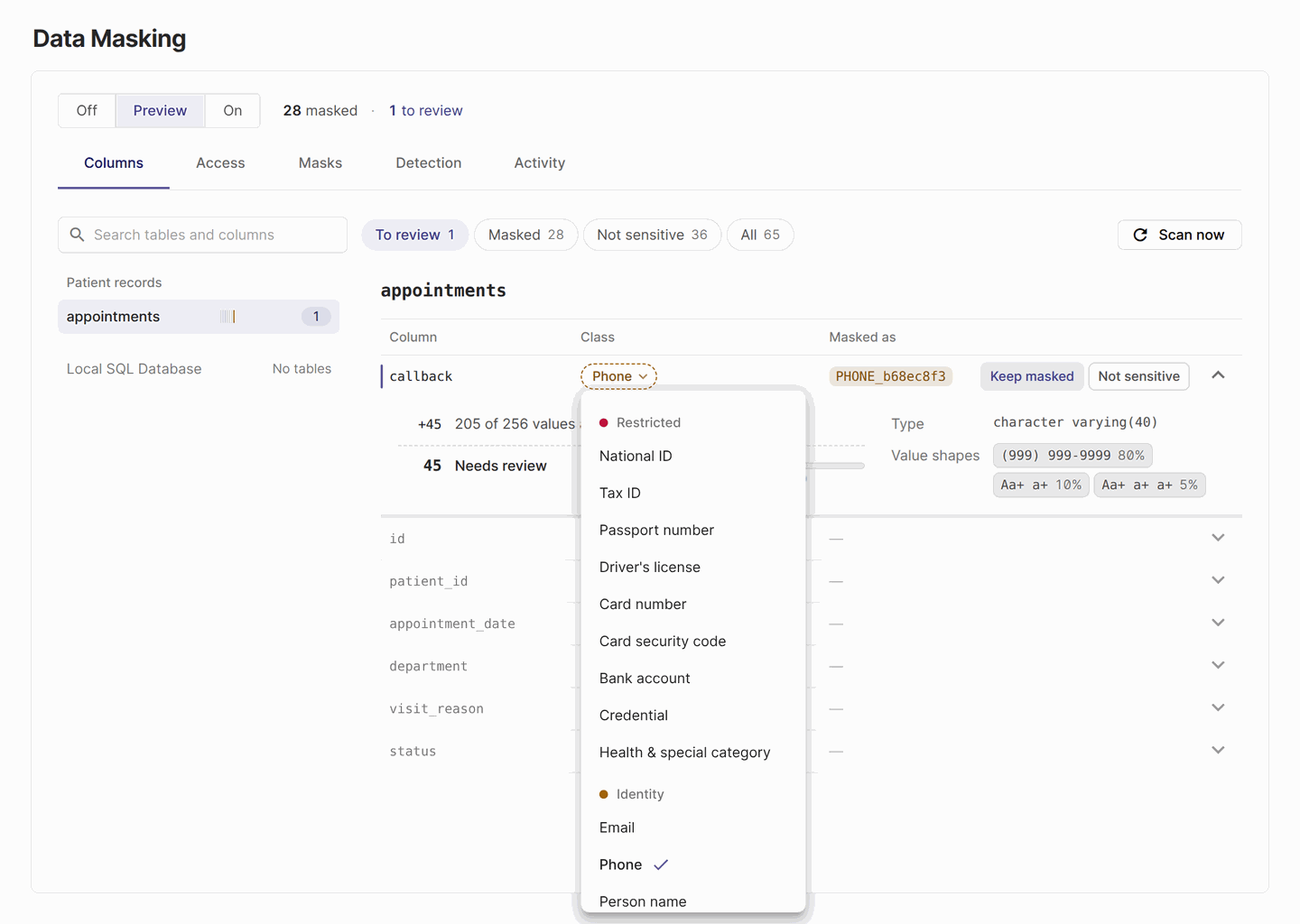
The picker lists the 23 classes under their tiers: Restricted, Identity, Quasi-identifiers and Free text. The current class has a check mark, and Not sensitive comes last. The class decides the mask format, so choosing a class also chooses how the values look. See Classes and mask formats.
You can use the picker on any row, not only rows to review:
- Mask a column detection missed. Filter on Not sensitive, find the column and choose its class.
- Correct a class. A clinical
notescolumn detected as Free text with personal data only hides emails, phone numbers and similar inside the text. If it holds diagnoses, choose Health & special category to redact the whole value. - Unmask. Choose Not sensitive.
Choosing the class a masked column already has does nothing.
Undo a Not sensitive
After you mark a column that had a class not sensitive, a toast at the bottom left reads, for example, "callback marked not sensitive", with an Undo button. It stays for 8 seconds. Undo masks the column again with the class it had, and Activity records that as a new decision (Set class to Phone). After the toast closes, choose the class from the picker instead.
Keyboard shortcuts
The column table and the rail are one tab stop each. Focus a row, then:
| Key | Action |
|---|---|
| j or ↓ | Next row |
| k or ↑ | Previous row |
| Home, End | First row, last row |
| m | Keep masked |
| n | Not sensitive (rows to review only) |
| Enter | Open or close the evidence |
In the rail, ↑, ↓, Home and End move between tables and open them.
Who can decide
Any full system admin can decide columns. A full system admin is an admin account with no role. Admins with a role (df-compliance restricted admins) don't see the page, and the API refuses them with Only a system administrator can view Data Masking settings. AI and MCP sessions can read the settings but never change them. See Who sees real values.
Not sensitive unmasks a column for every caller, yet it does not need the super admin. A designated super admin controls who gets real values on the Access tab, but any other full admin can still mark a column not sensitive. Watch for it in two places. The Activity log records every Marked not sensitive with the admin's name. In Compliance baselines, the "... marked not sensitive" check (for HIPAA, "No PHI identifiers marked not sensitive") fails when a column detected as one of the baseline's protected classes, with a score of 70 or more, is marked not sensitive. Its Fix link opens ?filter=clear.
Decisions are sticky
- An admin decision survives every rescan. A scan refreshes the evidence of a decided column, but never its verdict or class.
- Rules and baselines skip decided columns. Detection rules and Compliance baseline rules never change a column an admin decided. If you marked
member_refnot sensitive and then add a rule that matches it, the rule doesn't mask it: choose the class yourself. - Automatic changes only add masking. For columns nobody decided, a rescan, a rule or a baseline can mask a column or move it to a stricter class. None of them ever unmasks a column, except for the name-only columns in the next bullet. When a rescan finds weaker evidence, the column keeps its stored verdict, and the evidence says
An earlier scan classified this as .... - Name-only columns are provisional. A column classified from its name only (never scanned yet, in a warehouse scanned without sampling, or whose values a scan couldn't read) takes the result of the first scan that reads its values, even when that result is weaker.
- Gone is gone. Columns and tables that no longer exist in the database are removed at the next scan.
To unmask a column, mark it Not sensitive.
Decide with the API
Send the class id, or null for not sensitive, to the column's id service.table.column:
curl -X PATCH "https://your-dreamfactory-instance.com/api/v2/system/data_masking/column/patients.appointments.callback" \
  -H "X-DreamFactory-Session-Token: <admin session token>" \
  -H "Content-Type: application/json" \
  -d '{ "class": "phone" }'
For a name the URL path can't carry (non-ASCII characters, %, quotes), send the id in the body instead: PATCH /api/v2/system/data_masking/column with {"id": "patients.appointments.callback", "class": "phone"}. The response is the updated column, with verdict, class, source set to admin, decided_by and the evidence. Class ids are listed in Classes and mask formats.
| Status | Message |
|---|---|
| 400 | Send class: a class id to mask the column, or null to mark it not sensitive. |
| 400 | Unknown class. Use one of: national_id, tax_id, ..., free_text_pii, or null. (the full list) |
| 400 | Invalid column id '<id>'. Use service.table.column. |
| 400 | Send the column id (service.table.column) as id in the body, with class. (body form without an id) |
| 404 | Column '<id>' not found. Scan the service first. |
| 404 | '<name>' is not a database service Data Masking covers. |
| 403 | Only a system administrator can change Data Masking settings. |
| 403 | AI sessions cannot change Data Masking settings. |
See the API and CLI reference for the full endpoint list.
Scans
What a scan does
Scan now (and Scan databases on the first visit) scans every active SQL database service that Data Masking covers. Scan next to a database under Not scanned yet, and Retry next to one under Couldn't scan, scan only that database.
For each database, a scan:
- Reads the schema: tables, columns, types and keys.
- Samples values: the first 128 and the last 128 rows of each table in key order. The key is the primary key, else a single-column unique key, else the physical row id on PostgreSQL and SQLite. A table without a usable key is read once, up to 256 rows. Each value is cut to 1,000 characters.
- Classifies each column, then stores the verdict, the score, the evidence and masked examples. Sampled values stay in memory: they are never written, logged or cached.
Each table has a time budget of 20 seconds (DF_MASKING_SCAN_TABLE_BUDGET_MS). A table that runs out of time is partly sampled.
Only one scan runs at a time. A scan request through the API while another scan runs returns the current status and starts nothing. Automatic scans requested meanwhile run when the current scan ends.
Snowflake, Databricks, Trino, Dremio and BigQuery bill per query, so Scan now classifies them from column names only. To sample them, run php artisan df:masking scan --sample, or add "sample": true to the body of a scan API request.
To scan one database through the API, name its service:
curl -X POST "https://your-dreamfactory-instance.com/api/v2/system/data_masking/scan" \
  -H "X-DreamFactory-Session-Token: <admin session token>" \
  -H "Content-Type: application/json" \
  -d '{ "service": "billing" }'
Leave out service to scan every database. The API answers 400 There are no active database services to scan. Add a SQL database service first. when nothing can be scanned.
Scans only read
A scan reads data only with SELECT statements built from names in the schema; the only other statements it sends set up the read-only transaction. No value from your data is ever placed in a query. Where the database supports it, each read runs in its own transaction, which is always rolled back:
| Database | How a scan reads |
|---|---|
| PostgreSQL | A READ ONLY transaction with SET LOCAL statement_timeout |
| MySQL, MariaDB | A READ ONLY transaction. The MAX_EXECUTION_TIME hint is enforced by MySQL and ignored by MariaDB. |
| SQL Server | SNAPSHOT isolation when the database allows it, so the scan takes no shared locks on your rows. Otherwise the default isolation. |
| Other SQL databases (SQLite, Oracle and others) | Plain SELECT statements in autocommit, bounded by the per-table time budget |
The statement timeout is 10 seconds (DF_MASKING_SCAN_STATEMENT_TIMEOUT_MS), and the database server enforces it on PostgreSQL and MySQL only. A scan connects with the service's own connection and credentials, so that account needs SELECT on the tables.
Every table and column name is quoted with the database's own quote character, so names that contain quotes, brackets or dots can be sampled. On Informix, only plain identifier names can be sampled. SQL Server rowversion columns are never sampled.
When a scan fails
- One database can't be read. The scan carries on with the others and ends partly failed. The toast reads, for example, "Scan finished. Couldn't read HR." The database moves to Couldn't scan in the rail, with the reason in a tooltip and a Retry button. Its columns keep the classification from earlier scans.
- No database can be read. The toast reads "Scan failed. Couldn't read ...". "Scan didn't finish." means the scan stopped without naming a database.
- A scan stalls. A scan that stops reporting progress for 5 minutes (
DF_MASKING_SCAN_STALE_MINUTES) is marked failed. - A table can't be read. It keeps its earlier classification.
- A column's values can't be read. The column is at least To review (a name that already scores 70 or more keeps it Masked), with
Values could not be read (SQLSTATE <code>); masked until a scan reads them or an admin decides.
Failure reasons never contain data. They name the problem and the SQLSTATE only:
Could not connect (SQLSTATE <code>)Login failed (SQLSTATE <code>)Database not found (SQLSTATE 3D000)Permission denied (SQLSTATE 42501)Could not read the database (SQLSTATE <code>), orCould not read the database (<error type>)when the driver gives no SQLSTATE
"Couldn't read the scan history. Check the DreamFactory log." means DreamFactory couldn't read the scan history from its system database. It is a server problem, not a sign that nothing was scanned. On a first visit, the page then shows no Scan databases button.
Scans you start announce their outcome in a toast. The Activity log lists every scan under Scans, for example Scan started, Scan finished: 65 columns in 4 databases and Scan failed: could not read HR.
Automatic scans
You don't need to click Scan now after every change:
- New or changed database services. When you create an active SQL database service, or change its configuration, a background scan of that service starts right away, or when the running scan ends.
- New tables and columns. In mode Preview or On, the first request that reaches a table or column no scan has seen classifies its columns from their names on the spot, so nothing is served unclassified. It also starts a scan of that service. Each service gets at most one such scan per minute: later requests wait for the next minute and are never dropped. Until that scan finishes:
- the new columns use the name-only score bands;
- a text column whose name says nothing is To review as Free text with personal data, with the evidence
Not scanned yet: personal data in its values is masked until a scan reads them(orFree text not scanned yet: ...for notes and comments). In mode On it is masked with the Free text format, which by default hides only detected spans such as emails and phone numbers; - custom detection rules don't apply yet.
- Background scans never sample the warehouses. They show no toast unless they fail or are partial. An open page refreshes within 30 seconds, or when you return to the window.
Background scans begin only once scanning is under way: a scan has finished (even one of empty databases), or the mode is Preview or On. On a new instance where nobody has scanned and the mode is Off, adding a database does not scan it. This also happens when php artisan df:masking setup ran before any SQL service existed. Click Scan databases, or run php artisan df:masking scan, once.
Computed fields
DreamFactory can compute a field's value with a SELECT database function (db_function): virtual fields, and real columns with a select function. Data Masking lists these fields on the Columns tab, and each one inherits the masking of the columns its expression reads:
- Strictest wins. The field takes the class of the strictest masked or to-review column it reads. For computed fields the order is Restricted, then Free text, then Identity, then Quasi-identifiers.
- Formats can't leak. The field keeps that column's format when it reads a single masked column, or when the format hides the whole value (Redact, Token, Null). A partial format (Last 4, First letter, Year only, Detected spans) over several masked columns becomes Redact, so one column can't reveal pieces of another.
- Unclear expressions are masked. An expression with a subquery, or a name that isn't a column of the table, can't be checked. The field goes to To review, masked with Redact until you decide. Its evidence reads
Built from an expression that could not be checked. - Harmless expressions add nothing. An expression that reads only columns not sensitive adds no masking, and
COUNT(...)alone is never masked.
The evidence shows what the field reads: Built from: email, ssn, with (and parts that could not be checked) appended when part of the expression couldn't be checked.
If you change or remove the expression, the field stays masked, because automatic changes never remove masking. Its evidence then shows Was built from: ssn (or Was built from an expression that could not be checked) above the An earlier scan classified this as ... line. Mark the field Not sensitive to clear it.
An admin decision on a computed field overrides the inheritance. If you mark a field not sensitive, callers get its computed value even when it reads masked columns, so check the expression first.
Things to know
- "Not sensitive" appears four times on one screen. It is a filter chip, a row button, the last item in the class picker and a verdict word in the evidence. The evidence verdict is what detection concluded, not the current decision.
- Search matches table names too. Typing
patientsshows every column of thepatientstable, not only columns whose names contain the text. - Masked as is never the real value. Even an admin with real-value access sees a masked example there. To see what a caller actually receives, call the API with that caller's key or session. The Data Explorer shows what you receive. See What changes for apps.
- Format changes are per class, not per column. To change how one column looks, give it another class, or change its class's format on the Masks tab for every column of that class.
- Free text's format reaches never-scanned columns. New text columns whose names say nothing are masked with the Free text with personal data format until their scan. If you set that class to Redact or Null, those columns, text keys included, are fully hidden until their scan finishes.
- A deleted rule leaves its columns masked. The delete dialog's Delete and unmask button (it shows a count) unmasks the columns only that rule flagged. To unmask a column later, mark it Not sensitive. See Custom rules.
- Non-SQL databases are listed, not masked. Databases under Not covered keep returning real values to people and apps. While masking is On, AI sessions get 403 from them.
Related
- Data Masking: how scanning, review, Preview and On fit together.
- Get started: scan and review a first database step by step.
- Classes and mask formats: the 23 classes and how each format masks values.
- Custom rules: teach detection about columns the built-in rules miss.
- Who sees real values: admins, roles, AI sessions and the super admin.
- Activity log: every decision, scan and blocked attempt.
- Troubleshooting and limits: symptoms, causes and fixes.