What changes for apps
This page is for the people who build and run the apps, scripts and integrations that call your DreamFactory database APIs. When masking is On, those apps can get masked values back, and some requests behave differently, so that filters, sorting and error messages don't give away what the mask hides. Read this page before you turn masking On for apps that already exist.
Everything here applies only when all three of these are true:
- Masking is On. In Preview and Off, requests and responses are unchanged and Data Masking adds no headers. Preview only records, on the Activity tab, which callers would have received masked values.
- The service is covered. Data Masking covers SQL database services: MySQL and MariaDB, PostgreSQL, SQLite, SQL Server, Oracle, Snowflake and the other SQL connectors. Other database services, such as MongoDB, Cassandra, CouchDB, DynamoDB and Salesforce, are not masked, and apps keep their normal access to them.
- The caller gets masked values for the column. A role with real-value access, or an admin with a grant, gets real values and none of the changes below for those columns. See Who sees real values.
Data Masking decides on the server what each caller gets. It reads no request header of its own, and nothing a client sends can turn masking off.
Quick reference
| Your app... | What happens in mode On | Status |
|---|---|---|
| Reads a masked column | Gets the value in the column's mask format | 200 |
| Filters on a masked column in a way it may not | That comparison matches no rows | 200 |
| Sorts, groups or aggregates on a masked column | That part of the request is left out | 200 |
| Reads by id where the id field is a restricted or free-text masked column | Finds no record | 404 or 400 |
| Updates or deletes by a filter or id that compares a masked column in a way it may not | The request is refused | 400 |
| Sends masked values back in an update | Those fields stay unchanged | as usual |
| Inserts masked values | The request is refused | 400 |
| Gets a database error | The error text no longer contains values | as usual |
| Exports a package with table data | The request is refused | 403 |
Two response headers tell your app what Data Masking did: X-DreamFactory-Masked-Fields lists the masked fields in the response, and X-DreamFactory-Masking-Rewrites lists what it changed in the request. See Response headers.
Rewrites and refusals are also logged on the Activity tab under Blocked, with the caller, for example "Conditions on a masked column matched no rows" for patients.patients.ssn by "API key: support-portal". A rewrite is logged at most once every 10 minutes for the same caller, table and columns, and a refused write at most once a minute for the same caller and table. See Activity log.
Values
Masked columns come back in their class's mask format. This is the support-portal app reading a patient with no real-value access:
curl -i "https://your-dreamfactory-instance.com/api/v2/patients/_table/patients/2?fields=id,first_name,email,ssn,date_of_birth,notes" \
  -H "X-DreamFactory-API-Key: YOUR_APP_API_KEY"
HTTP/1.1 200 OK
X-DreamFactory-Masked-Fields: first_name, email, ssn, date_of_birth, notes
X-DreamFactory-Trace-Id: 02f30114-d073-41de-b449-8e0cea288a46

{"id":2,"first_name":"NAME_87183da6","email":"EMAIL_e4a7daa0","ssn":"\u2022\u2022\u2022\u2022\u2022\u2022\u2022\u2022","date_of_birth":"1979-\u2022\u2022-\u2022\u2022","notes":"Send lab results to \u2022\u2022\u2022\u2022\u2022\u2022."}
first_name and email use Token, ssn uses Redact (always 8 bullets), date_of_birth uses Year only, and notes uses Detected spans, which hides only the personal data it detects inside the text. The bullet is the character U+2022, which JSON writes as \u2022. See Classes and mask formats for every format.
What your app should expect:
- Numbers and booleans become
nullunder every format except Token. So do JSON values (arrays and objects), except under Token and Detected spans. Make sure your app acceptsnullin masked numeric fields. GraphQL schemas are not changed to make those fields nullable. nullstaysnull, and an empty string stays an empty string.- Tokens are stable. The same value gives the same token on the same instance, for example
EMAIL_e4a7daa0, so you can still group or match records by a tokenized column in your app. Another instance gives different tokens unless both use the same token key. - Related records are masked too, with the same rules.
- Every response format is masked: JSON, XML and CSV. Masking happens before event scripts, caching and logging see the response.
- Stored procedures and functions (
_proc,_func) are masked on a best-effort basis: result cells by column name, and detected spans in every other string. - New tables and columns are classified from their names until their scan finishes, which takes seconds, or minutes on large databases. Meanwhile their text columns use the Free text format: with the default Detected spans, only the personal data detected in them is hidden. See Review columns.
Filters on masked columns match no rows
A comparison your app may not make on a masked column counts as unknown, the way SQL treats a comparison with NULL. A row is returned only when the whole filter is true, so an unknown comparison never matches. The answer never depends on the masked value, so a filter cannot be used to guess it, and an app that looks a record up by a masked value gets no record rather than someone else's.
Which comparisons are allowed depends on the column's tier:
| Tier | =, !=, IN, NOT IN (up to 25 values) | LIKE, CONTAINS, STARTS WITH, ENDS WITH, <, >, <=, >= | IS NULL, IS NOT NULL |
|---|---|---|---|
| Identity, Quasi-identifiers | Work as usual | Match no rows | Work as usual |
| Restricted, Free text | Match no rows | Match no rows | Work as usual |
These are unknown on any masked column too:
INorNOT INlists of more than 25 values.- A function or expression over the column, such as
substr(ssn,1,3) = '123'. - A filter that mentions the column and that Data Masking cannot parse with certainty.
- A filter too large to expand safely.
How whole filters work out, with ssn (National ID, restricted) and email (Email, identity):
| Filter | Rows returned |
|---|---|
ssn = '123-45-6789' | None |
(state = 'MA') AND (ssn = '123-45-6789') | None |
(state = 'MA') OR (ssn = '123-45-6789') | The MA rows |
NOT (ssn = '123-45-6789') or ssn != '123-45-6789' | None |
ssn IS NOT NULL | The same rows as without masking |
email = 'marcus.chen@example.org', or email IN (...) with up to 25 values | The exact matches, as without masking |
email LIKE '%@example.org' | None |
Here is a filter and a sort on masked columns, sent with the support-portal key:
curl -i -G "https://your-dreamfactory-instance.com/api/v2/patients/_table/patients" \
  -H "X-DreamFactory-API-Key: YOUR_APP_API_KEY" \
  --data-urlencode "fields=id" \
  --data-urlencode "filter=ssn like '123%'" \
  --data-urlencode "order=email"
HTTP/1.1 200 OK
X-DreamFactory-Masking-Rewrites: filter:ssn, order:email
X-DreamFactory-Trace-Id: 36c613bf-98c2-40dd-8fc2-eac5f4371584

{"resource":[]}
And an OR that keeps its unmasked side:
curl -i -G "https://your-dreamfactory-instance.com/api/v2/patients/_table/patients" \
  -H "X-DreamFactory-API-Key: YOUR_APP_API_KEY" \
  --data-urlencode "fields=id,state" \
  --data-urlencode "filter=(state='MA') OR (ssn='123-45-6789')" \
  --data-urlencode "limit=3"
HTTP/1.1 200 OK
X-DreamFactory-Masking-Rewrites: filter:ssn
X-DreamFactory-Trace-Id: 46c14070-823b-4c6f-ab20-a14bfbd4365e

{"resource":[{"id":2,"state":"MA"},{"id":9,"state":"MA"},{"id":12,"state":"MA"}]}
More details:
- The response stays 200 and keeps DreamFactory's shape, including
count_only,include_count, related records, and JSON, XML and CSV. When nothing can match, DreamFactory receives an always-false filter such as(id IS NULL) AND (id IS NOT NULL). - Every spelling of the column is covered:
patients.ssn,`ssn`,[ssn],"ssn"andSSNall count asssn. havingis covered too, and so are the filters DreamFactory builds to read related records. A relationship keyed on a masked column, such asemail, can return empty related records.- A filter that doesn't mention a masked column reaches DreamFactory exactly as you sent it.
- Record filters set on a role (server-side filters) are not changed. They are part of your access rules and run on real values as before.
To find records, filter on columns that are not masked, use exact matches on identity and quasi-identifier columns, or look records up by id.
DreamFactory 7.7.1 filter behavior
Two DreamFactory 7.7.1 behaviors matter when you write filters:
- DreamFactory reads
NOTonly at the very start of a filter. Data Masking therefore writes the negations it produces as inverted comparisons:state != 'MA',age <= 3,NOT IN,NOT LIKE,IS NOT NULL. Parts of your filter with no unknown comparison keep your text exactly, includingNOT,XORandNOR, and DreamFactory treats them as it would without masking. - DreamFactory 7.7.1 ignores filters sent as an array (
filter[]=...). Data Masking leaves array forms (filter[],having[]) as sent and reports nothing for them. DreamFactory 7.7 reads nohavingparameter at all. Data Masking still checks the string form in case a connector reads it.
Sorting, grouping and functions
Data Masking leaves these out of a read request when they use a masked column, and the response is still 200:
- Sorting (
order) on a masked column. TheX-DreamFactory-Masking-Rewritesitem isorder:<column>. - Grouping (
group) on a masked column, reported asgroup:<column>. - Aggregates (
SUM,AVG,MIN,MAX) and other expressions over a masked column infields, such asMAX(ssn),MAX(DISTINCT ssn),MAX(ssn) AS morupper(ssn), reported asfields:<column>.COUNTover a masked column is kept.
When a grouping on a masked column is left out and the request also has aggregates, plain selections of that column are left out of fields too. If nothing is left in fields, DreamFactory returns only the key fields.
Lookups by id
DreamFactory finds records by id by comparing their id field (id_field, or the primary key) with the ids you send. When that id field is masked for the caller, the lookup follows the filter rules: it is unknown for Restricted and Free text id fields, and for Identity and Quasi-identifier id fields with more than 25 ids. Data Masking then answers the way DreamFactory answers ids that don't exist, without running the lookup:
| Request | Answer |
|---|---|
GET _table/<table>/<id> | 404 Record with identifier '•••' not found. |
GET with ids=..., or with the records sent in the body | 400 Batch Error: Not all requested records could be retrieved. |
PUT, PATCH, MERGE or DELETE by id: in the path, in ids=, or by records in the body | 400 Writes may filter masked columns (ssn) only by exact match (=, IN), and never restricted or free-text columns. |
The batch error's context holds a 404 Record with identifier '•••' not found. for the first id only. Send continue=true to get one for each id.
An Identity id field such as email works as before with up to 25 ids. If a table your apps read by id is keyed on a restricted or free-text column, look its records up by another key, mark the key column Not sensitive if it holds no personal data, or give the app's role real-value access.
Writes
Writes with a filter
A PUT, PATCH, MERGE or DELETE whose filter compares a masked column in a way the caller may not (see the tier table above) is refused with 400:
Writes may filter masked columns (ssn) only by exact match (=, IN), and never restricted or free-text columns.
The message names the columns. If Data Masking cannot parse the filter with certainty, the 400 reads Data Masking could not verify the filter of this write. Use simple comparisons, or filter on columns that are not masked.
Data Masking never rewrites the filter of a write, because a rewritten filter could change which rows are written. Write by a key that is not masked.
Updates
PUT, PATCH and MERGE treat masked values sent back as unchanged. If your app reads a record, edits one field and sends the whole record back, the masked fields it sends back (bullets, or a token of that column's class) are removed from the write and keep their stored values. If the body held only masked values, the request gets 400 Nothing to write: the request only sent back masked values, and masked values are never written.
A null sent back also counts as unchanged for numeric and boolean columns and for columns that use the Null format, because that is what the caller read. A caller who gets masked values cannot set such a column to null.
Inserts
A POST that contains masked values (bullets, or a token of the column's class) is refused with 400 Masked values can't be inserted. Send real values or leave the field out. A null is a real null here and is inserted.
Upserts
On services with allow_upsert, a PUT or PATCH that ends up inserting a new row stores NULL in masked fields whose values were removed as unchanged.
Expressions
A write that carries an {"expression": ...} value, in the records or in params, is refused with 400 Expressions are not allowed on tables with masked columns on any table where the caller has masked columns. A raw SQL expression could copy a masked column into a visible one. Write literal values instead.
Database errors
Database errors can quote the values a row holds. For callers who get masked values, Data Masking reduces them:
Database error during insert (SQLSTATE 23000). Data Masking removed the details.
The operation is insert, update, delete, read, call or request. This applies to SQLSTATE classes 22, 23, 27, 38, 39, 44 and P0, and to any message with DETAIL or CONTEXT lines or key (...)=(...), whatever language the database server uses. Other database errors keep their text, with quoted values replaced by •••. If an error cannot be checked, the message is The request failed. Data Masking removed the error details.
DreamFactory's own validation messages stay readable and keep the field names your app sent, for example Invalid field '1' in order by clause. or Required field 'created_at' can not be NULL.
To debug an error, repeat the request as a caller with real-value access, or in Preview.
Package export and import
A package export (POST /api/v2/system/package) that includes data from a covered table is refused for callers who would get masked values:
Exporting table data needs real-value access. Ask the super admin for a grant, or export without table data.
The status is 403. Masked records in a package would become data on the instance that imports it. Importing a package that holds masked values refuses those records, with a 400 for each.
Data Masking settings are never part of a package. On the target instance, set them again or apply the same Compliance baseline.
Callers without a session
Scheduler tasks without a run-as app, queue workers, MQTT and AMQP listeners, and php artisan commands that call the API have no session, so they get masked values in every masked column. Give a scheduled task that needs real values a run-as app, and give that app's role real-value access. See Callers without a session.
Event scripts
Data Masking handles a request before event scripts run:
- A
pre_processscript sees the request after Data Masking checked it, and apost_processscript receives the response already masked. platform.apicalls from a script are masked like the caller the script runs for.- Scripts that open their own database connections bypass the API and are not masked. Internal
_speccalls from server-side scripts are not masked either.
A filter, sort or grouping that a pre_process script adds or changes runs on real values, and its results can reveal them. Event scripts are code your admins write, so Data Masking trusts them. Give non-admin roles no access to system/event_script, and review scripts that build filters from request parameters.
When Data Masking cannot finish a request
In mode On, Data Masking fails closed. If it cannot check a request or mask a response, for example because a dm_* table in the system database cannot be read, the caller gets 500 with one of these messages:
Data Masking could not check this request.Data Masking could not mask this response, so it was withheld.
In Preview the same request passes through unchanged and the error is written to the DreamFactory log. Check the log and the system database. See Troubleshooting and limits.
Response headers
In mode On, Data Masking adds up to two headers to the responses of covered services, for callers who get masked values:
| Response header | Example | Meaning |
|---|---|---|
X-DreamFactory-Masked-Fields | first_name, email, ssn, date_of_birth, notes | These fields are masked in this response, including fields whose value is null. Fields of related records appear as relation.field. The value is * for _proc, _func and _spec?model=true responses; a _spec body lists the fields in masked_columns. |
X-DreamFactory-Masking-Rewrites | filter:ssn, order:email | Data Masking changed these parts of the request because they use a masked field. It is sent even when the response holds no masked field. |
Each item in X-DreamFactory-Masking-Rewrites names what happened:
| Item | What happened |
|---|---|
filter:<field>, having:<field> | Conditions on the field matched no rows. |
filter:* | A filter that Data Masking could not check matched no rows. |
order:<field>, group:<field> | The sort or grouping was left out. |
fields:<field> | A function on the field, such as MAX(ssn), was left out of fields. |
Exact matches that still work, such as email = 'marcus.chen@example.org', IN with up to 25 values, or IS NULL, are not reported. Items from the requests DreamFactory makes internally while serving yours are included, for example filter:<key> when related records joined on a masked key were left out.
Data Masking never reads these headers from requests. Sending them changes nothing.
Header format
- Items are separated by a comma and a space.
- A value is at most 1024 bytes. Items that don't fit are replaced by
+N moreat the end, for example, +3 more. - Field names are percent-encoded as UTF-8 for every byte outside visible ASCII, and so are
%and,. A field namedlast nameappears aslast%20name.
To read a header, split on ,, trim each item, skip a +N more item, and decode the rest with decodeURIComponent (JavaScript) or rawurldecode (PHP):
function readMaskingHeader(response, name) {
  const raw = response.headers.get(name);
  const result = { items: [], more: 0 };
  if (!raw) return result;
  for (const part of raw.split(',')) {
    const item = part.trim();
    if (!item) continue;
    const more = /^\+(\d+) more$/.exec(item);
    if (more) {
      result.more += Number(more[1]);
      continue;
    }
    result.items.push(decodeURIComponent(item));
  }
  return result;
}

// readMaskingHeader(res, 'X-DreamFactory-Masked-Fields').items
//   -> ['first_name', 'email', 'ssn', 'date_of_birth', 'notes']
// readMaskingHeader(res, 'X-DreamFactory-Masking-Rewrites').items
//   -> ['filter:ssn', 'order:email']
No header doesn't mean real values
A response without these headers holds no masked field and no reported rewrite. That happens when the mode is Off or Preview, the caller sees real values for every field returned, no masked field was returned, or the service is not covered. Don't use the headers as a security check. Services Data Masking cannot cover are never masked, and reduced database error text is not reported in a header.
X-DreamFactory-Trace-Id
The responses above also carry X-DreamFactory-Trace-Id. DreamFactory returns it on API responses for log correlation. It is not a Data Masking header, but it matters here: a request that sends it counts as an AI session. An app whose gateway, proxy or SDK copies it into later requests gets AI-session masking even when its role has real-value access, and in mode On a 403 from database services Data Masking cannot cover. Don't forward it from apps. See AI and MCP sessions for the details and the exact 403 message.
Browser apps on another origin
Browser JavaScript on another origin can only read response headers that CORS exposes, and Data Masking does not change your CORS settings. To let a browser app read both headers:
- Open System > Config > CORS and edit the entry that matches your app's origin and API path.
- In Exposed Headers, add both names, separated by a comma:
X-DreamFactory-Masked-Fields,X-DreamFactory-Masking-Rewrites. - Save the entry.
Until you do, response.headers.get('X-DreamFactory-Masked-Fields') returns null in the browser even though the header is in the response. See CORS and SSL.
Check in Data Explorer
API Generation & Connections > Data Explorer shows what the API returns to you, the signed-in admin, and marks what Data Masking changed. Unless you have real-value access, you see masked values there too.
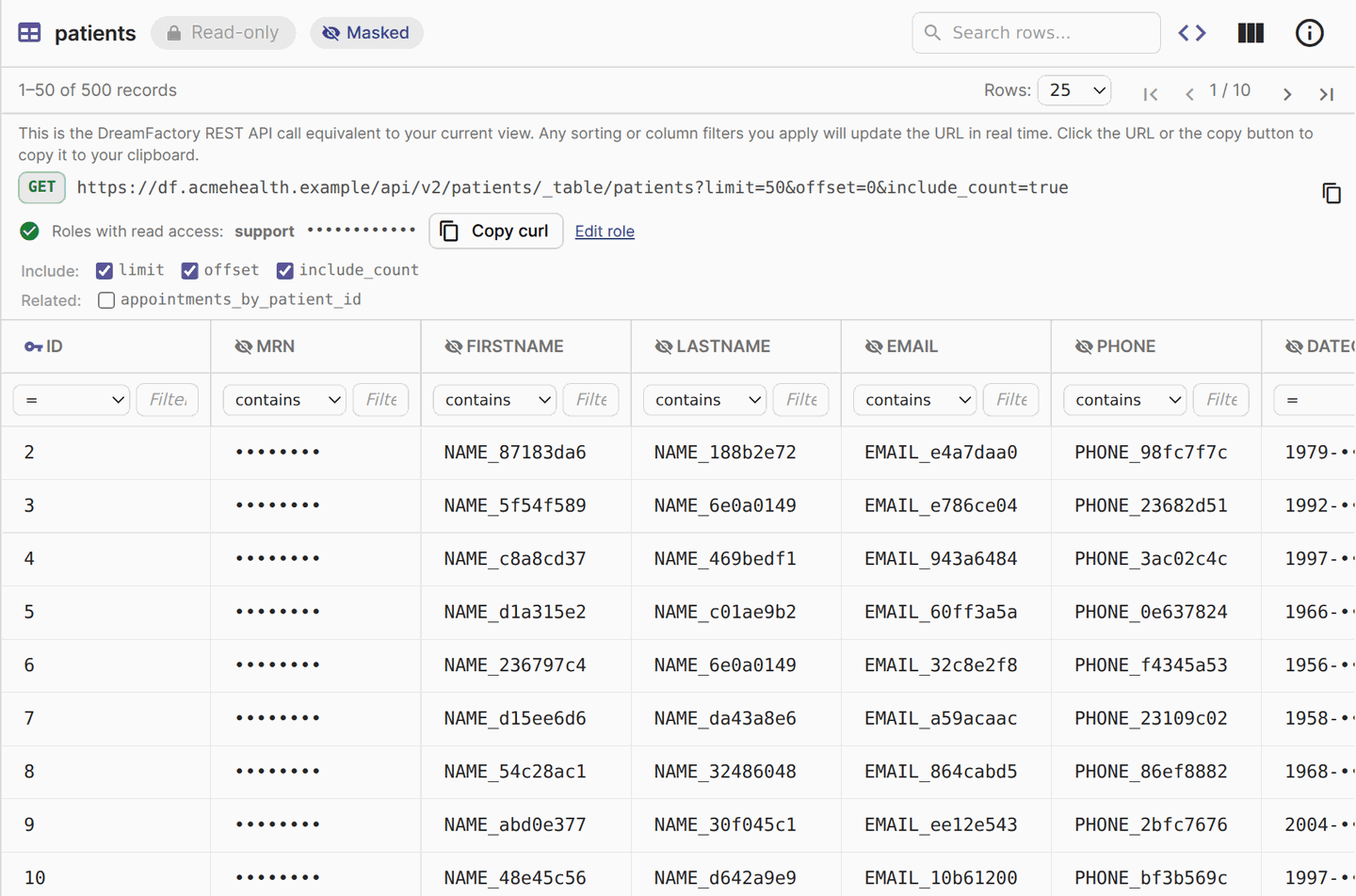
- Masked chip. When the response carried
X-DreamFactory-Masked-Fields, a Masked chip appears next to Read-only in the toolbar. It links to the Access tab. - Column icons. Each masked column has an eye-off icon in its header, with the tooltip "Masked".
- Values are the strings the API returned: bullets, tokens and
NULL.
When you filter or sort on a masked column, a note under the toolbar says what happened, for example "Conditions on masked columns match no rows: ssn · Sort ignored on masked columns: email". Other notes are "A filter Data Masking could not check matched no rows", and "+N more" when the header was cut.
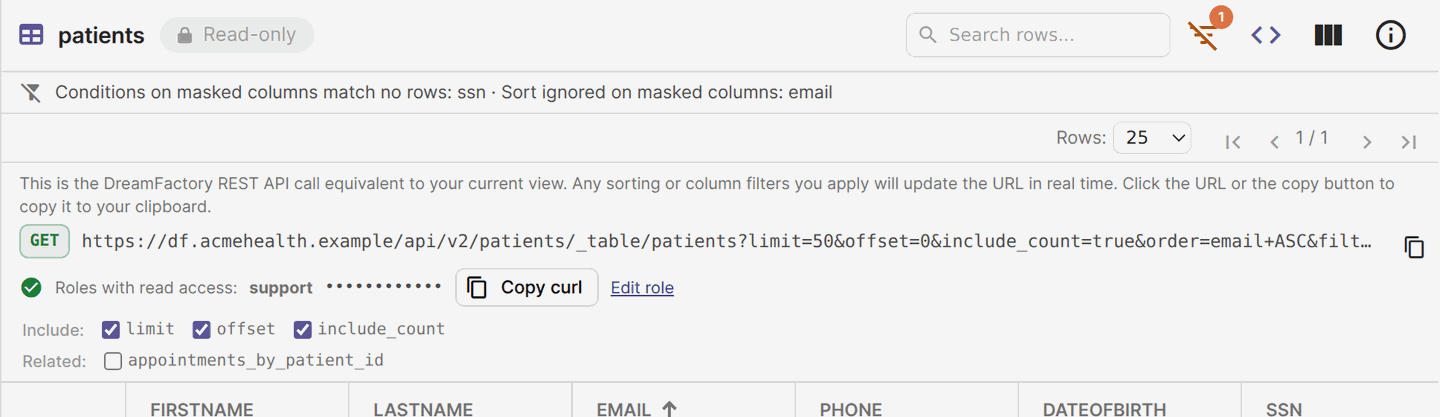
In this second screenshot there is no Masked chip. The result is empty, so no masked field came back, and only X-DreamFactory-Masking-Rewrites was sent. Neither the chip nor the note appears in Preview, or when you see real values.
See what an app gets
Your view as an admin says nothing about what an app gets. To see that, call the API with the app's key:
- In Data Explorer, open the table. The API call panel under the toolbar shows the request for your current view. The code icon in the toolbar shows or hides it.
- The line Roles with read access: names a role that can read this table and its API key. If several roles can, pick one from the list.
- Click Copy curl. It copies a
curlcommand with that key in theX-DreamFactory-API-Keyheader and the current URL. - Run the command in a terminal. Add
-ito see theX-DreamFactory-Masked-FieldsandX-DreamFactory-Masking-Rewritesheaders.
Edit role opens the role, if you need to change what it can reach. The copied command contains a working API key: treat it like a password.
Before you turn On for existing apps
Work through this list while masking is in Preview:
- See who would be affected. On the Activity tab, select Preview. Each "Would mask N columns" row names a table and a caller, such as
API key: support-portal. Preview logs at most one row per caller and table per hour. - Give real values to the callers that need them, before you switch On: role access for apps, grants for admins. See Who sees real values.
- Look records up by id, or by columns that are not masked. Check that no table your apps read or write by id is keyed on a restricted or free-text column.
- Don't filter, sort or group on masked columns. On identity and quasi-identifier columns, use exact
=orINwith up to 25 values. On restricted and free-text columns, onlyIS NULLandIS NOT NULLwork. - Don't send masked values back as new records. Updates that send masked values back leave those fields unchanged. Inserts with masked values fail with 400. Upserts can store
NULL. - Accept
nullin masked numeric and boolean fields. - Give scheduled tasks a run-as app whose role has real-value access, if they need real values. Queue workers, MQTT and AMQP listeners and
php artisancommands get masked values. - Expose both headers in CORS for browser apps on another origin.
- Make sure gateways and SDKs don't forward
X-DreamFactory-Trace-Id. - Test with each app's API key once masking is On, and check the response headers. Use Data Explorer's Copy curl, or a staging instance with the same setup.
- Know how to step back. The super admin can switch the mode back to Preview in Security > Data Masking. Anyone with shell access can run
php artisan df:masking mode preview.
Then turn masking On. See Get started.
Messages your app can receive
| Status | Message | When |
|---|---|---|
| 404 | Record with identifier '•••' not found. | GET _table/<table>/<id> on a masked id field. See Lookups by id. |
| 400 | Batch Error: Not all requested records could be retrieved. | A GET by ids= or by records in the body, on a masked id field |
| 400 | Writes may filter masked columns (<columns>) only by exact match (=, IN), and never restricted or free-text columns. | A write by a filter or id on a masked column |
| 400 | Data Masking could not verify the filter of this write. Use simple comparisons, or filter on columns that are not masked. | A write filter that Data Masking cannot parse |
| 400 | Nothing to write: the request only sent back masked values, and masked values are never written. | An update that only sent back masked values |
| 400 | Masked values can't be inserted. Send real values or leave the field out. | An insert with masked values |
| 400 | Expressions are not allowed on tables with masked columns | A write with an {"expression": ...} value |
| 403 | Exporting table data needs real-value access. Ask the super admin for a grant, or export without table data. | A package export with covered table data |
| 403 | Data Masking blocks AI access to services it cannot mask. | An AI session calling a database service Data Masking does not cover |
| 500 | Data Masking could not check this request. | The request could not be checked |
| 500 | Data Masking could not mask this response, so it was withheld. | The response could not be masked |
| Unchanged | Database error during <operation> (SQLSTATE <state>). Data Masking removed the details. | A database error that could quote row data |
| Unchanged | The request failed. Data Masking removed the error details. | An error text that could not be checked |
Related
- Who sees real values: give apps, roles and admins real values
- Classes and mask formats: every format and what it returns
- Activity log: Preview rows and blocked requests
- Troubleshooting and limits: symptoms, causes and fixes
- Querying and filtering records: DreamFactory's filter syntax
- Event scripts: scripts that run before and after requests