Classes and mask formats
Every masked column has a class, such as Email, National ID or Health & special category. The class decides how the column's values come back masked. Each class has one mask format (Redact, Last 4, Token and others), and that format applies to every column of the class in every covered database. You change a class's format on the Masks tab.
The 23 classes are grouped in four tiers, from Restricted, the most sensitive, to Free text. The tier decides more than how a value looks: it also decides which formats are allowed, which roles can see real values, and which filters apps can still use on the column.
Quick reference
| Concept | Description |
|---|---|
| Admin UI path | Security > Data Masking, Masks tab |
| Classes | 23 in four tiers: Restricted (9), Identity (8), Quasi-identifiers (5), Free text (1) |
| Formats | Redact, Last 4, First letter, Year only, Token, Null, Detected spans |
| Scope of a format | One format per class, for every column of that class in every covered database |
| Numbers and booleans | null under every format except Token |
| Token | The class prefix, _ and 8 hex characters. Stable on an instance. Never used for Restricted classes. |
| Token key | Generated on first use and stored encrypted with APP_KEY, or set with DF_MASKING_TOKEN_KEY |
| Who can change a format | Any full system admin. AI and MCP sessions cannot. |
| REST API | GET /api/v2/system/data_masking/mask, PATCH /api/v2/system/data_masking/mask |
Tiers
| Restricted | Identity | Quasi-identifiers | Free text | |
|---|---|---|---|---|
| Holds | Government IDs, card and bank data, secrets, health and other special-category data | Data that identifies a person directly | Data that identifies a person in combination | Prose that may contain personal data |
| Classes | 9 | 8 | 5 | 1 |
| Token format | Never | Every class | Postal code and Gender | Never |
| Roles set to "All except restricted" | Masked | Real values | Real values | Real values |
| Filters apps can use on the column in mode On | IS NULL and IS NOT NULL only | =, !=, IN with up to 25 values, IS NULL and IS NOT NULL | =, !=, IN with up to 25 values, IS NULL and IS NOT NULL | IS NULL and IS NOT NULL only |
| Color in the admin app | Rose, with a lock icon | Amber | Slate blue | Teal |
Other comparisons on a masked column match no rows. See What changes for apps for filters, sorting and lookups, and Who sees real values for role scopes.
When several classes compete for one column, for example through two detection rules, the stricter tier wins: Restricted, then Identity, then Quasi-identifiers, then Free text. A masked column without a class (its chip reads "Choose a class") is treated as Restricted and masked with Redact.
Classes
The Id is the class id the API uses. Built-in detectors are the value checks the built-in rules run on sampled values. Detection also scores column names, including common names in other languages (for example telefono, geburtsdatum, passwort), and the table context, such as a table that holds people. The rules are deterministic: there is no machine learning.
Restricted
| Class | Id | Default format | Also allowed | Built-in detectors |
|---|---|---|---|---|
| National ID | national_id | Redact | Last 4, Null | Dutch BSN, French NIR, Spanish DNI, Swedish personnummer, UK NI number, US SSN |
| Tax ID | tax_id | Redact | Last 4, Null | Brazilian CPF, German Steuer-ID, Italian codice fiscale, US ITIN |
| Passport number | passport_number | Redact | Last 4, Null | Passport shape |
| Driver's license | drivers_license | Redact | Last 4, Null | Driver's license shape |
| Card number | card_number | Last 4 | Redact, Null | Card checksum (Luhn), Card shape |
| Card security code | card_security | Redact | Null | Security code digits |
| Bank account | bank_account | Last 4 | Redact, Null | Account digits, IBAN checksum |
| Credential | credential | Redact | Null | High-entropy secret, JWT, Password hash, Provider API key |
| Health & special category | special_category | Redact | Null | Blood type, ICD-10 code |
Health & special category covers health data and the other special categories: beliefs, origin, biometrics and criminal records. Credential covers passwords, password hashes, API keys, tokens and other secrets.
Identity
| Class | Id | Default format | Also allowed | Built-in detectors | Token prefix |
|---|---|---|---|---|---|
email | Token | First letter, Redact, Null | Email syntax | EMAIL | |
| Phone | phone | Token | Last 4, Redact, Null | Formatted phone, Phone digits | PHONE |
| Person name | person_name | Token | First letter, Redact, Null | Name lexicon | NAME |
| Street address | street_address | Redact | Token, Null | Street pattern | ADDR |
| Date of birth | date_of_birth | Year only | Redact, Token, Null | Birth date plausibility | DOB |
| IP address | ip_address | Token | Redact, Null | IPv4 | IP |
| Username | username | Token | First letter, Redact, Null | Username shape | USER |
| Precise location | geo_precise | Redact | Token, Null | Precise coordinates | GEO |
Quasi-identifiers
| Class | Id | Default format | Also allowed | Built-in detectors | Token prefix |
|---|---|---|---|---|---|
| Postal code | postal_code | Redact | Token, Null | Dutch postcode, Numeric postal code, UK postcode, US ZIP+4 | ZIP |
| Gender | gender | Redact | Token, Null | Gender values | GENDER |
| Age | age | Redact | Null | Age range | none |
| Card expiry | card_expiry | Redact | Year only, Null | Expiry date | none |
| Personal financial | financial_personal | Redact | Null | Money amount | none |
Personal financial covers income, salaries, balances and similar amounts about a person.
Free text
| Class | Id | Default format | Also allowed | Built-in detectors |
|---|---|---|---|---|
| Free text with personal data | free_text_pii | Detected spans | Redact, Null | Card checksum (Luhn), Email syntax, Formatted phone, US SSN |
See Free text and detected spans for what Detected spans hides.
The Detection tab lists the same detectors under Built-in rules, with the name and version of the rule pack:
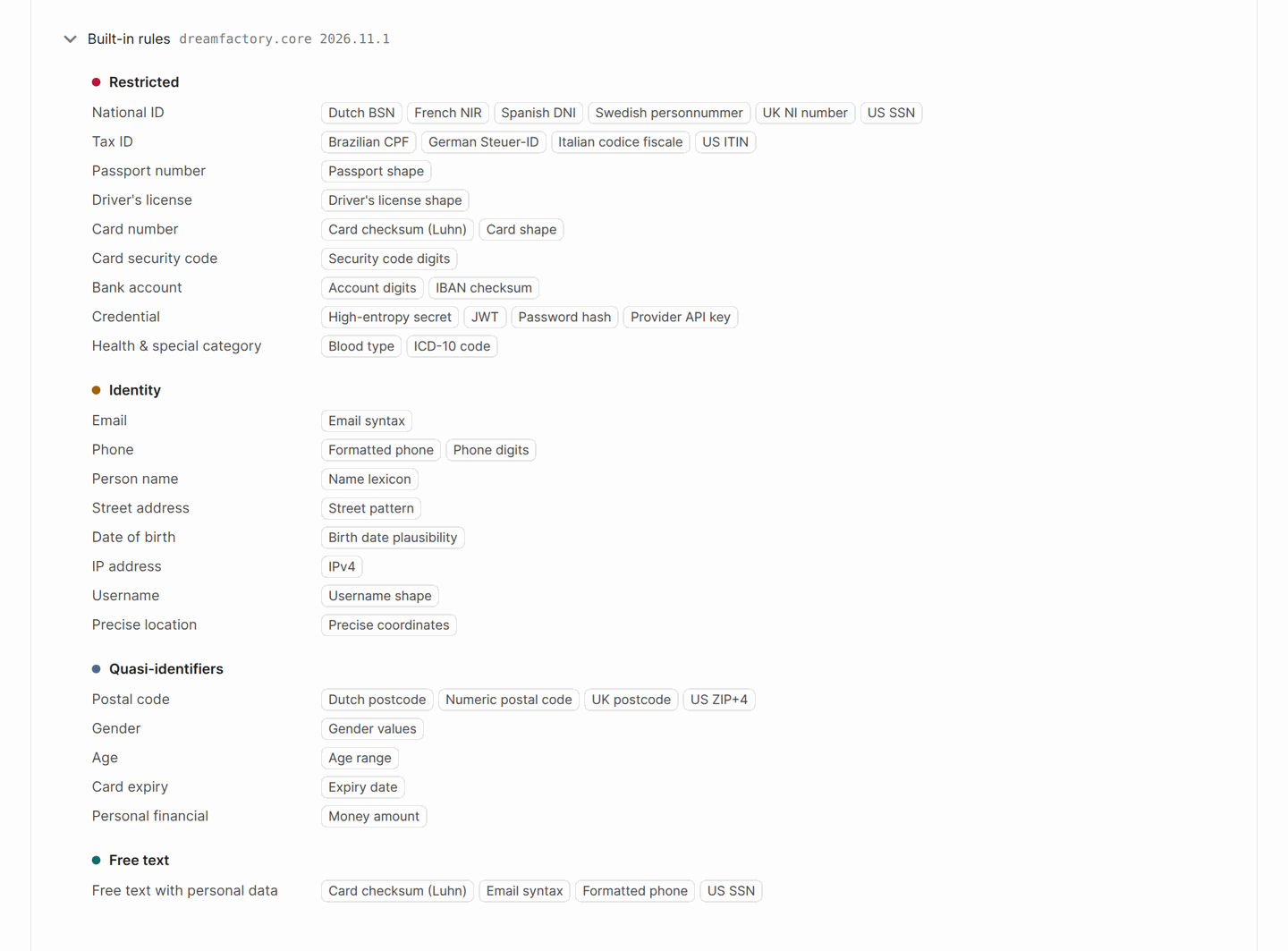
When the built-in rules miss a column, add a custom rule or set the column's class on the Columns tab.
Mask formats
Every hidden character is • (U+2022 BULLET). Tokens and null carry no bullet.
| Format | API id | What a masked value looks like | Example |
|---|---|---|---|
| Redact | redact | Always 8 bullets, whatever the length, so the length is hidden too | 123-45-6789 → •••••••• |
| Last 4 | last4 | Every letter and digit except the last four becomes a bullet. Spaces and separators stay. A value with 4 or fewer letters and digits is redacted. | 4111 1111 1111 1234 → •••• •••• •••• 1234, +1 415-555-0132 → +• •••-•••-0132 |
| First letter | initial | The first character of each word. An email keeps the first character before the @ and the top-level domain. | Jane Doe → J••• D••, jane.doe@example.com → j•••••••@•••••••.com |
| Year only | year | Keeps a 4-digit year from 1900 to 2099 and hides every other digit. A T time part is dropped. MM/YY keeps the year. Anything else is redacted. | 1984-03-12 → 1984-••-••, 07/28 → ••/28 |
| Token | token | The class prefix, _ and 8 lowercase hex characters. The same value always gives the same token on an instance. See Tokens. | marcus.chen@example.org → EMAIL_e4a7daa0 (on the Acme Health instance) |
| Null | null | JSON null | Type 2 diabetes → null |
| Detected spans | span | Free text only. Each piece of personal data found in the text becomes 6 bullets, and the rest stays readable. | Call Jane at 415-555-0132 or jane@example.com → Call Jane at •••••• or •••••• |
Year only keeps any other text as it is: a date and time sent with a space, 1984-03-12 08:30:00, becomes 1984-••-•• ••:••:••.
These rules apply under every format:
- A
nullvalue staysnull. - Numbers and booleans become
null, except under Token, which tokenizes their text form. - JSON values (arrays and objects) become
null, except under Token, which tokenizes the whole JSON, and under Detected spans, which masks spans in every string inside it. - Values that aren't valid UTF-8, such as binary data, are redacted, except under Null (
null) and Token (a token). - An empty string stays an empty string, so masking still shows that a value is empty. The exceptions are Null, which returns
null, and Token, which returns a token.
A masked number is null under every format except Token. That includes an integer age, coordinates stored as numbers, salary amounts and numeric account or ID columns. Typed clients and GraphQL schemas that don't expect null can fail. The Masks tab shows a second example, a number becoming null, on the Precise location, Age and Personal financial rows. Before you turn masking On, check your apps with the "Before you turn On for existing apps" list in What changes for apps.
Choosing a format
- Token keeps values joinable. Use it when apps or analysts need to group, count distinct values or match records without seeing the values.
- Last 4 lets support staff confirm a card, account or phone number with the caller.
- Year only keeps age-based logic working for dates of birth.
- Redact hides the value and its length.
- Null hides even whether a value exists, because a missing value and a masked one both come back as
null.
Token is not the strictest choice. Because a token is stable, it links records across tables. When a Compliance baseline has to pick a stricter format, it ranks them from strictest to least strict: Null, Redact, then Last 4, Year only and First letter, then Detected spans, then Token.
Tokens
A token is the class prefix, _, and the first 8 lowercase hex characters of an HMAC-SHA256 of the class and the value, keyed with the instance's token key. On the Acme Health instance, the first name Marcus comes back as NAME_87183da6 and his email as EMAIL_e4a7daa0.
- Stable and joinable. The same value of the same class gives the same token in every table, database, request and app on the instance. You can group, count distinct values and join two masked results on the token without seeing the value.
- Normalized first. Email and Username values are trimmed and lowercased. Phone keeps digits only. Person name and Street address collapse spaces and are lowercased. Other classes are trimmed. So
Jane@Example.comandjane@example.comgive the same token, and so do+1 415-555-0132and14155550132. - Class-specific. The class is part of the input, so the same text in an Email column and a Username column gives different tokens.
- Not unique. 8 hex characters are 32 bits. In a column with many distinct values, two different values can share a token. Use tokens to group and join, not as keys that must be unique.
- Never for Restricted classes. Anyone who can line up tokens with known values can build a lookup table. Restricted values such as 9-digit national IDs come from a set small enough to reverse that way. The Masks tab doesn't offer Token for Restricted classes, and the API refuses it.
- Safe to send back. A client that sends a token back in an update leaves the real value unchanged, and an insert that contains a token is refused. See What changes for apps.
The token prefix of each class is in the Identity and Quasi-identifiers tables.
The token key
By default, Data Masking generates the key on first use: 32 random bytes, stored in DreamFactory's system database and encrypted with APP_KEY. All nodes of an instance read the same key.
To choose the key yourself, set DF_MASKING_TOKEN_KEY to the base64 encoding of exactly 32 bytes. A base64: prefix is accepted. This value wins over the stored key. A value that isn't base64 of 32 bytes is ignored: DreamFactory logs a warning and keeps using the stored key. To generate one:
openssl rand -base64 32
Set DF_MASKING_TOKEN_KEY when:
- Two instances must produce identical tokens, for example two regions, or a staging copy whose tokens must match production. Without it, every instance has its own key and its own tokens.
- You plan to rotate
APP_KEY. If the stored key can no longer be decrypted, Data Masking generates a new one and logsdf-masking: the stored token key could not be decrypted (was APP_KEY changed?); generated a new one. Masked tokens will differ from earlier ones.
See Install and operate for where to set environment variables.
A new token key, whether you set a new DF_MASKING_TOKEN_KEY, remove it, or rotate APP_KEY without it, changes every token the instance returns. Tokens that apps or analysts stored earlier, in caches, reports or exports, no longer match new ones. Plan a key change like a data migration.
Change a format on the Masks tab
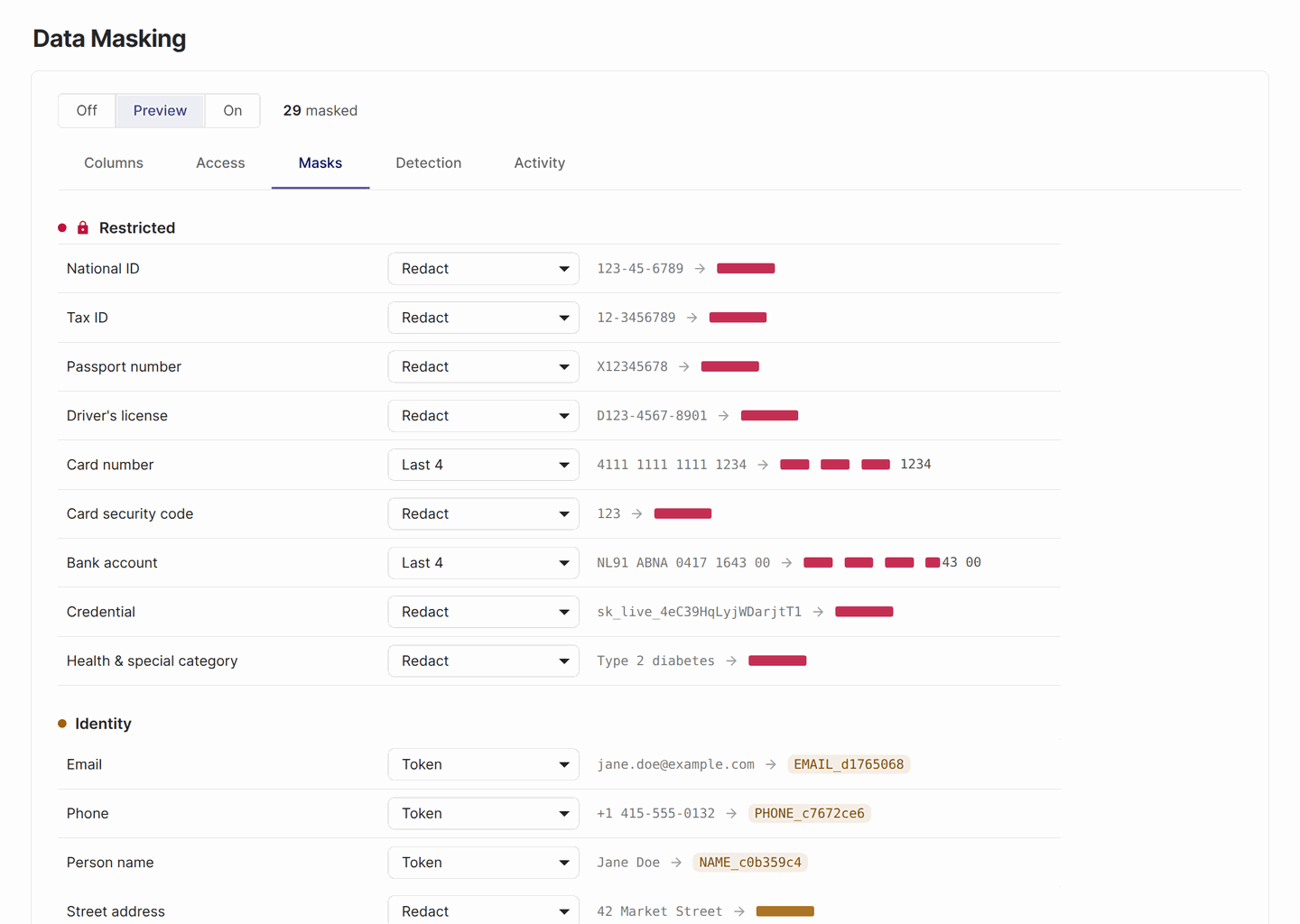
- Open Security > Data Masking and select Masks. The tab is also at
#/api-security/data-masking?tab=masks. - Find the class. Classes are grouped by tier: Restricted, Identity, Quasi-identifiers and Free text.
- Pick a format in the class's select. The select only offers the formats that class allows.
The change saves at once, with the toast "Mask updated". The example next to the select (sample → masked) redraws with the new format. The examples use built-in sample values. The tokens shown there are computed in the browser for illustration, so the hex differs from the tokens your instance returns.
What the change does:
- It applies to the whole class. Every column of that class, in every covered database, uses the new format. There is no per-column format: to mask one column differently, give it another class on the Columns tab.
- It applies to the next response. In mode On, the next response from a covered database uses the new format. In Preview and Off, responses aren't masked, so nothing changes for apps. On several nodes, this needs the shared cache described in Install and operate.
- It updates the Columns tab. The Masked as examples reload with the new format.
- It is logged. The Activity log records it under Changes, for example
Email now masked as first letter, with your name as the actor.
Any full system admin can switch a class to any format it allows, including a weaker one, such as Redact to Last 4 for National ID. This doesn't need the super admin, even though giving people real values on the Access tab does. Watch the Changes filter in Activity for format changes.
Some Compliance baselines check formats:
| Baseline | Check | Allowed formats |
|---|---|---|
| HIPAA | "Dates of birth show the year at most, and ages are hidden" | Date of birth: Year only, Redact or Null. Age: Redact or Null. |
| PCI DSS | "Card numbers show at most the last 4 digits" | Card number: Last 4, Redact or Null |
A format outside these lists fails the check. The baseline's Apply then switches the class to an allowed format (HIPAA: Year only for Date of birth, Redact for Age; PCI DSS: Last 4) and lists the change as, for example, Date of birth: mask as Year only (now Token).
Change a format with the API
Send one or more class and format pairs with the API ids from the tables above:
curl -X PATCH "https://your-dreamfactory-instance.com/api/v2/system/data_masking/mask" \
  -H "X-DreamFactory-Session-Token: <admin session token>" \
  -H "Content-Type: application/json" \
  -d '{
    "resource": [
      { "class": "email", "format": "initial" }
    ]
  }'
The response lists every class with its tier, current format and allowed formats. Two of the 23 entries are shown here:
{
  "resource": [
    { "class": "national_id", "tier": "restricted", "format": "redact", "formats_allowed": ["redact", "last4", "null"] },
    { "class": "email", "tier": "identity", "format": "initial", "formats_allowed": ["token", "initial", "redact", "null"] }
  ]
}
A format the class doesn't allow returns 400 with the allowed list, for example Card number can be masked as: last4, redact, null. An unknown class returns 400 Unknown class '<x>'. Use one of: ..., and a body without a resource list returns 400 Send a resource list of {class, format} items. GET /api/v2/system/data_masking/mask returns the same list as the response above. See the API and CLI reference.
Free text and detected spans
The Free text with personal data class covers prose columns such as notes, comments, descriptions and messages. Its default format, Detected spans, hides only the personal data inside the text and leaves the rest readable. In the Acme Health demo, a patient's notes value comes back as Send lab results to ••••••.
Detected spans finds:
- email addresses
- phone numbers written with separators, such as
415-555-0132or+1 (415) 555-0132 - payment card numbers that pass the Luhn checksum and a card range check, including well-known test card numbers
- US Social Security numbers written with dashes or spaces
- IBANs that pass their checksum
- UK National Insurance numbers, French NIR numbers, and Spanish DNI and NIE numbers
- IPv4 addresses
- credentials: private key blocks, JSON web tokens, and provider API keys such as AWS access keys and GitHub, GitLab, Slack and Stripe tokens
Each match is checked by a validator before it is hidden, which keeps order numbers, dates and version strings readable. Each detected span becomes 6 bullets, ••••••, whatever its length. The Built-in rules list names four detectors for this class. Detected spans uses the full list above.
Detected spans does not find:
- names:
Call Jane at ...keepsJane - street addresses and dates of birth
- diagnoses, medications and other health details
- phone numbers written as one run of digits, such as
4155550132 - anything else not in the list above
For clinical notes, case narratives and other text that can hold names or health details, redact the whole value. Either give the column the Health & special category class on the Columns tab, or set Free text with personal data to Redact on the Masks tab for every such column.
Other behavior to know:
- If the text can't be checked (for example invalid UTF-8), the whole value is redacted.
- In a JSON column, every string inside the document is checked.
- Never-scanned text columns use this class's format until their scan finishes. If you set Free text with personal data to Redact or Null, those columns, text keys included, are fully hidden meanwhile. See Automatic scans.
Things to know
- Formats are per class, not per column. One change affects every column of the class in every database.
- The Masks tab examples are illustrations. They mask fixed sample values, and their token hex is computed in the browser. The Masked as column on the Columns tab shows examples computed by the server.
- Format changes are logged under Changes. The Activity tab has no separate filter for masks.
- Restricted classes never offer Token. If a Token format ever reaches a Restricted class, the value is masked with Redact.
- Well-known sample values are ignored. Detection and Detected spans skip the published sample SSNs
078-05-1120,219-09-9999and123-45-6789, so test data built from them stays readable in free text and isn't detected as National ID by its values. Detection also ignores well-known test card numbers, although Detected spans still hides them. Test with realistic fake values. - Token is not anonymization. A stable token still links one person's records across tables. For data that must not be linkable, use Redact or Null.
- Last 4 on a short value redacts it. A value with 4 or fewer letters and digits gets 8 bullets.
Related
- Review columns: decide columns and choose their class.
- Custom rules: classify columns the built-in detectors miss.
- Who sees real values: roles with "All except restricted" and other access settings.
- What changes for apps: filters, writes and the response headers in mode On.
- Compliance baselines: the format checks and what Apply changes.
- Install and operate:
DF_MASKING_TOKEN_KEYand the other environment variables.