Installing and Configuring AAuth
This page takes a commercial DreamFactory instance to a working AAuth issuer: the dreamfactory/df-aauth package present, its tables created, a TLS reverse proxy in front, the settings in place, and AAuth switched on and verified. It is also the reference for every DF_AAUTH_* setting. It is written for the administrator who runs the DreamFactory server. What to do in the admin app afterwards (scopes, person servers, agents) is in Managing AAuth. For what AAuth is and how it works, see the overview.
Installing the package changes nothing by itself. AAuth stays off until a sys admin turns it on, and a request without AAuth headers is handled exactly as before, whether AAuth is on or off. The one visible difference while AAuth is on: DreamFactory's 400 and 401 answers to requests without credentials also carry a discovery Link header (see Verify).
AAuth requires a DreamFactory commercial license (Gold or Platinum). On Silver and open source instances, Security > AAuth shows the upgrade page. On a Gold or Platinum instance, the same page means the dreamfactory/df-aauth package is not installed; see Check for the package.
Requirements
| Requirement | Details |
|---|---|
| DreamFactory | 7.8.0 or later 7.x. The package requires dreamfactory/df-core ~1.0.4 and dreamfactory/df-system ~0.6.2. |
| License | Gold or Platinum. |
| PHP | 8.3 or later with the sodium, openssl, curl, json and mbstring extensions. The DreamFactory images have all five; check with php -m. |
| Https origin | One host name that agents and approvers use to reach DreamFactory, with TLS on port 443, for example https://api.example.com. It can be an internal name. See Choose the issuer. |
| Outbound https | DreamFactory fetches the metadata and keys of the agent providers and external person servers that agents use: public addresses only, unless you admit internal ones (Private networks and custom CAs). Try it calls DreamFactory through its own issuer URL, so the server must reach that origin too. |
| Cache | Any Laravel cache store that keeps data between requests works for one node. Not array, which forgets everything after each request: replay protection, single-use resource tokens, code ownership and every limit are then off. Not null: every signed POST, PUT, PATCH or DELETE, every auth token request and every consent code is then refused. Several nodes need one shared store (Redis or Memcached) and shared consent sessions. See Several DreamFactory nodes, and for what happens while the store is down, Without a cache. |
| Clock | Signatures are accepted for 60 seconds either side of the server clock. Run NTP on every DreamFactory host. |
| System database | Tested on MySQL 5.7. The migrations use only Laravel's schema builder and are written for MySQL/MariaDB, PostgreSQL, SQLite and SQL Server. |
Discovery fetches connect directly to the agent provider or person server: they ignore any outbound HTTP proxy configured in the environment, because DreamFactory pins the connection to the address it has checked. If your servers reach the internet only through a forward proxy, allow DreamFactory direct https egress to the agent providers you accept. Discovery also never follows redirects.
Check for the package
On commercial builds that include it, the package is already in place. Check from the DreamFactory directory:
cd /opt/dreamfactory
ls vendor/dreamfactory/df-aauth
composer show dreamfactory/df-aauth
With Docker, run the same check inside the container:
docker exec <container> ls /opt/dreamfactory/vendor/dreamfactory/df-aauth
If the directory exists and composer show prints the package, skip to Create the tables. The package registers itself through Laravel package discovery (DreamFactory\Core\AAuth\ServiceProvider); there is nothing to add to config/app.php.
If it is missing, the admin app shows the upgrade page under Security > AAuth even on a Gold or Platinum instance. Ask DreamFactory support (support@dreamfactory.com) for commercial composer files that include dreamfactory/df-aauth, and apply them exactly as described in Activating Your License: the three composer files replace yours, then composer install (or, with Docker, an image rebuild).
Docker
Install the package into the image, not into a running container. With the df-docker setup, copy the composer files into the df-docker directory and rebuild with docker compose build web, then docker compose up -d, as in Activating Your License.
A package installed with composer inside a running container lives in that container's writable layer and is gone when the container is re-created. The AAuth settings survive in the system database, but the AAuth endpoints do not: agents get DreamFactory's normal "no API key" errors, so AAuth fails closed.
If your image build needs Composer credentials, pass them to the build as a build secret, never in an image layer. Run artisan commands as the web server user so that the files they create stay writable for PHP-FPM:
docker exec -u www-data <container> php /opt/dreamfactory/artisan migrate --force
Create the tables
cd /opt/dreamfactory
php artisan migrate --force
The package's six migrations create twelve tables, all prefixed aauth_:
| Table | Holds |
|---|---|
aauth_settings | The on/off switch and other stored settings |
aauth_keys | Signing keys |
aauth_scopes | Which roles are scopes, with their names and descriptions |
aauth_person_servers | Trusted person servers |
aauth_agents | Agents seen, and blocks |
aauth_agent_keys | Every agent id each agent key has presented an agent token for |
aauth_activity | The Activity log |
aauth_ps_pending | Open person and auth token requests |
aauth_ps_grants | Always allow grants |
aauth_ps_subjects | Subject identifiers mapped to DreamFactory users |
aauth_ps_tokens | The agent each person and auth token of the built-in person server was issued for |
aauth_sessions | Consent page sessions, used only with DF_AAUTH_SESSION_DRIVER=database |
The migrations are idempotent: each table or column is created only when it is missing, and 2026_11_16_000004_keep_aauth_agent_key_history rebuilds aauth_agent_keys and keeps its rows. aauth_scopes.role_id references role.id with ON DELETE CASCADE, so deleting a role also removes its scope. What each table means for backups and recovery is in Where state lives.
Check that all six ran:
php artisan migrate:status | grep aauth
  2026_11_10_000001_create_aauth_tables .............................. [2] Ran
  2026_11_11_000002_create_aauth_agent_keys_table .................... [2] Ran
  2026_11_12_000003_add_aauth_key_rotation_and_sessions .............. [2] Ran
  2026_11_16_000004_keep_aauth_agent_key_history ..................... [2] Ran
  2026_11_16_000005_add_aauth_scope_since ............................ [2] Ran
  2026_11_17_000006_create_aauth_ps_tokens_table ..................... [2] Ran
The batch number in brackets differs between installs. Until the migrations have run, GET /api/v2/system/aauth answers 503 with AAuth is not set up yet. Run: php artisan migrate, and php artisan df:aauth prints The df-aauth tables are missing. Run: php artisan migrate --force.
Choose the issuer
The issuer is the https origin of this DreamFactory as an AAuth server. Its resource (the /api/v2 APIs), its person server and its agent provider (the Try it agent) all use it. It is the iss of every token DreamFactory issues and the aud of every token addressed to DreamFactory itself, and it is stored in every Always allow grant for DreamFactory's APIs.
Agents sign the host name they call (the @authority component of the signature), and DreamFactory accepts a signed request only when that host is the issuer host. All agent traffic must therefore reach DreamFactory at exactly that name. A signed request for any other host name of the same server gets 401 with Signature-Error: error=invalid_signature and the detail Use https://api.example.com.
DreamFactory takes the issuer from DF_AAUTH_ISSUER. When that is not set, it uses the origin of APP_URL if APP_URL is https (with its host lowercased). It never takes the issuer from the request's Host header, so a client cannot change it.
| Rule | Example |
|---|---|
https:// followed by a lowercase host name, nothing else | https://api.example.com works |
| No port, path, query or fragment | https://api.example.com:8443 and https://api.example.com/df are invalid |
| Uppercase letters are not lowercased, they make the issuer invalid | https://API.example.com is invalid |
| A trailing slash is removed | https://api.example.com/ works as https://api.example.com |
Internationalized domain names in their ASCII (xn--) form | https://xn--bcher-kva.example works |
| The name may be internal | An internal host name works when agents, their agent provider and approvers are all inside your network; see Private networks and custom CAs |
With an invalid or missing issuer, AAuth cannot be turned on. The Enabled switch is disabled, the page shows Set DF_AAUTH_ISSUER to an https URL, and the admin API answers 400 with Set DF_AAUTH_ISSUER to an https URL.
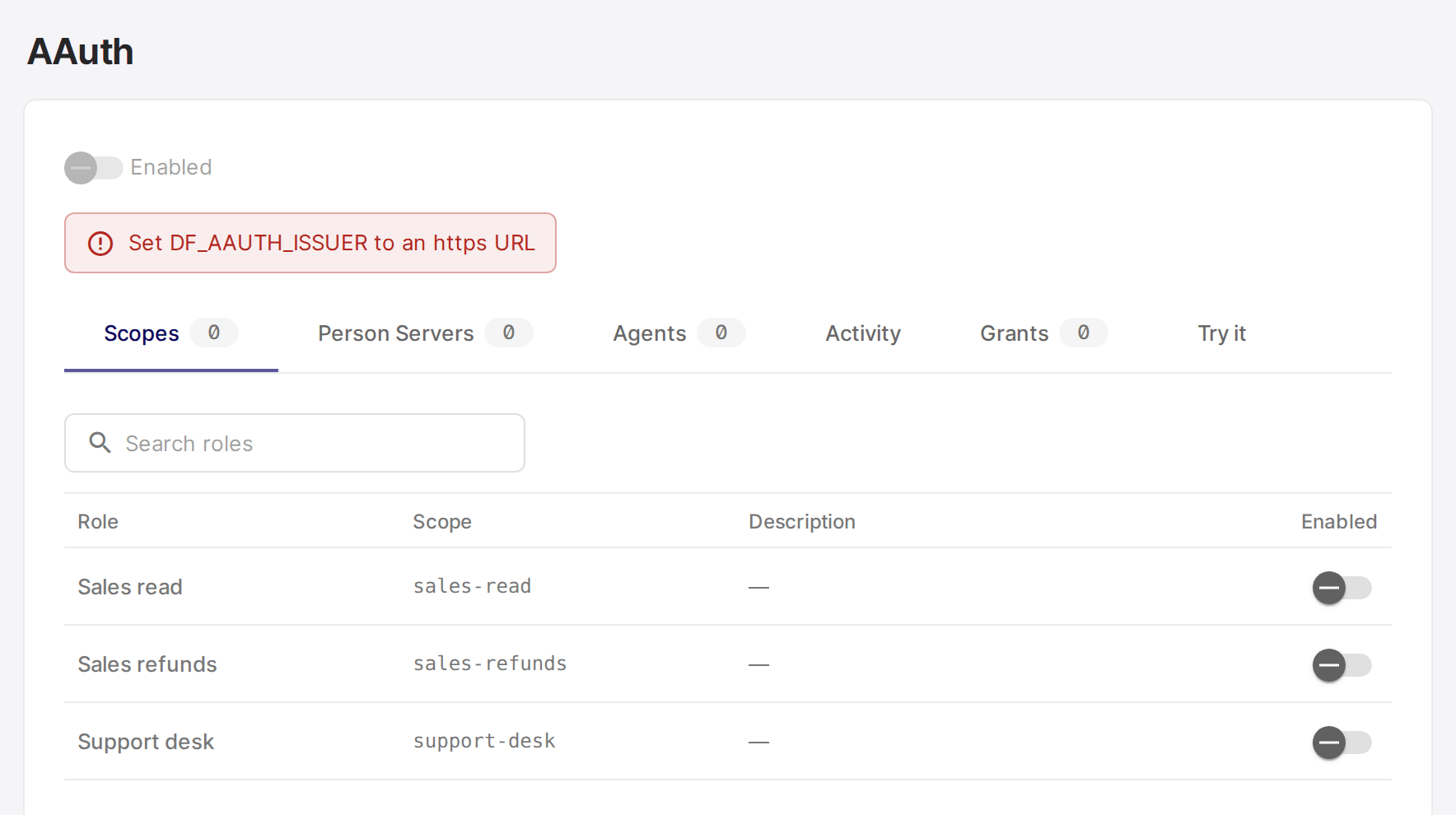
If the issuer becomes invalid while AAuth is on, for example after an .env change, AAuth stops: every AAuth endpoint answers 404 and signed requests fail as if AAuth were off. The stored switch stays on, although GET /api/v2/system/aauth reports "enabled": false and "issuer_ok": false meanwhile, and AAuth resumes as soon as the issuer is valid again.
The admin app can stay where it is, for example on plain http at an internal address: only agents and approving people need the issuer. The exception is approval with single sign-on, which needs the admin app's login page on the issuer origin; see Before you rely on it.
The issuer is in every token DreamFactory issues and in every Always allow grant for DreamFactory's APIs. Changing it later invalidates every issued token and leaves those grants unused, so every agent starts over and people approve again. Choose the name you intend to keep. See Changing the issuer.
Put a TLS reverse proxy in front
Agents and approvers reach DreamFactory over https at the issuer. DreamFactory's web server in the Docker image serves plain http on port 80, so terminate TLS in a reverse proxy in front of it: nginx, Caddy or a cloud load balancer. The same rules apply wherever you terminate TLS.
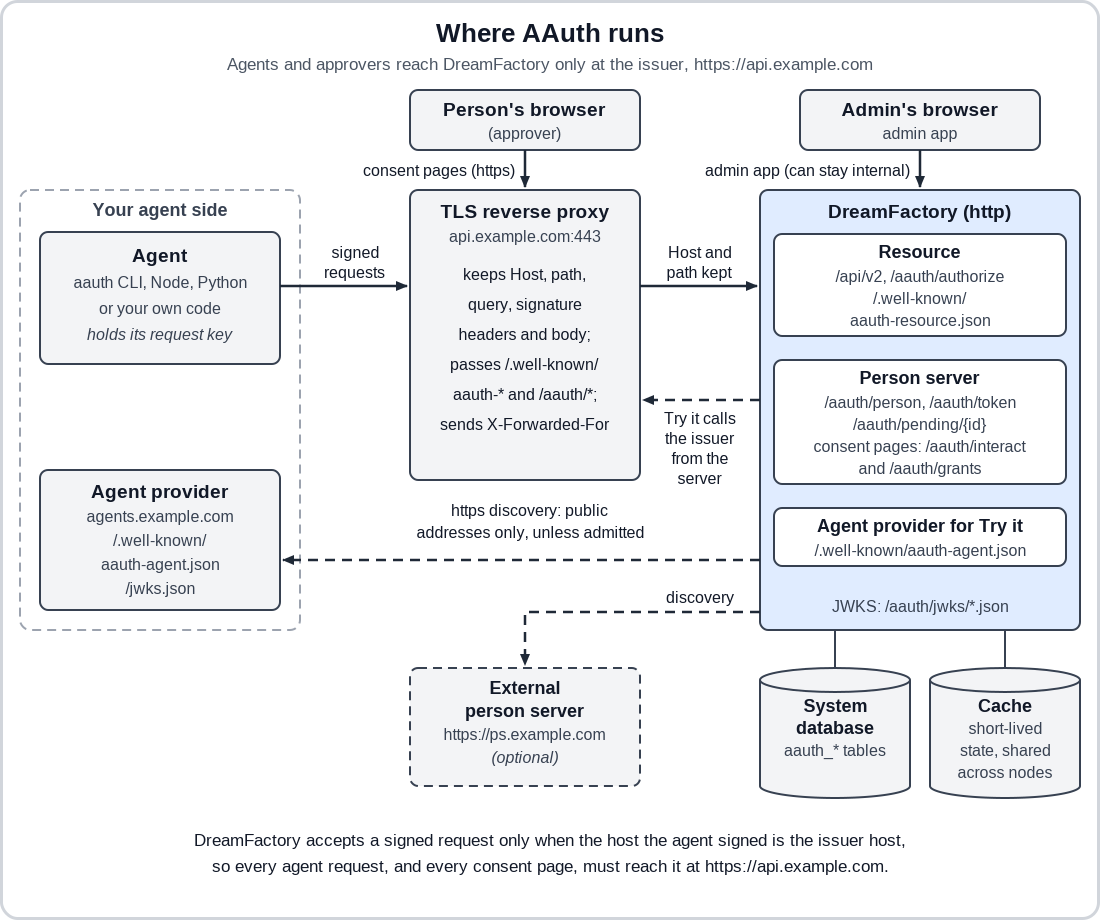
The proxy must:
- Preserve
Host. DreamFactory compares the signed@authoritywith the issuer host. - Pass the request target unchanged. Signatures cover the raw path and the raw query string: no path rewriting, no decoding or re-encoding, no reordering of query parameters.
- Pass the request body and these headers unchanged:
Signature,Signature-Input,Signature-Key,Content-TypeandContent-Digest. - Not block
/.well-known/. Allow/.well-known/aauth-resource.json,/.well-known/aauth-person.jsonand/.well-known/aauth-agent.json, and pass everything under/aauth/(keys, token endpoints and the consent pages). - Send
X-Forwarded-For. Then setDF_AAUTH_TRUSTED_PROXIESto the address the proxy connects from, so the sign-in and request limits see real client addresses.
nginx
server {
    listen 443 ssl;
    server_name api.example.com;
    ssl_certificate     /etc/ssl/api.example.com/fullchain.pem;
    ssl_certificate_key /etc/ssl/api.example.com/privkey.pem;
    client_max_body_size 100m;

    location / {
        # No URI after the upstream address: nginx then forwards the original request target unchanged.
        proxy_pass http://dreamfactory:80;
        proxy_http_version 1.1;
        proxy_set_header Host              $host;
        proxy_set_header X-Forwarded-For   $proxy_add_x_forwarded_for;
        proxy_set_header X-Forwarded-Proto https;
    }
}
Replace dreamfactory:80 with the address of your DreamFactory web server, and keep it without a path. With a path, even a single trailing slash (proxy_pass http://dreamfactory:80/;), nginx forwards a normalized path instead of the original one: escaped characters such as %27 or %2F arrive decoded and duplicate slashes are merged, so signatures over such paths no longer verify.
Many nginx configurations contain location ~ /\. { deny all; }, which also blocks /.well-known/. Add a prefix location for AAuth's documents in the same server block; ^~ stops nginx from checking regular-expression locations for these paths:
location ^~ /.well-known/aauth- {
    proxy_pass http://dreamfactory:80;
    proxy_http_version 1.1;
    proxy_set_header Host              $host;
    proxy_set_header X-Forwarded-For   $proxy_add_x_forwarded_for;
    proxy_set_header X-Forwarded-Proto https;
}
Caddy
Caddy keeps Host and the request target by default and sends X-Forwarded-For itself:
api.example.com {
    reverse_proxy dreamfactory:80 {
        header_up X-Forwarded-Proto https
    }
}
Cloud load balancers
The same rules apply. Terminating TLS at the load balancer is fine. Turn off any path normalization, header stripping or rule that blocks paths starting with a dot, and make sure the load balancer forwards the original Host.
Configure DreamFactory
Add the issuer, and the address of your proxy, to DreamFactory's .env:
DF_AAUTH_ISSUER=https://api.example.com
DF_AAUTH_TRUSTED_PROXIES=10.0.0.10
10.0.0.10 stands for the address your proxy connects to DreamFactory from; see DF_AAUTH_TRUSTED_PROXIES. Then reload the configuration:
cd /opt/dreamfactory
php artisan config:clear      # or php artisan config:cache, if your deployment caches config
php artisan cache:clear
DF_AAUTH_ISSUER is the only setting you must set (unless APP_URL is already the https origin). The defaults of everything else are meant for production. With several DreamFactory nodes, also set DF_AAUTH_CACHE_STORE and DF_AAUTH_SESSION_DRIVER; see Several DreamFactory nodes. Every setting is listed in the Configuration reference.
In the DreamFactory Docker image, PHP-FPM does not pass the container's environment to PHP, so DF_AAUTH_* entries under environment: in docker-compose.yml never reach the web server. They do reach php artisan when you run it with docker exec, so df:aauth status can show a valid issuer while the admin app still asks for one. Write the lines into /opt/dreamfactory/.env instead.
That file is part of the container's filesystem, so it is reset when the container is re-created. Add the lines in your image build, after the step that creates .env, for example:
RUN printf '\n%s\n' \
      'DF_AAUTH_ISSUER=https://api.example.com' \
      'DF_AAUTH_TRUSTED_PROXIES=10.0.0.10' >> /opt/dreamfactory/.env
The leading \n keeps the first line separate even when .env does not end with a line break.
To see the configuration the web server uses, call GET /api/v2/system/aauth/status (see The df:aauth command).
The DreamFactory server must also resolve the issuer's host name and reach it over https, because Try it calls the issuer URL from the server. If the container or host resolves api.example.com to an address it cannot reach, map the name to the proxy (for example with extra_hosts in docker-compose.yml). If the proxy's certificate comes from an internal CA, set DF_AAUTH_CA_BUNDLE.
Turn AAuth on
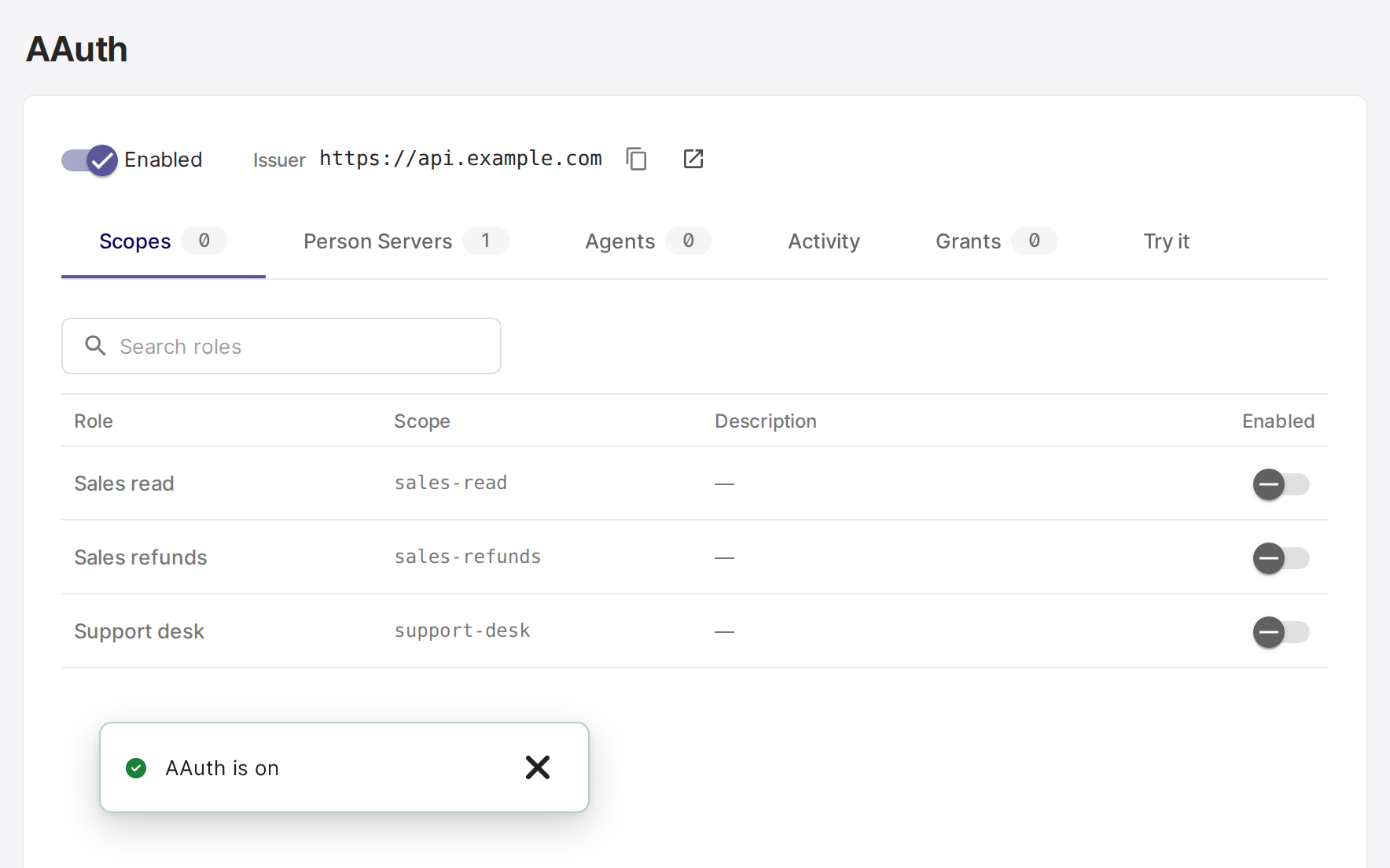
In the admin app, open Security > AAuth and switch Enabled on. A toast reads AAuth is on, and a Resource metadata link (an open-in-new icon) appears next to the issuer and its Copy button.
Or use the admin API, as a sys admin:
curl -s -X PATCH https://api.example.com/api/v2/system/aauth \
  -H "X-DreamFactory-Session-Token: $DF_SESSION_TOKEN" \
  -H "Content-Type: application/json" \
  -d '{"enabled": true}'
The response is the AAuth overview. On a new instance:
{
  "enabled": true,
  "issuer": "https://api.example.com",
  "issuer_ok": true,
  "urls": {
    "resource_metadata": "https://api.example.com/.well-known/aauth-resource.json",
    "person_metadata": "https://api.example.com/.well-known/aauth-person.json",
    "agent_metadata": "https://api.example.com/.well-known/aauth-agent.json",
    "interact": "https://api.example.com/aauth/interact"
  },
  "counts": {
    "scopes_enabled": 0,
    "person_servers": 1,
    "agents": 0,
    "grants": 0,
    "activity_24h": 0
  }
}
Only sys admins can view or change AAuth settings. What other callers get is listed in Messages the admin API returns.
The first time AAuth is switched on, DreamFactory:
- generates three Ed25519 signing keys, one each for its resource, its person server and its agent provider;
- adds its own person server, listed as This DreamFactory under Person Servers;
- creates an app named
aauth(description "AAuth agent sessions") that agent sessions run under. It is listed with your other API keys. The app has no role, so its API key on its own reaches none of your services' data, like the key of any app without a role. Do not give it a role, and do not delete it while AAuth is in use.
Callers that use API keys or session tokens are not affected. Agents still cannot reach any data until you offer a role as a scope; see Scopes.
Verify
-
Fetch the resource metadata:
curl -s https://api.example.com/.well-known/aauth-resource.jsonExpected result:
200with the issuer.scope_descriptionsstays empty until you enable scopes. While AAuth is off, this URL answers404.{"issuer":"https://api.example.com","jwks_uri":"https://api.example.com/aauth/jwks/resource.json","name":"DreamFactory","access_mode":"auth-token","authorization_endpoint":"https://api.example.com/aauth/authorize","scope_descriptions":{},"signature_window":60,"additional_signature_components":["@query","content-type","content-digest"]} -
Call an API without credentials:
curl -s -o /dev/null -D - https://api.example.com/api/v2/sales/_table/orders | grep -i '^link'Expected result: DreamFactory's own error (
400,No session token (JWT) or API Key detected in request.) is unchanged and now carries a discovery link. When DreamFactory answers such a request with401, the response also carriesAAuth-Requirement: requirement=agent-token.link: <https://api.example.com/.well-known/aauth-resource.json>; rel="aauth-resource" -
As a sys admin,
GET /api/v2/system/aauthreturns"enabled": trueand"issuer_ok": true. -
Check the deployment from the server:
php artisan df:aauth statusOn a single node with a Redis cache and DreamFactory's default file sessions, the output looks like this (key ids shortened):
AAuth 0.1.0
  Enabled              yes
  Issuer               https://api.example.com
  Cache store          redis (redis, shared)
  Consent sessions     file (this node only)
  Private hosts        (none)
  Private networks     (none)
  CA bundle            system trust store
  Sign-in              DreamFactory password
  Key overlap          1d, rotate by hand
  Pending (live)       0

+----------+-----------+---------+----------------------+---------+-----------------+
| Purpose  | Key id    | State   | Created              | Retired | Published until |
+----------+-----------+---------+----------------------+---------+-----------------+
| agent    | 3SR1Gx... | signing | 2026-11-16T18:43:39Z |         |                 |
| person   | L75eKq... | signing | 2026-11-16T18:43:39Z |         |                 |
| resource | 5aA9Zm... | signing | 2026-11-16T18:43:39Z |         |                 |
+----------+-----------+---------+----------------------+---------+-----------------+
! Consent pages use file sessions. With more than one node and no sticky sessions set DF_AAUTH_SESSION_DRIVER=redis (or database).
Every line that starts with
!is a warning. On a single node, the session warning above can stay, and so can the cache store warning that afilecache produces; fix anything else. Each line and warning is explained in Thedf:aauthcommand.--jsonprints the same as JSON for scripts. -
Check the housekeeping schedule. The package schedules
df:aauth prunedaily at 03:17, and, whenDF_AAUTH_KEY_ROTATION_DAYSis set,df:aauth rotate-keys --older-than=Ndaily at 03:47:php artisan schedule:list | grep aauth| 17 3 * * * | 'artisan' df:aauth prune | 2026-11-17 03:17:00 | 2026-11-16 03:17:00 |Something must run Laravel's scheduler every minute. Check both root's and the web server user's crontabs (with Docker:
docker exec <container> crontab -landdocker exec <container> crontab -u www-data -l). If neither has the line below, add it to the web server user's crontab exactly as written; Pruning explains where DreamFactory's scheduler package puts it and why:* * * * * cd /opt/dreamfactory/ && php artisan schedule:run >> /dev/null 2>&1
If a check fails, see Troubleshooting AAuth. Next, give agents something to ask for and approve a first call: follow the quickstart.
Configuration reference
AAuth has two kinds of settings:
- Environment settings (this section): the issuer, token lifetimes, discovery limits, proxies. They are read from the package's
config/df-aauth.php, where every value comes from an environment variable, sophp artisan config:cacheis safe. Change them in DreamFactory's.env, then runphp artisan config:clear(orconfig:cacheagain). - Policy: the on/off switch, scopes, person servers, agents and grants. It is stored in the system database and managed in the admin app or through
/api/v2/system/aauth; see Managing AAuth.
To keep a copy of the config file in the application (optional; the package's own file is used otherwise):
php artisan vendor:publish --provider="DreamFactory\Core\AAuth\ServiceProvider" --tag=config
Issuer and network
| Variable | Default | Meaning |
|---|---|---|
DF_AAUTH_ISSUER | The APP_URL origin when it is https, else none | Https origin of this DreamFactory as an AAuth server. See Choose the issuer. |
DF_AAUTH_TRUSTED_PROXIES | Empty | Comma-separated addresses or CIDRs whose X-Forwarded-For AAuth believes. See DF_AAUTH_TRUSTED_PROXIES. |
DF_AAUTH_PRIVATE_HOSTS | Empty | Comma-separated host names that discovery may fetch from although they resolve to private-use addresses. See Private networks and custom CAs. |
DF_AAUTH_PRIVATE_NETWORKS | Empty | Comma-separated CIDRs or addresses that discovery may connect to. |
DF_AAUTH_CA_BUNDLE | The system trust store | PEM bundle file, or hashed CA directory, that discovery and Try it trust instead of the system store. |
Tokens and requests
| Variable | Default | Meaning |
|---|---|---|
DF_AAUTH_AUTH_TOKEN_TTL | 3600 | Seconds an auth token from the built-in person server is valid. Never longer than the agent token or the token the agent presented (person token, or auth token on a step-up). Capped at 3600. It does not change how long a scope name stays reserved after a rename or after its role is deleted: always 61 minutes, because auth tokens from any person server may last an hour; see Scope names. |
DF_AAUTH_PERSON_TOKEN_TTL | 3600 | Seconds a person token from the built-in person server is valid. Never longer than the agent token. Capped at 3600. |
DF_AAUTH_RESOURCE_TOKEN_TTL | 300 | Seconds a resource token (sent in a 401 with requirement=auth-token) is valid. The AAuth drafts allow at most 300, and DreamFactory does not cap this value, so do not raise it. |
DF_AAUTH_AGENT_TOKEN_TTL | 3600 | Seconds an agent token from the built-in agent provider (the Try it agent) is valid. Clamped to 60 to 86400. |
DF_AAUTH_PENDING_TTL | 600 | Seconds a person or auth token request, and its code, stays open for the person to approve. |
DF_AAUTH_SIGNATURE_WINDOW | 60 | Seconds a signature's created time may differ from the server clock. Published as signature_window in the resource metadata. Requests other than GET and HEAD are remembered (request key and signature base) for twice this long to refuse replays; see Replay. |
DF_AAUTH_PLAYGROUND_AGENT_NAME | DreamFactory Playground | Name of the built-in Try it agent, shown on consent pages and in aauth-agent.json. |
The AAuth drafts cap person and auth tokens at one hour, and DreamFactory refuses a person or auth token whose lifetime is longer, with Token lifetime exceeds 1 hour. The built-in person server therefore caps DF_AAUTH_AUTH_TOKEN_TTL and DF_AAUTH_PERSON_TOKEN_TTL at 3600 seconds and raises values below 60 to 60. A larger setting gives one-hour tokens.
Discovery
| Variable | Default | Meaning |
|---|---|---|
DF_AAUTH_FETCH_TIMEOUT | 3 | Seconds for one discovery fetch (metadata or JWKS of an agent provider or external person server). The connect timeout is the smaller of this value and 2 seconds. |
DF_AAUTH_FETCH_MAX_BYTES | 262144 | Largest metadata or JWKS document accepted, in bytes (minimum 1024). |
DF_AAUTH_DISCOVERY_CACHE_SECONDS | 300 | Seconds fetched metadata and JWKS are cached. An unknown key id triggers at most one refresh per minute per URL. |
Several nodes
| Variable | Default | Meaning |
|---|---|---|
DF_AAUTH_CACHE_STORE | DreamFactory's default store (CACHE_STORE) | A store from config/cache.php, such as redis, for AAuth's short-lived state: replay records, rate limits, code claims, discovery results and Try it runs. With several nodes it must be shared (redis, memcached or database). An unknown name falls back to the default store and logs an error. |
DF_AAUTH_SESSION_DRIVER | SESSION_DRIVER | Session driver for the consent and grants pages only. With several nodes and no sticky sessions, use redis, or database (table aauth_sessions). Other routes are not affected. |
A misspelled store name falls back to DreamFactory's default store, which may be a per-node file store, yet df:aauth status reports the misspelled name as shared. Look for df-aauth: DF_AAUTH_CACHE_STORE '<name>' is not a configured cache store; using the default store. in DreamFactory's log after changing it.
Signing keys and housekeeping
| Variable | Default | Meaning |
|---|---|---|
DF_AAUTH_KEY_OVERLAP | 86400 | Seconds a retired signing key stays published and accepted after a rotation. Never less than the longest configured token lifetime plus 300. See Signing keys. |
DF_AAUTH_KEY_ROTATION_DAYS | 0 | Rotate signing keys automatically once they are this many days old, from the Laravel scheduler. 0 rotates only by hand (php artisan df:aauth rotate-keys). |
DF_AAUTH_ACTIVITY_RETENTION_DAYS | 30 | Days Activity rows are kept. Remembered agent keys not seen for that long are dropped too. 0 keeps both forever. See Pruning. |
Consent sign-in
| Variable | Default | Meaning |
|---|---|---|
DF_AAUTH_SSO | auto | Sign-in on the consent pages through DreamFactory's login page (OAuth, OpenID Connect, SAML). auto offers it when an OAuth, OpenID Connect or SAML login service is active; on always offers it; off never does. |
DF_AAUTH_SSO_LOGIN_PATH | /dreamfactory/dist/#/auth/login | The admin app's login route on the issuer origin, which returns the person to the consent page signed in. |
LDAP and Active Directory sign-in needs no setting: it is offered whenever such a service is active. See Approving Agents with Company Sign-In.
Development
| Variable | Default | Meaning |
|---|---|---|
DF_AAUTH_ALLOW_INSECURE | false | Development only. See below. |
DF_AAUTH_ALLOW_INSECURE=true allows an http issuer or one with a port, http server identifiers, and discovery fetches to private and loopback addresses. Link-local and cloud metadata addresses stay refused. Never set it on an instance that anyone else can reach. df:aauth status warns while it is on.
DF_AAUTH_TRUSTED_PROXIES
AAuth limits sign-in attempts, code attempts, pending requests and discovery fetches per client address (see Built-in limits). Behind a reverse proxy, every request comes from the proxy's address. Without this setting, all clients share one budget, and one client can lock the others out.
Set it to the address, or CIDR, that the proxy connects to DreamFactory from, as PHP sees it in REMOTE_ADDR:
DF_AAUTH_TRUSTED_PROXIES=10.0.0.10
With Docker port publishing, that is usually the gateway of the container's network. For a compose network:
docker network inspect <network> -f '{{(index .IPAM.Config 0).Gateway}}'
Trust that address only when clients cannot reach DreamFactory's published port except through the proxy. With userland or rootless port forwarding, every client that connects to the published port arrives from the gateway, so it could send its own X-Forwarded-For and dodge the per-address limits. Publish DreamFactory's port on 127.0.0.1 only, or leave it unpublished and put the proxy on the same Docker network, so that only the proxy connects from the trusted address.
AAuth then reads X-Forwarded-For from right to left and uses the first address that is not a trusted proxy. X-Forwarded-For from any other peer is ignored, so clients cannot choose their own address. Never list a range that clients can connect from.
This setting is used only by AAuth. DreamFactory's own trusted-proxy configuration does not change.
Private networks and custom CAs
Discovery fetches the metadata and keys of agent providers and person servers only from public addresses. When agents, agent providers or a person server live on an internal network, admit them explicitly:
DF_AAUTH_PRIVATE_HOSTS: host names, exact (agents.corp.internal) or with a leading*.(*.corp.internalmatches any subdomain, notcorp.internalitself). A listed host may resolve to private-use addresses (10.0.0.0/8,172.16.0.0/12,192.168.0.0/16,100.64.0.0/10,fc00::/7), not to loopback.DF_AAUTH_PRIVATE_NETWORKS: CIDRs or single addresses (10.20.0.0/16,fd12:3456::/48). Any host that resolves inside them is admitted, loopback included if you list it.
Either list admits an address. Entries that are not valid host names, addresses or CIDRs are dropped silently; php artisan df:aauth status prints the lists as DreamFactory read them. Some addresses are never reachable, whatever you list:
- link-local
169.254.0.0/16(which holds cloud metadata services) andfe80::/10; - the AWS instance metadata IPv6 range
fd00:ec2::/32and the Alibaba Cloud metadata address100.100.100.200; 0.0.0.0/8and::, multicast, broadcast and240.0.0.0/4;- the same addresses written as IPv4-mapped, IPv4-compatible, NAT64 or 6to4 IPv6 addresses.
Use the narrowest entries that cover the servers you need, such as agents.corp.internal rather than *.corp.internal. Never list the networks of DreamFactory's own database, cache or other internal services: whoever presents a token to DreamFactory chooses the URLs it fetches.
DF_AAUTH_CA_BUNDLE points at a PEM file, or a c_rehashed directory, of CA certificates that discovery and Try it trust instead of the system store. Use it for servers whose certificates come from an internal CA, including your own issuer when Try it calls it. To keep trusting public CAs as well, append your CA to a copy of the system bundle. On the Ubuntu-based DreamFactory images the system bundle is /etc/ssl/certs/ca-certificates.crt:
cat /etc/ssl/certs/ca-certificates.crt corp-root-ca.pem > /etc/ssl/aauth/ca-bundle.pem
The web server user must be able to read the file. If it cannot, every discovery fetch fails (closed), DreamFactory logs df-aauth: DF_AAUTH_CA_BUNDLE '<path>' is not a readable file or directory; discovery fetches fail until it is fixed., and df:aauth status shows the bundle as [NOT READABLE].
An internal deployment, where the issuer, the agent provider and the people who approve are all inside the network, could look like this:
DF_AAUTH_ISSUER=https://data.corp.internal
DF_AAUTH_PRIVATE_HOSTS=agents.corp.internal
DF_AAUTH_CA_BUNDLE=/etc/ssl/aauth/ca-bundle.pem
DF_AAUTH_TRUSTED_PROXIES=10.0.0.10
DF_AAUTH_PRIVATE_HOSTS and DF_AAUTH_PRIVATE_NETWORKS apply to discovery only. Try it calls only the issuer and needs no entry there, but it does use DF_AAUTH_CA_BUNDLE.
Built-in limits
These limits are fixed in df-aauth 0.1.0. The attempt, request, fetch and row counters are kept in the AAuth cache store; the client address is determined as described in DF_AAUTH_TRUSTED_PROXIES. While the cache store is unavailable these counters are off; the cap of 20 open pending requests per agent and the cap of 20 agent ids per signing key are kept in the system database and still apply. See Without a cache.
| What | Limit |
|---|---|
| Sign-in failures on the consent and grants pages | 10 per client address per 10 minutes; 20 per account per 15 minutes. A locked bucket answers Too many attempts. Try again in a few minutes. without checking the password. Anyone who knows a person's login can fill that person's account bucket and so stop them from approving with a password or directory account for 15 minutes at a time; single sign-on is not affected. |
| Wrong passwords on one request | 5. The request then ends, the page shows Too many failed sign-ins. Ask the agent to start again., and the agent's poll gets 410 invalid_code. |
| Unknown or reused interaction codes | 10 per client address and per browser session per 10 minutes. |
| Single sign-on returns to the consent pages | 30 per client address per 10 minutes. |
| Pending requests | 20 open per agent; 30 new per agent per minute; 60 new per client address per minute. Over the limit: 429 rate_limited with Retry-After: 60. |
| Discovery fetches that miss the cache | 20 per client address per minute. A failed fetch is remembered for 60 seconds; an unreachable host is skipped for 60 seconds. |
| Activity rows for requests that fail before any token verifies | 20 per client address per minute. The requests are still refused. |
| Agent ids per signing key | 20. An agent token that names one more agent id for the same key gets 403 too_many_agents. |
Token iat in the future | 60 seconds of leeway, then clock_skew. |
| Justification text | 1000 characters; longer text is cut. Agent names on consent pages: 120 characters. |
| Try it | 6 calls per run. A run is kept for 15 minutes and its tokens for 1 hour. Recorded response bodies are cut at 64 KB. |
Settings stored in the database
The aauth_settings table holds enabled (the admin switch), retired_scopes (scope names reserved after a rename or after their role was deleted, maintained by DreamFactory), and two values that have no admin control in df-aauth 0.1.0:
| Name | Default | Meaning |
|---|---|---|
ps_local_enabled | true | DreamFactory's built-in person server. false removes /.well-known/aauth-person.json and its key set, and answers 404 on /aauth/person, /aauth/token, /aauth/pending/*, /aauth/interact and /aauth/grants. The resource keeps accepting tokens from trusted external person servers. |
name | DreamFactory | Display name in the resource and person server metadata, and the resource name on consent pages and in grants. |
Values are stored as JSON, so a text value needs double quotes inside the SQL string and a switch is true or false.
A value that is not valid JSON reads as empty: name then falls back to DreamFactory, but ps_local_enabled counts as false and switches the built-in person server off. Check the quoting before you run the statement.
For example, to set the display name:
-- when the row does not exist yet
INSERT INTO aauth_settings (name, value, updated_at) VALUES ('name', '"Example Data API"', CURRENT_TIMESTAMP);
-- when it exists
UPDATE aauth_settings SET value = '"Example Data API"', updated_at = CURRENT_TIMESTAMP WHERE name = 'name';
Changes apply from the next request. Other servers that cached the metadata see them after their cache expires.
Related DreamFactory and Laravel settings
| Setting | Why it matters for AAuth |
|---|---|
APP_KEY | Encrypts the private signing keys and derives the subject identifiers in person and auth tokens. Changing or losing it breaks AAuth; see APP_KEY. |
APP_URL | Issuer fallback when DF_AAUTH_ISSUER is not set and APP_URL is https without a port. |
CACHE_STORE | AAuth's short-lived state uses this store unless DF_AAUTH_CACHE_STORE names another. It must be shared (Redis, Memcached) across nodes. |
SESSION_DRIVER | The consent and grants pages keep the signed-in person in a Laravel session with this driver unless DF_AAUTH_SESSION_DRIVER is set. The default, file, is per node. |
SESSION_SECURE_COOKIE | The consent pages' session cookie is always Secure when the issuer is https. Set this to true as well when the admin app is served over https. |
DF_LOGIN_ATTRIBUTE | The consent pages sign people in with this attribute (default email) and their DreamFactory password. |
Upgrading
Read the package's changelog first: vendor/dreamfactory/df-aauth/CHANGELOG.md in the new version lists migrations and changed behavior. Then:
-
Install the new version. Apply the updated commercial composer files from DreamFactory as in Activating Your License (with Docker, rebuild the image). If your composer files already allow the new version, update only this package:
cd /opt/dreamfactory
composer update dreamfactory/df-aauth --no-dev
If Composer stops on a platform requirement of another DreamFactory package (for example
ext-oci8on a host without it), add the same--ignore-platform-req=...flags your DreamFactory build uses. -
Run the migrations and clear the caches:
php artisan migrate --force
php artisan config:clear && php artisan cache:clear -
Run
php artisan df:aauth statusand check that no new warnings appeared.
With several nodes, upgrade every node to the same version. Settings, scopes, grants and keys are kept.
Turning AAuth off and removing it
Switching Enabled off (or PATCH /api/v2/system/aauth with {"enabled": false}) stops all agent access at once. A toast reads AAuth is off. Every AAuth endpoint answers 404: the metadata, key set and token endpoints with not_found (Not found.); the consent page and the grants page (/aauth/grants) with a page that reads Agent sign-in is not available. (A known /aauth path called with the wrong method still answers 405.) Signed requests go through DreamFactory's normal authentication and fail because they carry no API key, and the discovery Link header disappears. Settings, scopes, grants, keys and activity are kept, so switching it on again restores the previous state.
Switching AAuth off is enough to stop it. To remove the package and its tables as well:
cd /opt/dreamfactory
php artisan migrate:reset --path=vendor/dreamfactory/df-aauth/database/migrations --force
composer remove dreamfactory/df-aauth --update-no-dev
php artisan config:clear && php artisan cache:clear
Run migrate:reset first: it needs the package's migration files, rolls back only this package's migrations and drops the aauth_* tables. Its output also lists every other migration of the instance as Migration not found. Those lines are expected: --path limits the rollback to the package's files, and nothing else is rolled back. Add --pretend to see the SQL first. Then remove the DF_AAUTH_* lines from .env. With Docker, run migrate:reset in the running container, then rebuild the image from composer files without the package. If your composer files come from DreamFactory and include dreamfactory/df-aauth, a later update installs it again.
The app named aauth stays; delete it with your other API keys if you no longer need it.
If you already removed the package, drop the twelve tables yourself and delete the package's six rows from migrations by exact name. Leaving a row behind makes a later reinstall skip that migration.
DROP TABLE IF EXISTS aauth_scopes;
DROP TABLE IF EXISTS aauth_settings;
DROP TABLE IF EXISTS aauth_keys;
DROP TABLE IF EXISTS aauth_person_servers;
DROP TABLE IF EXISTS aauth_agents;
DROP TABLE IF EXISTS aauth_agent_keys;
DROP TABLE IF EXISTS aauth_activity;
DROP TABLE IF EXISTS aauth_ps_pending;
DROP TABLE IF EXISTS aauth_ps_grants;
DROP TABLE IF EXISTS aauth_ps_subjects;
DROP TABLE IF EXISTS aauth_ps_tokens;
DROP TABLE IF EXISTS aauth_sessions;
DELETE FROM migrations WHERE migration IN (
  '2026_11_10_000001_create_aauth_tables',
  '2026_11_11_000002_create_aauth_agent_keys_table',
  '2026_11_12_000003_add_aauth_key_rotation_and_sessions',
  '2026_11_16_000004_keep_aauth_agent_key_history',
  '2026_11_16_000005_add_aauth_scope_since',
  '2026_11_17_000006_create_aauth_ps_tokens_table'
);