Approving Agents with Company Sign-In
This page shows how to let the people who approve agents sign in to DreamFactory's consent pages with LDAP, Active Directory or single sign-on. It is for DreamFactory admins who set up sign-in for approvers, and for security reviewers. The person who approves an agent signs in on the consent page (/aauth/interact) or on the page where they manage their standing grants (/aauth/grants). Besides a DreamFactory email and password, they can sign in with an LDAP or Active Directory account, or with single sign-on through OAuth, OpenID Connect or SAML. The page explains each method and how the single sign-on handoff is protected. Where approval fits in the AAuth flow is shown in How it works in DreamFactory.
Every method identifies a DreamFactory user, so the person can approve exactly the scopes whose roles that user holds (a sys admin can approve every enabled scope); see Who can approve a scope. Signing in is never consent: after any method the person sees the same cards, Continue as (with Deny) to confirm who the agent acts for, and the consent card with Allow and Deny. A password or directory sign-in on the consent pages signs the person in to those pages only and never creates, changes or ends a DreamFactory session. Single sign-on goes through DreamFactory's own login page, which can leave the person signed in to DreamFactory, and to your identity provider, in that browser; see Before you rely on it.
Sign-in methods
| Method | For | Shown when |
|---|---|---|
| Email (or username) and password | Local DreamFactory users | Always |
| Directory account | Users of an LDAP or Active Directory service | At least one such service is active |
| Single sign-on | Users of OAuth, OpenID Connect or SAML login services. It also works for every other login method DreamFactory's login page offers. | DF_AAUTH_SSO=auto (the default) and an OAuth, OpenID Connect or SAML service is active, or DF_AAUTH_SSO=on |
You add and configure LDAP, Active Directory, OAuth, OpenID Connect and SAML services under Security > Authentication, as for DreamFactory's own login; see SSO & API Authentication Setup. AAuth uses the services that are active there and has no list of its own.
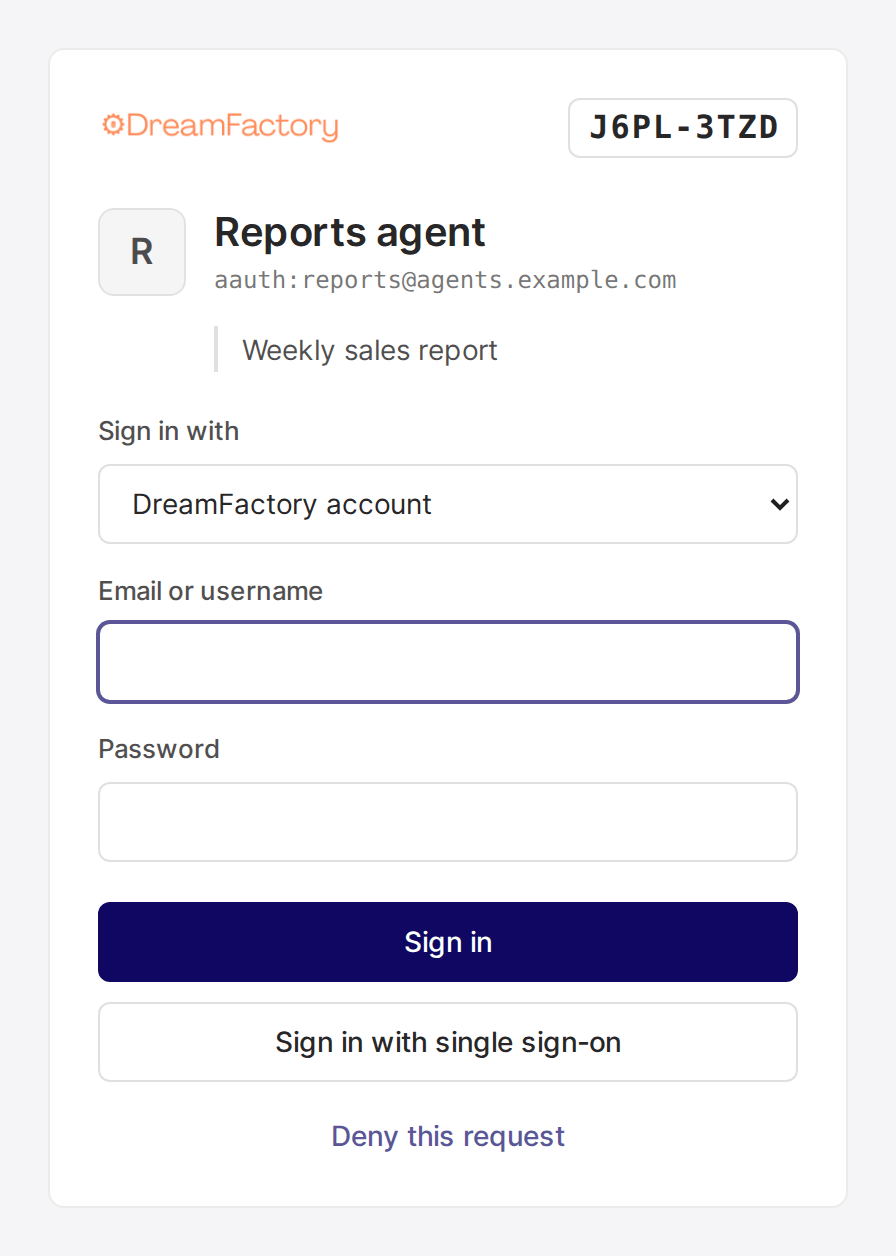
Run Try it, click Approve, and sign in on the consent page with the method you want to test. Sign in as a user who should be able to approve, and as one who should not: the second sees the scope locked with You don't have this role.
Directory accounts (LDAP and Active Directory)
When at least one LDAP or Active Directory service is active, the sign-in card gets a Sign in with list. It offers DreamFactory account plus every active directory service, by the service's label. The login field then reads Email or username: a directory username for a directory service, or the usual DreamFactory login (the email address, unless DF_LOGIN_ATTRIBUTE=username) for DreamFactory account.
When the person picks a directory service and clicks Sign in:
- DreamFactory binds to the directory with the username and password. An empty password is refused before any bind, because many directory servers treat it as an anonymous bind.
- DreamFactory creates or updates the DreamFactory user for that directory account and assigns roles exactly as a DreamFactory login with that service does: the service's default role (or, with group mapping turned on, the role mapped to the person's directory group) and any roles set in the service's Role per App list.
- That DreamFactory user must be active. The page then shows Continue as (or the consent card).
No DreamFactory session is started; the person is signed in to the consent pages only. Wrong credentials show Wrong username or password., and so does a directory server that DreamFactory cannot reach.
The limits are the same as for passwords: 10 failed sign-ins per client address in 10 minutes, 20 per account in 15 minutes, and 5 per pending request. A directory account counts separately from a local account: jdoe on a directory service is not the local user jdoe. Anyone who knows a login can use up its per-account budget and so keep that person from signing in with a password or directory account for 15 minutes at a time; single sign-on is not affected.
DreamFactory keeps its own user for each directory account, separate from any local user with the same address. It forms that user's email by adding the service name to the directory address, for example jordan+corp-ldap@example.com for jordan@example.com on the service corp-ldap. Activity shows that address in the Person column, and that is the user to give roles to.
Make the scope's role one that directory users get when they sign in: the directory service's default role, or the role mapped to their directory group (see Role Based Access Control). Group mapping gives a user one role, from the first of their groups that has a mapped role (Active Directory checks the primary group first). For a person who must approve several scopes, assign the other roles to their DreamFactory user under Admin Settings > Users after their first sign-in. Use apps that the service's Role per App list does not name, because each sign-in replaces the user's role in those apps.
When a directory user signs in, DreamFactory adds the default or group-mapped role only in apps where the user has no role yet, and it does not remove roles. Someone removed from a directory group keeps the role they already received in DreamFactory, and with it the right to approve that scope. When someone must lose approval rights, deactivate their DreamFactory user (a directory sign-in does not reactivate it), or remove the role from it. A removed role comes back at their next sign-in when it is the service's default role or is still mapped to one of their groups.
Single sign-on (OAuth, OpenID Connect, SAML)
These login methods send the browser to an identity provider, so the consent page can't check a password itself. Instead it hands the person to DreamFactory's own login page, which already supports every login method configured on the instance, and takes them back signed in.
What the person sees:
-
On the sign-in card, they click Sign in with single sign-on.
The browser opens DreamFactory's login page on the issuer origin, for example
https://api.example.com/dreamfactory/dist/#/auth/login. -
They sign in with any method that page offers.
If they are already signed in to DreamFactory in that browser, they come straight back without being asked for credentials.
-
A short page reads Signing you in and One moment.
-
The consent page shows Continue as with their first name, or the consent card.
The person still chooses Continue as or Deny, and Allow or Deny.
On the grants page the same flow ends back at /aauth/grants.
How the handoff works
- Sign in with single sign-on is a form post protected by a CSRF token. It claims the agent's request for this browser, so no other browser can act on the code while the person is at the login page. DreamFactory stores a random one-time state in the browser's consent session.
- DreamFactory redirects to
https://api.example.com/dreamfactory/dist/#/auth/login?redirect=..., where the redirect target ishttps://api.example.com/aauth/interact/sso#state=.... It builds both addresses from the configured issuer (DF_AAUTH_ISSUER), never from the request'sHostheader. - Once the person is signed in, DreamFactory returns the browser to
/aauth/interact/sso, appending the DreamFactory session token. Because the return address ends in a URL fragment (#state=...), the token lands inside the fragment, which browsers never send to a server. - A script on the landing page moves the state and the token into a form post, and removes them from the address bar and the browser history first.
- The server checks the state: it must be one this browser's consent session issued, it is used once whatever the outcome, and it is at most 15 minutes old. A browser can have at most five outstanding states, so two consent tabs don't cancel each other.
- The server checks the session token like any DreamFactory session: signature, expiry, the logout blacklist, and an existing, active user.
- The server signs the person in to the consent session, with a new session id, and returns them to the consent card. It does not store the session token; only the user id is kept.
Why this is safe
- The token stays out of server logs and Referer headers. It travels inside the URL fragment and is moved into a form post by the landing page's script.
- No login CSRF or token injection. The state is random, bound to the browser that clicked the button, compared in constant time and consumed by the first attempt. A token posted without one of that browser's states signs nobody in.
- The token is checked like any DreamFactory session, and the person's DreamFactory user must be active.
- Same origin only. The redirect is built from the configured issuer, and the admin app's login page follows a
redirectonly to its own origin. DreamFactory's OAuth services also check where they return the browser (df.oauth.allowed_redirect_domains, by default theAPP_URLhost). - Signing in is not consent. The person still sees the agent, the resource and the scopes, and must click Allow. Scope requests an agent makes with a person's token can be approved only by that person; anyone else sees
Sign in as the person this agent acts for. - Rate limited. At most 30 single sign-on completions per client address in 10 minutes, and failed completions count toward the limit on wrong codes.
Before you rely on it
- Sessions are reused. If the person is already signed in to DreamFactory in that browser, the login page returns at once, without asking for credentials. How long a DreamFactory session lasts is set by
DF_JWT_TTLandDF_JWT_REFRESH_TTL. There is no "enter your password again to approve" option, because the admin app can't force a fresh login. - The person usually stays signed in. Single sign-on can leave the person signed in to DreamFactory, and to your identity provider, in that browser. Not you? on the consent page signs them out of the consent pages only, so the next single sign-on can return the same account without asking for credentials. On a shared computer, sign out of DreamFactory and of the identity provider after approving.
- The admin app must be served on the issuer origin, at
/dreamfactory/dist/by default (DF_AAUTH_SSO_LOGIN_PATHchanges the login path). Whatever that setting says, the consent pages load their logo and font from/dreamfactory/dist/on the issuer origin. - Scopes follow DreamFactory roles. A person who signs in with single sign-on can approve a scope only when their DreamFactory user holds its role, through the login service's default role or role mapping, or by direct assignment.
- JavaScript is required on the landing page, because it moves the token out of the URL fragment. Without it the page reads
Turn on JavaScript to finish signing in.
| Message | Cause |
|---|---|
Single sign-on did not complete. Try again. | The session token was not valid, or the sign-in took longer than 15 minutes. While the request is still open, the person is returned to its sign-in card. |
This sign-in link has expired. Try again. | The state was not issued by this browser's consent session, or was already used, for example when the login finished in another browser. |
Single sign-on is not available here. | Single sign-on is not offered (DF_AAUTH_SSO=off, or auto with no OAuth, OpenID Connect or SAML service active). |
Single sign-on did not complete. Go back to the agent's code and try again. | The landing page received no state or token. |
Too many attempts. Try again in a few minutes. | The rate limit above was reached (HTTP 429). |
Every message the consent pages can show is listed in Messages on the consent pages.
Settings
| Variable | Default | Effect |
|---|---|---|
DF_AAUTH_SSO | auto | auto: offer single sign-on when an OAuth, OpenID Connect or SAML login service is active. on: always offer it; the login page then covers passwords and directory accounts too. off: never offer it. |
DF_AAUTH_SSO_LOGIN_PATH | /dreamfactory/dist/#/auth/login | The admin app's login route on the issuer origin |
DF_LOGIN_ATTRIBUTE | email | DreamFactory's login attribute. With username, the sign-in field reads Username. |
Directory sign-in has no setting of its own: it follows the LDAP and Active Directory services that are active in DreamFactory. After changing an environment variable, clear the configuration cache (php artisan config:clear). All AAuth variables are listed in the configuration reference.
Not supported
- Identity-provider-initiated SAML. The consent page must start the flow, so that the one-time state exists.
- Pasting an API key or a DreamFactory session token into the consent page.
- Approving in a different browser from the one that first acted on the code. Codes are single-use per browser, whatever the sign-in method; choosing single sign-on claims the code for this browser before it leaves for the login page.
Using your organization's own person server
If your organization already runs an AAuth person server, where people approve agents for many APIs with your own sign-in, DreamFactory can accept the tokens it issues instead of asking people to sign in here. Add it on the Person Servers tab and choose the scopes it may vouch for; the steps are in Add an external person server, and what changes for agents approved there is in What changes with an external person server.
DreamFactory's own person server can also approve agents for other AAuth resources; what that means for who can grant what is in Who can grant what.