Troubleshooting AAuth
This page helps DreamFactory admins and agent developers find out why an AAuth request, an approval or a Try it run failed. Start with Where to look first, then find the exact message in the Error reference. Messages are quoted exactly as DreamFactory sends them; parts in angle brackets, such as <scope> or <METHOD>, vary. The examples use the issuer https://api.example.com.
Where to look first
-
Check Activity. Open Security > AAuth, select the Activity tab and click Rejected. Each row shows its result (Denied, Blocked or Error) and, under it, the reason. For errors, the reason is the message the agent received followed by its code, such as
invalid_signature. Click Token required to see the challenges, or All to follow a whole flow. Activity reasons explains each reason.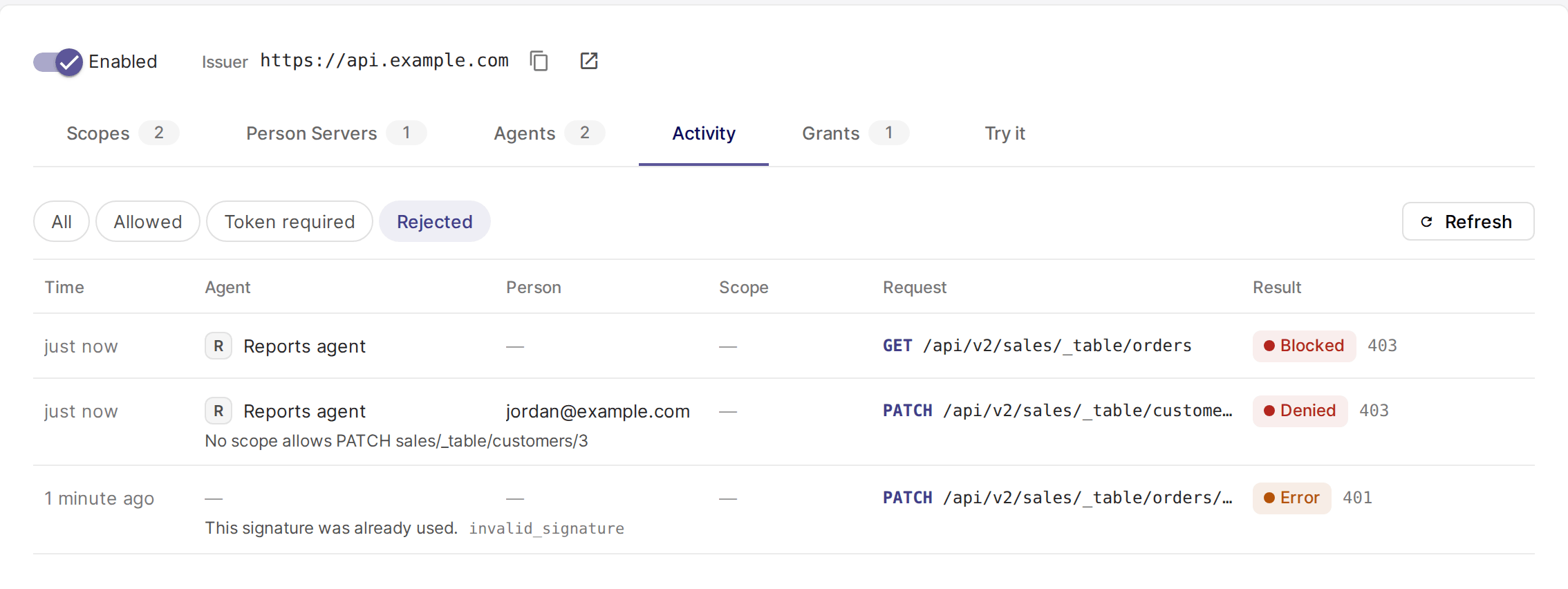
Requests refused before their token and signature verify, such as a bad signature, a malformed request or a token from an untrusted person server, show no agent and no person, and at most 20 of them per client address per minute are recorded. Requests to the person server endpoints and the consent pages never appear in Activity, and requests to
/aauth/authorizeonly when they are refused because the agent is blocked, DreamFactory has no record of the token, the signing key has used too many agent ids, or the agent's state could not be read or updated. -
Run the status check on a DreamFactory server, from
/opt/dreamfactory:php artisan df:aauth status
# Docker: docker exec -u www-data <container> php /opt/dreamfactory/artisan df:aauth statusFix every line that starts with
!if it applies to your setup. For example, a single node that uses the file cache and file sessions prints:AAuth 0.1.0
Enabled yes
Issuer https://api.example.com
Cache store file (file, this node only)
Consent sessions file (this node only)
...
! The AAuth cache store (file) is local to this node. With more than one DreamFactory node set DF_AAUTH_CACHE_STORE to a shared store (redis) so replay protection and limits hold across nodes.
! Consent pages use file sessions. With more than one node and no sticky sessions set DF_AAUTH_SESSION_DRIVER=redis (or database).Both warnings matter only with several nodes. Every warning, with its fix, is listed in Warnings in Operating AAuth in Production.
-
Fetch the resource metadata from outside your network:
curl -i https://api.example.com/.well-known/aauth-resource.jsonA healthy instance answers
200with JSON that contains"issuer":"https://api.example.com". A404with the JSON body{"error":"not_found","detail":"Not found."}means AAuth is off, or the issuer setting is invalid. Any other404or a403means the df-aauth package is not installed, or the reverse proxy blocks/.well-known/paths (see 404 on the well-known documents). -
Read DreamFactory's log for messages that start with
df-aauth:grep 'df-aauth' /opt/dreamfactory/storage/logs/dreamfactory.logAAuth logs problems at the
warninganderrorlevels, so anAPP_LOG_LEVELoferrorhides its warnings. One message, the notice that a role's scope name was removed when a request ended, uses thenoticelevel. Each message and what it means is listed under Monitoring in Operating AAuth in Production. -
Repeat the request with Try it. On the Try it tab, send the same method and path. If Try it succeeds and your agent fails, look at the agent: its signing, its clock, its agent provider, or the person server it uses (Try it always uses this DreamFactory's own). If both fail, the cause is on the DreamFactory side. See Try it fails and Try it.
Error reference
Errors that AAuth sends to agents are application/problem+json bodies with error and detail members. Signature and token failures always use status 401, add a Signature-Error: error=<code> header, and add a type member of urn:ietf:params:sig-error:<code>:
HTTP/1.1 401 Unauthorized
Content-Type: application/problem+json
Cache-Control: no-store
Signature-Error: error=invalid_signature

{"type":"urn:ietf:params:sig-error:invalid_signature","error":"invalid_signature","detail":"This signature was already used."}
Act on error (and on Signature-Error); the detail text is for people.
Errors an agent receives
API calls (/api/v2)
Status and error | Detail | Cause | Fix |
|---|---|---|---|
401 person_token_required | Get a person token from your person server and sign with it. | The request was signed with an agent token. This is the normal first step. | Ask the person server for a person token. |
401 auth_token_required | Ask your person server for an auth token for scope <scope>. | The request was signed with a person token. AAuth-Requirement carries a resource token. | Ask the person server for an auth token. |
401 insufficient_scope | Scope <scope> is needed for <METHOD> <service>/<path>. | Step-up: the auth token's scopes do not cover this request. AAuth-Requirement carries a new resource token. | Ask for an auth token with the new resource token, presenting the current auth token. The person approves again. See Step-up. |
403 insufficient_scope | No scope allows <METHOD> <service>/<path> | No enabled scope that this person server may vouch for has a role that allows the request. There is no AAuth-Requirement. | Admin: enable a scope whose role allows the request, or allow that scope for the person server. |
403 insufficient_scope | The person no longer holds the role behind scope <scope>. | The role was removed from the person after they approved. | Restore the role, or ask a person who holds it. |
403 insufficient_scope | The role behind scope <scope> is not available. | DreamFactory could not set up the session with the scope's role or the person's user. An inactive role does not cause this; it makes the scope stop matching (No scope allows ... or a step-up). | Read the df-aauth: could not seed the session: log line. |
403 denied | The person this agent acts for is no longer active. | The approving user was deactivated or deleted. | Stop. Another person must approve from the start. |
403 agent_blocked | This agent is blocked on this DreamFactory. | A sys admin switched off this agent under Agents, or another agent id that the request key has presented an agent token for. A new agent id in the agent token does not change that. With a person or auth token from DreamFactory's own person server, the agent is the one the token was issued for. | Stop and contact the DreamFactory admin. |
403 too_many_agents | This signing key has already presented agent tokens for 20 agent ids at this DreamFactory. Use a new key for a new agent. | The agent token names a new agent id for a request key that has already presented agent tokens for 20 agent ids here. Agent ids the key already used, and other keys, are not affected. | Use one request key per agent id. |
503 temporarily_unavailable | Try again shortly. | DreamFactory could not read or update the agent's state, or read the record of the token, in its system database, so it could not rule out a block and refused the request. Retry-After: 30. | Retry after Retry-After. Admin: read the df-aauth: agent state unavailable, signed request refused: log line and check the system database. |
400 invalid_request | Send either AAuth signatures or a DreamFactory API key/session token, not both. | The request also carries an API key or session token, as a header or query parameter. | Remove the API key and session token. |
400 invalid_request | Method overrides are not allowed on AAuth-signed requests. | An X-HTTP-Method-Override, X-HTTP-Method or X-Method-Override header, or a _method or method parameter that changes the method of a POST. | Send the real method. |
400 invalid_request | Multipart bodies cannot be covered by Content-Digest; send JSON. | A multipart/form-data body. | Send JSON. |
403 untrusted_person_server | Person server <issuer> is not trusted by this DreamFactory. | Normally not seen: the same case is refused earlier as 401 invalid_jwt (see the next table). | Add and enable the person server under Person Servers. |
Person and auth token requests (/aauth/person, /aauth/token)
These endpoints and polling must be signed with the agent token.
Status and error | Detail | Cause | Fix |
|---|---|---|---|
403 user_unreachable | This person server must reach the person; declare the interaction capability. | The body's capabilities does not include interaction. | Send "capabilities": ["interaction"]. |
400 invalid_request | This person server does not support missions (mission_s256). | The body has mission_s256. | Remove it. Missions are not supported in 0.1.0. |
400 invalid_request | resource must be a server identifier (https origin). | resource is not a bare https origin. | Send the resource's https origin: lowercase host, no port and no path. A trailing slash is removed. |
400 invalid_request | resource_token and presented_token are required. | A field is missing from the /aauth/token body. | Send both. |
400 invalid_request | The body must be a JSON object. | Empty or non-JSON body. | Send a JSON object. |
400 invalid_resource_token | The resource token is not addressed to this person server. or The resource token names another person server. | The resource token was issued for another person server. | Send it to the person server that issued the token you presented. |
400 invalid_resource_token | agent_jkt does not match the signing key. | /aauth/token was signed with a different key than the request that got the challenge. | Use one key for the whole flow. |
400 invalid_resource_token | The resource token does not match the presented token. | presented_token is not the token that the challenged request was signed with. | Present the person or auth token that received the challenge. |
400 invalid_resource_token | The resource token was already used. | A resource token is single-use. A retry with the same key gets the same pending request back; other reuse is refused. | Call the API again for a fresh resource token. |
400 invalid_resource_token | The resource token requests no scope. or The resource token has no jti. | A malformed resource token from another resource. | Fix the resource that issued it. |
400 invalid_resource_token | A verification message, such as JWT signature is invalid | The resource token did not verify. | See Signature and token errors. |
400 expired_resource_token | Token has expired | Resource tokens last 5 minutes. | Call the API again for a fresh one. |
400 invalid_presented_token | The presented token was not issued by this person server. | The presented token comes from another person server. | Present a token from this person server. |
400 invalid_presented_token | The presented token audience is not the resource. | The presented token is for another resource. | Present the token used on that resource. |
400 invalid_presented_token | The presented token is bound to another key. | The presented token belongs to another key. | Use one key for the whole flow. |
400 invalid_presented_token | Unknown subject. | The person mapping for this token no longer exists, for example because the user was deleted, or it belongs to another resource. | Ask for a new person token. |
400 expired_presented_token | Token has expired | The presented person or auth token expired. | Present a person token that is still valid, or ask for a new one. |
400 clock_skew | Token iat is in the future | A token's issue time is ahead of DreamFactory's clock. | See Clock skew. |
403 denied | The person is no longer active. | The approving user was deactivated. | Stop. |
403 agent_blocked | This agent is blocked on this DreamFactory. | A sys admin blocked the agent, or another agent id that the request key has presented an agent token for. Also when polling. | Stop. |
403 too_many_agents | This signing key has already presented agent tokens for 20 agent ids at this DreamFactory. Use a new key for a new agent. | As on the API calls. Also when polling. | Use one request key per agent id. |
503 temporarily_unavailable | Try again shortly. | DreamFactory could not read or update the agent's state in its system database, so it could not rule out a block. Also when polling. Retry-After: 30. | Retry after Retry-After. Admin: read the df-aauth person server: agent state unavailable, request refused: log line. |
401 invalid_jwt | The agent token sub is not an agent identifier (aauth:name@domain). | The agent token's sub is not an agent id (aauth:<name>@<host>). | Fix the agent identity. |
401 invalid_jwt | Sub-agent tokens are not supported by this person server. | The agent token has a parent_agent claim. | Sub-agents are not supported in 0.1.0. |
401 invalid_jwt | The agent token has no sub. or The agent token ps claim is not a server identifier. | Malformed agent token. | Fix the agent provider. |
429 rate_limited | Too many requests. Slow down. | More than 30 new requests per agent, or 60 per client address, in a minute. Retry-After: 60. | Wait for Retry-After. Behind a proxy, see Every client is rate limited at once. |
429 rate_limited | This agent already has too many requests waiting for the person. | 20 requests of this agent are still open. Retry-After: 60. | Cancel open requests with a signed DELETE on their Location, or let them expire. |
500 server_error | Unexpected error. | An internal failure. | Read the df-aauth person server: log line. |
Polling a pending request (/aauth/pending/<id>)
Status and error | Detail | Cause | Fix |
|---|---|---|---|
202 | The person has not answered yet. The body's status is pending until a browser first acts on the consent page (opening the link doesn't count), then interacting. | Poll again after Retry-After (2 seconds). | |
403 denied | The person denied the request. | The person chose Deny or Deny this request. | Stop, or ask again later. |
408 expired | The request expired before the person answered. | Nobody answered within 10 minutes (DF_AAUTH_PENDING_TTL). | Start again with a new request. |
410 invalid_code | This pending request is finished. | The token was already collected, the agent was already told denied or expired, the agent cancelled the request, or it ended after five wrong passwords. | Do not poll after you received a final answer. Otherwise start again. |
404 invalid_request | Unknown pending request. | Wrong id, a poll signed with another key, or a request deleted by housekeeping. | Poll the Location you received, with the same key. |
The authorization endpoint (/aauth/authorize)
Status and error | Detail | Cause | Fix |
|---|---|---|---|
401 person_token_required | Sign this request with a person token. | Signed with an agent token. | Sign it with the person or auth token. |
400 invalid_request | scope is required. | No scope in the body. | Send {"scope": "sales.read"}. |
400 invalid_scope | Unknown or unavailable scope: <scopes> | A scope that is not enabled, or not allowed for the token's person server. | Ask only for scopes listed in the resource metadata's scope_descriptions. |
403 agent_blocked | This agent is blocked on this DreamFactory. | As on the API calls. Activity records it as Blocked. | Stop. |
403 too_many_agents | This signing key has already presented agent tokens for 20 agent ids at this DreamFactory. Use a new key for a new agent. | As on the API calls. Activity records it as Error, without an agent. | Use one request key per agent id. |
401 invalid_jwt | This DreamFactory has no record of issuing this token. Get a new one. | As on the API calls (see Signature and token errors). Activity records it as Error, without an agent. | Drop the token and get a new one. |
503 temporarily_unavailable | Try again shortly. | As on the API calls (Retry-After: 30). The log line starts with df-aauth authorize: agent state unavailable, request refused:. | Retry after Retry-After. |
Requests that AAuth does not handle
| What you see | Cause | Fix |
|---|---|---|
DreamFactory's 400 whose message starts with No session token (JWT) or API Key detected in request. | The request carries no Signature-Key header, or AAuth is off. While AAuth is on, the response also has Link: <https://api.example.com/.well-known/aauth-resource.json>; rel="aauth-resource", and a DreamFactory 401 also gets AAuth-Requirement: requirement=agent-token. | Sign the request. If AAuth is off, ask the admin to switch it on. |
404 not_found with Not found. on /aauth/... or /.well-known/aauth-... | AAuth is off or the issuer is invalid; for the person server endpoints, aauth-person.json and jwks/person.json, the built-in person server may be off instead; or the path does not exist. (The consent pages answer with an HTML page instead; see Messages on the consent pages.) | Switch AAuth on, or use the right path. |
405 method_not_allowed with Method not allowed. | Wrong method on a known /aauth path. The Allow header lists the methods. | Use a listed method. |
Signature and token errors (401 with Signature-Error)
The code is in the Signature-Error header and in error. The window in the time messages is DF_AAUTH_SIGNATURE_WINDOW, 60 seconds by default.
| Code | Typical detail | Usual cause | Fix |
|---|---|---|---|
invalid_signature | Missing signature header., Missing signature-input header. or Missing signature-key header. | A signature header was not sent, or a proxy dropped it. | Send all three headers. See Signature headers go missing. |
invalid_signature | Use https://api.example.com | The request's Host is not the issuer host: the agent called another host name, or a proxy changed Host. | Call the issuer URL. See Wrong host name. |
invalid_signature | Signature created more than 60s ago | The agent's clock is behind, or the signed request waited too long before it was sent. | Sign just before sending; run NTP. See Clock skew. |
invalid_signature | Signature has expired | The signature's expires time has passed. | Sign again, or omit expires. |
invalid_signature | Content-Digest does not match the body | The body changed after signing, or Content-Digest is missing or computed over other bytes. | Compute sha-256 over the exact bytes you send. Check the proxy for body changes. |
invalid_signature | HTTP message signature is invalid | What arrived differs from what was signed: the path, query or Host was rewritten or re-encoded, or the request was signed with another key. | Sign the raw path and query exactly as sent. See invalid_signature only through the proxy. |
invalid_signature | This signature was already used. | A POST, PUT, PATCH or DELETE arrived a second time with the same request key and signature base: a retry without signing again, or the same request signed twice within one second with the same token. | Sign every request afresh, retries included, and don't send identical requests within the same second. |
invalid_signature | Signature-Input must include an integer created | No created parameter. | Add created (Unix time). |
invalid_signature | Covered component <component> is missing from the request | A header listed in Signature-Input was not sent. | Send every header you sign. |
invalid_signature | Signature-Input has no inner list for label "sig" | Signature-Input and Signature-Key use different labels. | Use the label sig in all three headers. |
invalid_signature | Malformed Signature-Key header, Malformed Signature-Input or Malformed Signature header | The header is not a valid structured field. | See Signing requests. |
invalid_input | Signature must also cover: @query | A required component is not covered. Signature-Error lists the full set in required_input. | Cover @query when there is a query string, and content-type and content-digest when there is a body. |
clock_skew | Signature created more than 60s in the future | The agent's clock is ahead of DreamFactory's. | Run NTP. See Clock skew. |
clock_skew | Token iat is in the future | The token issuer's clock (agent provider or external person server) is more than 60 seconds ahead of DreamFactory's. | Run NTP on the issuer's host. |
unsupported_scheme | Signature-Key scheme "<scheme>" is not supported; use jwt | Signature-Key uses a scheme other than jwt. The response has Accept-Signature-Scheme: jwt. | Send Signature-Key: sig=jwt;jwt="<token>". |
unsupported_algorithm | JWT alg "<alg>" is not accepted, JWK has no "alg" or JWK alg "<alg>" is not supported | The token or key uses another algorithm, such as EdDSA or RS256, or the key has no alg. The response has Accept-Signature-Alg: Ed25519, ES256. | Use Ed25519 or ES256, and put alg in every JWK. |
invalid_key | JWK kty/crv do not match alg <alg>, JWK "<member>" is not a <n>-byte base64url value, cnf.jwk must be a public key or Signature-Key jwt parameter missing or not a string | A malformed key, or a malformed Signature-Key header. cnf.jwk must be a public key means the private key was put in the token. | Publish and bind public keys only. Treat a leaked private key as compromised. |
unknown_key | Discovery failed: <url>: <reason> | DreamFactory could not fetch the issuer's metadata or JWKS. | See Discovery failures. |
unknown_key | No key <kid> in <jwks_uri> or Metadata for <issuer> has no usable jwks_uri | The issuer's JWKS has no key with that kid, or has several keys and the token names none; or its metadata has no https jwks_uri. | Publish the key, with its kid, in the JWKS that the metadata's jwks_uri names. |
unknown_key | Unknown key id '<kid>'. | A token signed by DreamFactory with a key it no longer publishes: after rotate-keys --revoke, or after a rotated key's overlap window ended (such a token has expired too; the key is checked before the expiry). | Get new tokens; the person approves again. |
issuer_missing | Metadata at <url> has no issuer | The well-known document has no issuer. | Add issuer to the agent provider's or person server's metadata. |
issuer_mismatch | Metadata issuer "<a>" does not equal "<b>" | The metadata's issuer differs from the token's iss, even by a trailing slash or letter case. | Make them byte-for-byte equal. |
invalid_jwt | The token issuer is not a person server trusted by this DreamFactory. | The token's person server is not listed or is switched off under Person Servers. For DreamFactory's own tokens: This DreamFactory is switched off, or the built-in person server is off. | Add or switch on the person server, or get tokens from a trusted one. |
invalid_jwt | This DreamFactory has no record of issuing this token. Get a new one. | A person or auth token that names this DreamFactory as its issuer, but DreamFactory has no record of issuing it: for example, the system database was restored from a backup taken before the token was issued, or the record was deleted. Also at /aauth/authorize. Activity records it as Error, without an agent. | Drop the token and get a new one; the person approves again. The aauth command, the Node and Python clients and Try it do this by themselves. |
invalid_jwt | Token audience must be https://api.example.com. | The person or auth token was issued for another resource, or the issuer has changed since. | Ask for tokens for this resource. |
invalid_jwt | A <typ> is not accepted here. | Signed with the wrong token type, for example a resource token, or a person token on /aauth/person, /aauth/token or polling. | Sign API calls with the agent, person or auth token, and person server requests with the agent token. |
invalid_jwt | Invalid server identifier "<iss>": <reason> | The token's iss is not a bare https origin: it has a port, a path, a trailing slash or uppercase letters, or uses http. | Serve the agent provider at a bare https origin: lowercase host, no port, path or trailing slash. |
invalid_jwt | JWT signature is invalid | The token does not verify with the issuer's published key. | Check that the agent provider signs with the key it publishes. |
invalid_jwt | Token lifetime exceeds 1 hour | A person or auth token from an external person server lives longer than an hour. | Issue tokens of at most one hour. |
invalid_jwt | Auth tokens must be issued by a person server (dwk aauth-person.json). or The auth token ps claim does not name its issuer. | An auth token from an access server, or a malformed one. | Access servers are not supported in 0.1.0. |
invalid_jwt | The token has no sub., The token has no typ., Token has no cnf.jwk, Malformed JWT, Unexpected dwk for <typ>, JWT exp missing or not an integer, JWT iat missing or not an integer or JWT alg <alg> does not match the key alg <alg> | A malformed token, or one signed with a key of another type than its header says. | Fix the token issuer. |
expired_jwt | Token has expired | The token's exp has passed. Person and auth tokens last at most an hour. | Get a new token. See Agents that stop working after an hour. |
DreamFactory ignores an alg signature parameter in Signature-Input; it never refuses a request for it.
Discovery failures
unknown_key errors from discovery have the detail Discovery failed: <url>: <reason>. The same text appears after Could not read <issuer>/.well-known/aauth-person.json: when you add a person server. For example:
Discovery failed: https://agents.example.com/.well-known/aauth-agent.json: HTTP 404
| Reason | Means | Fix |
|---|---|---|
host does not resolve | The DreamFactory server cannot resolve the host name. | Fix DNS, and check it from the DreamFactory server or container. |
<host> resolves to a non-public address (not admitted by DF_AAUTH_PRIVATE_HOSTS or DF_AAUTH_PRIVATE_NETWORKS) | The agent provider or person server is on an internal network. | Admit it with DF_AAUTH_PRIVATE_HOSTS or DF_AAUTH_PRIVATE_NETWORKS. See Private networks and custom CAs. |
<host> resolves to a link-local, metadata or reserved address | The host resolves to an address that can never be admitted. | Serve it from another address. |
only https URLs can be fetched | The URL is http. | Serve the documents over https. |
credentials in URL | The URL contains a user name or password. | Remove them. |
HTTP <status> | The document was not found, or the host refused it. | Publish the documents at the issuer origin. On the agent host, aauth whoami --check tests them; see Building an Agent with the AAuth Clients. |
not a JSON object | The response is not a JSON object, for example an HTML error page. | Serve the JSON document. |
response larger than <n> bytes | The document exceeds DF_AAUTH_FETCH_MAX_BYTES (256 KB). | Serve a smaller document. |
[unreachable] <error> | Connection refused or timed out (3 seconds, DF_AAUTH_FETCH_TIMEOUT), or TLS failed, for example a certificate from an internal CA. | Open the firewall. For an internal CA, set DF_AAUTH_CA_BUNDLE. |
too many discovery fetches from this client; try again in a minute | More than 20 fetches that missed the cache from one client address in a minute. | Wait a minute. Behind a proxy, set DF_AAUTH_TRUSTED_PROXIES. |
Discovery failed: the CA bundle configured on this server is not readable (no URL) means DF_AAUTH_CA_BUNDLE points to a file or directory that PHP cannot read. Fix the path or its permissions.
A detail that ends in (cached) is a failure DreamFactory remembered: a failed URL is not fetched again for 60 seconds, and an unreachable host is skipped for 60 seconds. Wait a minute after fixing the cause.
Messages on the consent pages
| Message | When | What to do |
|---|---|---|
Enter the code shown by the agent. | Continue was pressed with no code, or a form was sent for a request this browser's consent session does not know. | Type the code the agent shows, or open the agent's link. |
Unknown or expired code. | No open request has this code: a typo, a request older than 10 minutes, or one that already finished. | Check the code, or ask the agent to start again. |
This code was already used in another browser. Ask the agent for a new code. | Another browser acted on this code first: it signed in, started single sign-on, pressed a button on the card (such as Deny, Not you?, Continue as or Allow), or typed the code. A code belongs to the first browser that acts on it, so a browser that only opened the link earlier gets this too, also after the request was decided. Opening a link doesn't claim it, so link previews and mail link scanners don't cause this. With several DreamFactory nodes, the same browser can look new to another node; see The consent page forgets the person. | Use the browser that acted first, or ask the agent for a new code. If nobody expected another browser, tell the DreamFactory admin. |
This request has expired. Ask the agent for a new code. | The request expired or finished while the page was open. | Ask the agent for a new code. |
Too many attempts. Try again in a few minutes. (HTTP 429) | Too many wrong codes, failed sign-ins or single sign-on returns from this address, browser or account. See Built-in limits. | Wait. If everyone sees it, see Every client is rate limited at once. |
Too many failed sign-ins. Ask the agent to start again. | Five wrong passwords on one request. The request has ended. | The agent starts a new request. |
Wrong email or password. | DreamFactory account sign-in failed. The text says "email" even when the field is labeled Username (DF_LOGIN_ATTRIBUTE=username). | Check the credentials. |
Wrong username or password. | LDAP or Active Directory sign-in failed. The same message appears when DreamFactory cannot reach the directory server. | Check the credentials and the Sign in with choice. If every directory sign-in fails, check the directory service's host and port under Security > Authentication. |
Sign in first. | A decision was sent while nobody is signed in on this page, for example because the signed-in account was deactivated in the meantime. | Sign in again. |
Sign in as the person this agent acts for. | Someone other than the person who approved the agent's identity step is signed in. | That person approves, or the agent starts over with the right person. |
You don't have this role (on a scope) | The signed-in person does not hold that scope's role. If no requested scope can be granted, Allow is disabled. | Deny, or ask a person who holds the role. See Who can approve a scope. |
Select at least one new scope to allow, or deny. | Every checkbox was cleared, or only scopes the agent already has were left checked. | Check a new scope, or choose Deny. |
You don't have a role that allows this. | Allow was sent although no requested scope can be granted. | Deny, or ask a person who holds the role. |
Request expired with The agent did not follow up in time. Nothing more was shared. | After Continue as, the agent did not ask for its scopes within 2 minutes. With several DreamFactory nodes, a lost consent session shows the same card at once; see The consent page forgets the person. | When the agent asks later, it shows a new code. |
Something went wrong with This page lost contact with DreamFactory. Check the agent, then close this tab. | The waiting page could not reach DreamFactory five times in a row. | Check the agent, then close the tab. |
Single sign-on is not available here. | Single sign-on was requested, but it is not offered (DF_AAUTH_SSO=off, or no OAuth, OpenID Connect or SAML login service is active). | Sign in with a password. See Approving Agents with Company Sign-In. |
Single sign-on did not complete. Try again. | The return from DreamFactory's login page could not be verified: the session token is not a valid DreamFactory session (expired, logged out, or an inactive user), or more than 15 minutes passed since single sign-on started. | Try again from the agent's code. |
Single sign-on did not complete. Go back to the agent's code and try again. | The sign-in page came back without its state or token. | Open the agent's link again. |
This sign-in link has expired. Try again. | The single sign-on state was already used, or this browser's consent session did not start it (another browser, or a lost session). | Start single sign-on again in the same browser. |
Turn on JavaScript to finish signing in. | JavaScript is off on the single sign-on landing page. | Turn on JavaScript. |
Agent sign-in is not available. (HTTP 404) | AAuth is off, the issuer is invalid, or the built-in person server is off. In the same cases the grants page (/aauth/grants) answers 404 with the same page. | Ask the admin. |
That grant no longer exists. | On /aauth/grants, the grant was already revoked. | Nothing to do. |
Messages in the admin app and admin API
| Message | Where | Cause and fix |
|---|---|---|
Set DF_AAUTH_ISSUER to an https URL | Alert at the top of the AAuth page; the Enabled switch cannot be turned on. The API answers 400 with Set DF_AAUTH_ISSUER to an https URL. | No valid issuer. See Issuer mistakes. |
Couldn't load AAuth with AAuth is not set up yet. Run: php artisan migrate | The AAuth page. The API answers 503. | The AAuth tables are missing. Run php artisan migrate --force; see Installing and Configuring AAuth. |
Couldn't load AAuth (no further text) | The AAuth page. | The admin API call failed. Click Retry, and read the DreamFactory log. |
Couldn't load this list | One tab. | That tab's API call failed. Click Retry. |
Access to this feature is available via our commercial product. | The upgrade page instead of the AAuth page. | AAuth requires a DreamFactory commercial license (Gold or Platinum). On such an instance, the package is missing; see Check for the package. |
Only a system administrator can view AAuth settings. or Only a system administrator can change AAuth settings. | API, 403. | Call /api/v2/system/aauth as a sys admin. |
Scopes use lowercase letters, digits and . _ : - (up to 64) | Scopes tab. The API answers Scope must be 1-64 characters: lowercase letters, digits, and . _ : - (starting with a letter or digit). | Use a valid scope name, such as sales.read. |
<scope> is already used by another role | Scopes tab. The API answers Scope '<scope>' is already used by another role. | Scope names are unique. Choose another. |
'<scope>' is reserved for identity claims. | API. | profile and email cannot be scope names. |
Scope '<scope>' belonged to another role until recently, and auth tokens issued for it may still be in use. Choose another name, or try again in an hour. | API, when the name was given up recently. | A scope name that a role gave up stays reserved for 61 minutes: for the renamed role, which can take it back, or for no role at all when the role was deleted. A role that sends its own current name, unchanged, never gets this message. Choose another name, or wait. A role that takes the name later starts without the old grants and person server lists; see Good practice. |
Failed to delete resource: AAuth could not release this role's scope name, so the role was not deleted. Try again. | Deleting a role (admin app or API), 500. | Usually a database error, in one of two cases: AAuth could not reserve the role's scope name before the delete, or the delete ran in a transaction (rollback=true) and AAuth could not remove the name from grants and person server lists, so the delete was rolled back. DreamFactory kept the role and nothing changed. The log has df-aauth: role <id> not deleted, its AAuth scope name could not be released:. Try again once the database is healthy. See When a rename or role delete fails. |
Failed to delete resource: SQLSTATE[23000]: Integrity constraint violation: 1451 Cannot delete or update a parent row ... (MySQL; other databases word it differently) | Deleting a role (admin app or API), 500. | Another record still refers to the role, for example a login service (LDAP, Active Directory, OAuth, OpenID Connect, SAML or Azure AD) that uses it as its default role. DreamFactory refused the delete, and nothing about the role's AAuth scope changed: its scope name, grants and person server lists stay as they were, and saving its scope name again is accepted. Remove the reference, for example by giving the login service another default role, then delete the role again. |
Enter the person server origin, like https://ps.example.com. | Person Servers tab. | Enter a bare https origin. |
This DreamFactory is already listed. or That person server is already listed. | Person Servers tab. | It is already in the list. |
Could not read <issuer>/.well-known/aauth-person.json: <reason> | Person Servers tab. | DreamFactory could not fetch the person server's metadata. See Discovery failures. |
The person server metadata has no <field>. | Person Servers tab. | The metadata lacks person_token_endpoint, auth_token_endpoint or jwks_uri. |
The local person server cannot be removed. Turn it off instead. | API. | Switch This DreamFactory off instead. |
Unblock the agent before removing it; a removed agent is allowed again. | API, DELETE /api/v2/system/aauth/agents/<id>. | Removing an agent forgets it, which would also lift the block. Unblock first if you mean that. |
Turn AAuth on first. | API, POST /api/v2/system/aauth/playground. | Switch AAuth on. |
The df-aauth tables are missing. Run: php artisan migrate --force | php artisan df:aauth. | Run the migrations. |
Unknown action '<action>'. Use status, rotate-keys or prune. | php artisan df:aauth. | Use one of those actions. |
Activity reasons
The Activity tab shows a reason under rows whose result is not Allowed.
| Result | Reason | Means |
|---|---|---|
| Person token required | (none) | A normal challenge: the agent signed with its agent token. |
| Auth token required | (none) | A normal challenge: the agent signed with a person token. |
| Auth token required | Auth token does not cover this scope | Step-up: the agent needs a further scope, and the person must approve it. |
| Denied | No scope allows <METHOD> <service>/<path> | No enabled scope allows this request, for example No scope allows PATCH sales/_table/customers/3. |
| Denied | Person is inactive or deleted | The approving user was deactivated or deleted. |
| Denied | Person no longer holds this role | The role was removed from the approving user. |
| Denied | Role is unavailable | DreamFactory could not set up the session with the scope's role; see the df-aauth: could not seed the session: log line. |
| Blocked | (none) | The agent in the row is blocked under Agents. A request with a person or auth token from DreamFactory's own person server is recorded under the agent the token was issued for when that agent is blocked. Otherwise, a request signed with a key that has presented a blocked agent's agent token is recorded under that blocked agent, whatever agent id its own token names. |
| Error | A message and its code, such as This signature was already used. with invalid_signature | The request was malformed (invalid_request) or failed a signature or token check. Look the code up in Signature and token errors or API calls. |
| Error | This DreamFactory has no record of issuing this token. Get a new one. with invalid_jwt (status 401, no agent) | A person or auth token of this DreamFactory that it has no record of, for example after the system database was restored from a backup taken before the token was issued. The agent gets a new token. |
| Error | This signing key has already presented agent tokens for 20 agent ids at this DreamFactory. ... with too_many_agents (status 403, no agent) | An agent token named a 21st agent id for one signing key. A real agent uses one agent id per key; see What a block covers to find the agents of that key. |
| Error | agent state unavailable with temporarily_unavailable (status 503, no agent) | DreamFactory could not read or update the agent's state, or read the token's record, in its system database, so it could not rule out a block, and refused the request. See the agent state unavailable lines under Monitoring. |
The reason Person Server is not trusted is defined but not normally shown: a token from an untrusted person server appears as Error with invalid_jwt and The token issuer is not a person server trusted by this DreamFactory.
Try it fails
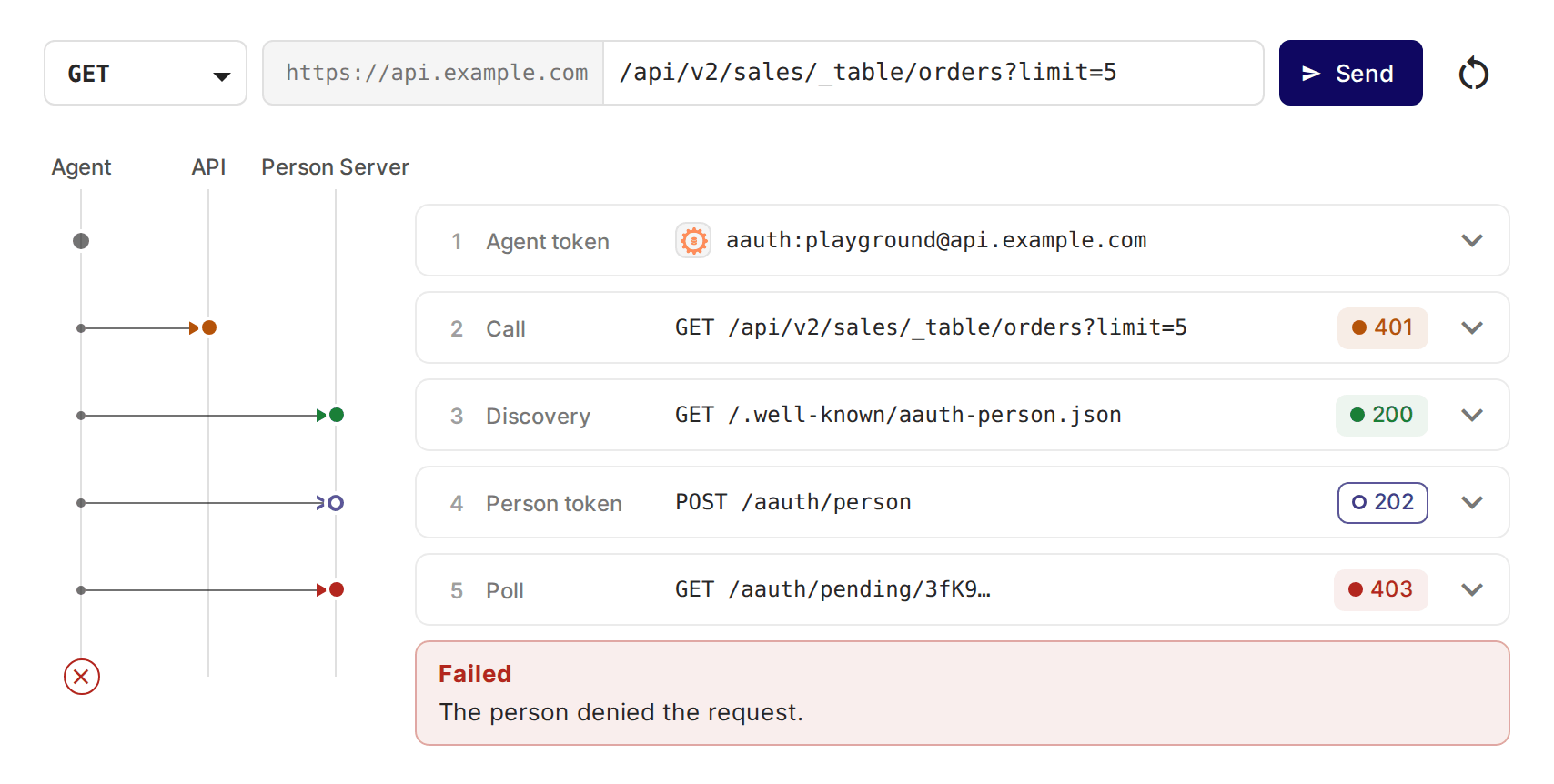
Try it runs the built-in agent, DreamFactory Playground, from the DreamFactory server against the issuer URL, exactly as an outside agent would. A failed run ends with a red Failed step and a message.
| Message | Cause | Fix |
|---|---|---|
Request to https://api.example.com/<path> failed: <error> | The DreamFactory server cannot reach its own issuer URL: the name does not resolve inside the server or container, the network does not route back to the proxy's public address (hairpin NAT), a firewall blocks it, or the server does not trust the issuer's certificate. | Make the issuer host resolvable and reachable from the DreamFactory server. For a certificate from an internal CA, set DF_AAUTH_CA_BUNDLE. |
DF_AAUTH_CA_BUNDLE is not a readable file or directory. | The CA bundle path cannot be read. | Fix the path or its permissions. |
Person server metadata is not available. | https://api.example.com/.well-known/aauth-person.json did not answer with the person server's metadata: the built-in person server is off, or the proxy blocks /.well-known/. | See 404 on the well-known documents. |
The person server refused the person token request (<error>: <detail>). or The person server refused the auth token request (<error>: <detail>). | The person server answered with an error, for example agent_blocked when DreamFactory Playground is blocked. | Look up the error in Person and auth token requests. |
The person denied the request. | Someone chose Deny or Deny this request on the consent page. | Send again and approve. |
Polling ended with HTTP 408 (expired). | Nobody answered within 10 minutes. | Send again, and approve within 10 minutes. |
Polling ended with HTTP 410 (invalid_code). | The request ended, for example after five wrong passwords. | Send again. |
Polling ended with HTTP 404 (invalid_request). | The pending request no longer exists. | Send again. |
Too many round trips. | The run made six API calls without a final response. This is a safety stop. | Send again. If it repeats, open the last Call step and check Activity for the reason. |
That run has expired. Send the request again. | The run was not updated for 15 minutes, for example because the tab was left before the run finished. | Send again. A run is also removed from the screen when you leave or reload the AAuth page. |
The body isn't valid JSON | The Body of a POST, PATCH or PUT is not JSON. | Fix the body. |
| Send is disabled | AAuth is off, the path is empty, or a run is still running or waiting for approval. | Switch AAuth on, enter a path, or finish the current run. |
A run can also finish normally with an error response from the API. The Response shows the status and body:
| Response | Cause | Fix |
|---|---|---|
403 with agent_blocked | DreamFactory Playground is blocked under Agents. | Switch its Allowed switch back on. |
403 with No scope allows <METHOD> <service>/<path> | No enabled scope's role allows this request. | Enable a scope whose role allows it. See Scopes. |
401 with invalid_jwt and The token issuer is not a person server trusted by this DreamFactory. | This DreamFactory is switched off under Person Servers. People can still approve, but DreamFactory refuses the tokens. | Switch This DreamFactory back on. |
401 with invalid_signature and Use https://api.example.com | The proxy changes Host. | See Reverse proxy mistakes. |
400 with No session token (JWT) or API Key detected in request. | The proxy dropped the Signature-Key header, so DreamFactory saw an unsigned request. | Pass the signature headers unchanged. |
A run that reuses cached tokens does not end at the first 401 with a Signature-Error header and no new challenge, such as invalid_jwt with This DreamFactory has no record of issuing this token. Get a new one. or a token signed with a revoked key. Try it then forgets your cached tokens and starts over once with the agent token: a second Call row with 401, then Discovery and Person token, and the run waits for approval. If the second attempt gets such a 401 as well, the run ends with it; see Signature and token errors.
Reverse proxy mistakes
AAuth signatures cover the host name, the raw path and query, and the body, so a proxy that changes any of them breaks every signed request. The proxy requirements are in Put a TLS reverse proxy in front.
Every signed request fails with "Use https://api.example.com"
Cause: the Host that reaches DreamFactory is not the issuer host. Either the agent calls DreamFactory by another name (an IP address, an internal name, a load balancer's name), or the proxy rewrites Host or adds a port to it.
Fix: agents must call exactly the issuer URL. Make the proxy pass the original Host. In nginx, use proxy_set_header Host $host;. Caddy keeps Host by default.
invalid_signature only through the proxy
Symptom: requests fail with HTTP message signature is invalid or Content-Digest does not match the body, although the agent signs correctly.
Cause: the proxy changes what was signed. Common causes are rewriting the path (stripping a prefix, or an nginx proxy_pass with a URI part), decoding or re-encoding percent-escapes, merging slashes, reordering or re-encoding the query string, and changing the body (compression, character set conversion, reformatting JSON).
Fix: forward the request target and the body unchanged. In nginx, write proxy_pass with no URI after the upstream address, for example proxy_pass http://dreamfactory:80;; nginx then forwards the original request target as is.
404 on the well-known documents
Symptom: /.well-known/aauth-resource.json, aauth-person.json or aauth-agent.json returns 404 or 403 from the proxy rather than JSON. Agents cannot discover DreamFactory, and Try it fails with Person server metadata is not available.
Cause: a rule that denies every path that starts with a dot, such as location ~ /\. { deny all; }.
Fix: allow the three /.well-known/aauth-*.json documents and pass /aauth/* to DreamFactory. A JSON 404 with not_found comes from DreamFactory itself and means AAuth is off or the issuer is invalid; for aauth-person.json it can also mean the built-in person server is off.
Signature headers go missing
Some proxies, web application firewalls and API gateways drop headers they do not know.
- Without
Signature-Key, a request to/api/v2is not an AAuth request at all, so it fails with DreamFactory's400No session token (JWT) or API Key detected in request. - On
/aauth/person,/aauth/tokenand polling, the agent getsMissing signature header.,Missing signature-input header.orMissing signature-key header. - Without
Content-Digest, a request with a body fails withContent-Digest does not match the body.
Fix: pass Signature, Signature-Input, Signature-Key, Content-Type and Content-Digest unchanged.
Every client is rate limited at once
Symptoms: everyone sees Too many attempts. Try again in a few minutes. on the consent pages, agents get 429 rate_limited, or discovery fails with too many discovery fetches from this client; try again in a minute.
Cause: DF_AAUTH_TRUSTED_PROXIES is not set, so every request counts against the proxy's address.
Fix: set DF_AAUTH_TRUSTED_PROXIES to the address the proxy connects to DreamFactory from, as PHP sees it in REMOTE_ADDR, and make the proxy send X-Forwarded-For. Never list a range that clients can connect from.
The consent page forgets the person
Symptoms, with several DreamFactory nodes and no sticky sessions: a button on the consent page is refused because its CSRF token is not valid on the node that received it, opening the agent's link again shows This code was already used in another browser. Ask the agent for a new code., or the waiting card after Continue as turns to Request expired although the agent did follow up.
Cause: the consent pages keep the signed-in person, the CSRF token and the browser's claim on the code in a session. With the default file session driver, that session lives on one node, and the next request reached another.
Fix: set DF_AAUTH_SESSION_DRIVER=redis (or database), or use sticky sessions for /aauth/*. Share the AAuth cache store as well (DF_AAUTH_CACHE_STORE). See Several DreamFactory nodes.
Clock skew
DreamFactory accepts a signature only when its created time is within 60 seconds of the server clock (DF_AAUTH_SIGNATURE_WINDOW). Tokens may be issued at most 60 seconds in the future; that leeway is fixed.
| Message | Clock problem |
|---|---|
Signature created more than 60s ago (invalid_signature) | The agent's clock is behind DreamFactory's, or the agent signed the request long before sending it, or it reused a signature. |
Signature created more than 60s in the future (clock_skew) | The agent's clock is ahead of DreamFactory's. |
Token iat is in the future (clock_skew) | The clock of the token's issuer, the agent provider or an external person server, is ahead of DreamFactory's. |
Token has expired (expired_jwt) sooner than expected | The token issuer's clock is behind DreamFactory's, or DreamFactory's clock is ahead. |
Run NTP on agent hosts, agent provider hosts and every DreamFactory node, and sign each request just before you send it. A DreamFactory node whose clock drifts refuses fresh signatures from every agent.
Issuer mistakes
The issuer is DF_AAUTH_ISSUER, or the APP_URL origin when DF_AAUTH_ISSUER is not set and APP_URL is https. It must be https:// plus a lowercase host name and nothing else. When it is not valid, AAuth cannot be switched on, and an AAuth that was on stops working: every AAuth endpoint answers 404. php artisan df:aauth status marks the issuer [invalid]. See Choose the issuer.
- A port, path or query (
https://api.example.com:8443,https://api.example.com/df) makes the issuer invalid. Agents must reach DreamFactory on port 443 at the bare host name. - Uppercase letters in the host of
DF_AAUTH_ISSUERmake the issuer invalid. DreamFactory does not lowercase that value for you; it does lowercase the host it takes fromAPP_URL. - http makes the issuer invalid, except with
DF_AAUTH_ALLOW_INSECUREfor local development. - Relying on
APP_URLgives no issuer whenAPP_URLis http, and an invalid one when it has a port; a path inAPP_URLis dropped. SetDF_AAUTH_ISSUERexplicitly. - A trailing slash is removed. It is harmless.
- An internal host name is accepted, although the status warning text says "public"; see Private networks and custom CAs.
- A changed
.envthat has no effect means the configuration is cached. Runphp artisan config:clear. In the DreamFactory Docker image, edit/opt/dreamfactory/.env; see Configure DreamFactory. - Changing the issuer later invalidates every issued token, and grants and person mappings for the old issuer are no longer used: agents and people start over. See Changing the issuer.
Agents that stop working after an hour
Person tokens last at most one hour (DF_AAUTH_PERSON_TOKEN_TTL, capped at 3600 seconds) and never longer than the agent token. An auth token never outlives the person or auth token it was issued against. There are no refresh tokens.
- When the auth token expires while the person token is still valid, the agent asks for a new auth token. With an Always allow grant, DreamFactory answers at once, without the person.
- When the person token expires, the agent's request fails with
401 expired_jwtToken has expired, and the agent must ask for a new person token. The person opens the link and continues again: Always allow covers only the scope step, never the identity step.
Plan for one person interaction per hour of continuous agent work in df-aauth 0.1.0. For unattended jobs, use an API key instead. To see when a token expires, decode it with aauth decode <jwt> on the agent host; see Building an Agent with the AAuth Clients.
AAuth agents and the Agents service
Two different features use the word "agents":
- Security > AAuth > Agents lists the agents that sent signed requests to this DreamFactory. They have no API key, and you cannot create them there; they appear on their first signed request to
/api/v2,/aauth/authorizeor the person server. - The Agents service registers agents that authenticate with their own API keys. See Agents.
An agent registered in the Agents service does not appear under Security > AAuth > Agents, and the other way round.
FAQ
Do I have to register agents?
No. An agent appears under Agents on its first signed request to /api/v2, /aauth/authorize or the person server. You control agents through scopes, person servers and blocks.
Can an agent act without a person?
Not with DreamFactory's own person server in df-aauth 0.1.0. A person must approve the agent's identity again whenever its person token expires, so at least once per hour of continuous work; see Agents that stop working after an hour. For unattended work, use an API key.
Can MCP clients use AAuth?
No. AAuth covers DreamFactory's REST APIs under /api/v2. MCP endpoints accept OAuth and, when enabled for the service, API keys.
Does the approver have to be an admin?
No. On this DreamFactory's person server, any active DreamFactory user who holds a scope's role can approve that scope. A sys admin can approve every enabled scope. See Who can approve a scope.
Why are there two approval steps?
The first step (Continue as) tells DreamFactory which person the agent acts for and issues a person token. The second step (Allow) grants scopes and issues an auth token. In the same browser, the page moves from the first step to the second by itself.
Can an agent get sys admin rights?
No. An agent runs with the role of its scope only, even when a sys admin approved it, and it can never call /api/v2/system/aauth.
Can I revoke a single token?
No. There is no revocation endpoint in 0.1.0; tokens expire within an hour. To cut agents off earlier, use the controls in Responding to an incident.
Is there a record of who approved what?
Activity logs the person and the scope of signed API calls. There is no separate approval log, and grants exist only for Always allow. See What is recorded.
What happens to existing API key callers when I turn AAuth on?
Nothing. Requests with an API key or session token are handled exactly as before. Only 400 and 401 responses to requests that carry no API key, session token or Signature-Key gain a Link header (and, on a 401, an AAuth-Requirement header); their status and body do not change. A request that carries both an API key and a Signature-Key header is refused with 400 invalid_request.
Which algorithms does DreamFactory accept?
Ed25519 and ES256, for tokens and for request signatures. EdDSA, none and RSA algorithms are refused.
Why does Activity show an agent named jkt:...?
The request used a person or auth token from an external person server, and DreamFactory has never seen that agent's key with an agent token. An external person server's tokens do not name the agent, so DreamFactory shows the start of the key's thumbprint instead. A block on a named agent covers only the keys DreamFactory has seen with that agent's agent token; to stop this key, block the jkt: row. That block holds even if the key later presents an agent token.
Can a browser-based agent use AAuth?
Yes. AAuth's own JSON endpoints (the well-known documents, the key sets, /aauth/authorize, /aauth/person, /aauth/token and polling) answer with Access-Control-Allow-Origin: *. For /api/v2, add a CORS entry for the agent's origin that allows the signature headers and exposes the AAuth headers; the exact lists are in Endpoints. See also CORS and SSL Configuration.
Does AAuth work with several DreamFactory nodes?
Yes, when the nodes share the system database, APP_KEY, the DF_AAUTH_* settings, the AAuth cache store and the consent sessions (or the load balancer keeps each browser on one node for /aauth/*). See Several DreamFactory nodes.
Is AAuth a finished standard?
No. See Standards status in the overview.
Can I rename the Try it agent?
Yes. Set DF_AAUTH_PLAYGROUND_AGENT_NAME; the default is DreamFactory Playground.
How do I report a security problem?
Email support@dreamfactory.com with "security" in the subject. Do not open a public issue.