Managing AAuth
This page is the reference for everything under Security > AAuth in the admin app and for the matching admin API under /api/v2/system/aauth. It covers which roles agents can ask for, who can approve them, how to watch and block agents, what approving people see, and what to do in an incident. It is written for DreamFactory sys admins. For what AAuth is and how the flow works, see the overview. To switch AAuth on and approve a first request, follow the quickstart first; to install the package and set the issuer, see Installing and Configuring AAuth. In an incident, see Responding to an incident.
Both the page and the API need a sys admin. Restricted administrators don't see the AAuth entry in the sidebar, and the API refuses every other caller; see Messages the admin API returns.
The AAuth page
Open Security > AAuth. The top row holds:
- Enabled: switches AAuth on or off for the whole instance.
- Issuer: the https origin agents use, such as
https://api.example.com, with a copy icon (tooltip Copy). While AAuth is on, an icon next to it (tooltip Resource metadata) openshttps://api.example.com/.well-known/aauth-resource.json.
When no usable issuer is configured, the Enabled switch is greyed out and the page reads Set DF_AAUTH_ISSUER to an https URL. Set the issuer first; see Choose the issuer.
Below the top row are six tabs:
| Tab | What it holds | Count on the tab | API resource |
|---|---|---|---|
| Scopes | Every role, and whether agents can ask for it | Enabled scopes | /scopes |
| Person Servers | The person servers whose tokens this DreamFactory accepts | Enabled person servers | /person_servers |
| Agents | Every agent that has sent a signed request | All agents | /agents |
| Activity | One row per signed /api/v2 request | None | /activity |
| Grants | Standing Always allow approvals | All grants | /grants |
| Try it | A built-in agent you run against your own API | None | /playground |
The open tab is kept in the address as ?tab=servers, ?tab=agents, ?tab=activity, ?tab=grants or ?tab=try (Scopes has no parameter), so you can bookmark a tab or send a link to it. On a narrow screen the tabs become a drop-down list.
If the page shows Couldn't load AAuth with a Retry button, the admin API call failed. When the message below it reads AAuth is not set up yet. Run: php artisan migrate, the package's tables are missing; see Installing and Configuring AAuth.
Switching AAuth on and off
Click Enabled. A toast reads AAuth is on or AAuth is off. What switching on creates the first time is described in step 2 of the quickstart.
Switching AAuth off stops all agent access at once:
- Every AAuth endpoint (
/.well-known/aauth-*and everything under/aauth/) answers404. - Signed requests to
/api/v2get DreamFactory's normal errors for a request without an API key or session token. - Send on the Try it tab is disabled.
Scopes, person servers, agents, grants and activity are kept, and everything works again when you switch AAuth back on. Callers that use API keys or session tokens are not affected either way. You can configure scopes and person servers while AAuth is off.
Scopes
A scope is a DreamFactory role that you offer to agents. An agent only ever gets the access of an enabled scope, and the person who approves it must hold that role (see Who can approve a scope).
Open the Scopes tab. Every role is listed, enabled scopes first.
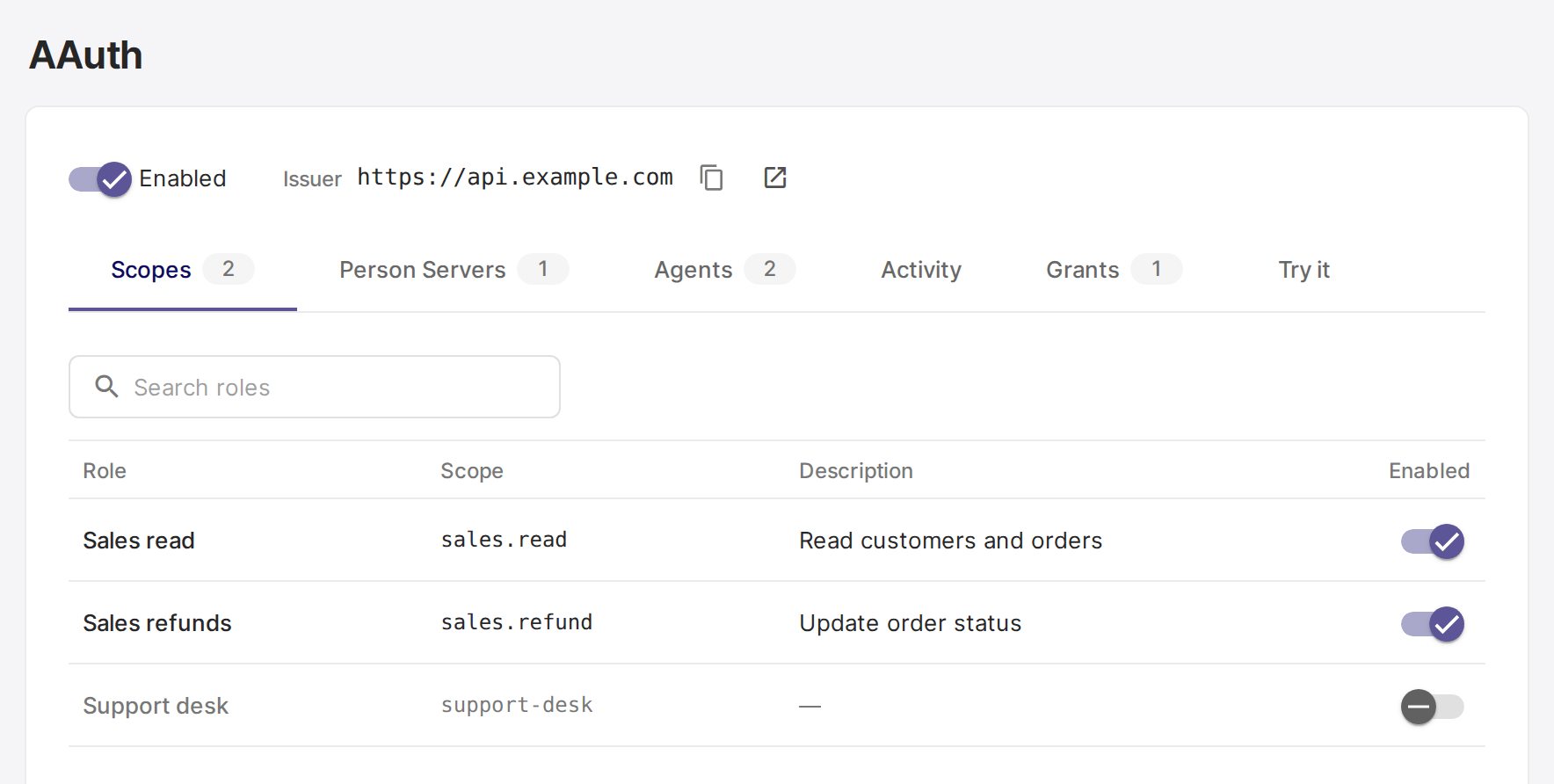
| Column | What it is |
|---|---|
| Role | The DreamFactory role. Create and edit roles under API Generation & Connections > Role-Based Access. |
| Scope | The name agents ask for and person servers put in tokens, for example sales.read. |
| Description | The text the approving person reads on the consent page, for example "Read customers and orders". |
| Enabled | Only enabled scopes can be requested, approved or used. |
To change a scope name or a description, click it, type, and press Enter or click elsewhere to save. Esc cancels. Search roles filters the list by role name, role description, scope name and scope description. The order is fixed when the page loads, so a row you just enabled stays where it is until you reload. With no roles at all the tab shows No roles and an Open Roles button.
Scope names
- Use 1 to 64 characters: lowercase letters, digits and
._:-, starting with a letter or digit. - Each name belongs to one role.
profileandemailare reserved for identity claims.- Until you configure a role, its scope name is derived from the role name: lowercased, with every run of other characters replaced by
-and leading or trailing-._:removed. Sales read becomessales-read. If you enable the role without naming the scope and another role already uses that name, the role id is appended, for examplesales-read-7. - Renaming a scope keeps it attached to its role: person server allow-lists and Always allow grants move to the new name.
- The old name stays reserved for that role for 61 minutes, the longest lifetime of an auth token from any person server plus a minute, so no other role can take it while tokens naming it may still exist. The role itself can take the name back.
DF_AAUTH_AUTH_TOKEN_TTLdoes not change the reservation. What happens to a deleted role's name is described in Good practice. - DreamFactory records when a role took its scope name, when the scope was first configured and at every rename. An auth token issued before that moment does not count for the scope, so a token issued for an earlier holder of the name, even one an external person server minted late, never reaches the role that holds it now. The agent gets a step-up challenge instead.
Auth tokens that carry the old name stop covering requests, so an agent holding one gets a step-up challenge for the new name on its next request. That step-up still lists the old name as well, so the consent card shows the old name locked (You don't have this role) next to the new one, and an Always allow grant does not answer it: the person approves once more.
| Message | Cause |
|---|---|
Scopes use lowercase letters, digits and . _ : - (up to 64) | The admin app refused a name that breaks the rules above. |
sales.read is already used by another role | The admin app found the name on another row of the list, including the derived name of a role that is not configured yet. |
Scope must be 1-64 characters: lowercase letters, digits, and . _ : - (starting with a letter or digit). | The admin API refused the name. The API lowercases capital letters itself, so Sales.Read sent to the API is stored as sales.read; the admin app refuses it instead. |
'email' is reserved for identity claims. | The name is profile or email. |
Scope 'sales.read' is already used by another role. | The admin API found the name on another role. |
Scope 'sales.read' belonged to another role until recently, and auth tokens issued for it may still be in use. Choose another name, or try again in an hour. | Another role gave up the name within the last 61 minutes, by a rename or because the role was deleted. A deleted role's names are held for no role, so no role can take them until the reservation ends. A role that sends its own current name, unchanged, never gets this message. |
Descriptions
The description is what the person sees next to the scope name when they approve an agent. Write it for them, in plain words: "Read customers and orders", "Update order status". Without a description, the role name is shown.
Enabled scope names and descriptions are published in the resource metadata (scope_descriptions in /.well-known/aauth-resource.json), which anyone can read. Don't put anything in them that you would not show an outsider.
How DreamFactory picks a scope
Agents usually don't name a scope. When an agent calls an API with a person token, or with an auth token that does not cover the request, DreamFactory works out the scope the request needs and puts it in the resource token it returns:
- It takes the enabled scopes that the person server behind the token may vouch for (see Person Servers).
- It keeps those whose role allows the request: the service, the path and the verb, checked exactly as for an API key with that role.
- It asks for the least privileged of them: the role with the fewest service access rows, then the fewest verbs in those rows, then the lowest role id.
When no enabled scope allows the request, the agent gets 403 insufficient_scope with No scope allows <METHOD> <service>/<path>, and no one is asked to approve anything.
With the example roles from the quickstart, Sales read (one access row: service sales, component _table/*, GET) and Sales refunds (one access row: service sales, component _table/orders/*, GET and PATCH):
| Request | Enabled scopes whose role allows it | DreamFactory asks for |
|---|---|---|
GET /api/v2/sales/_table/orders | sales.read (1 row, 1 verb), sales.refund (1 row, 2 verbs) | sales.read, the one with fewer verbs |
GET /api/v2/sales/_table/customers | sales.read | sales.read |
PATCH /api/v2/sales/_table/orders/5 | sales.refund | sales.refund |
PATCH /api/v2/sales/_table/customers/3 | None | Nothing: 403 insufficient_scope, No scope allows PATCH sales/_table/customers/3 |
An agent that holds an auth token for sales.read and sends the PATCH gets a step-up challenge for sales.refund; the person then approves the added scope. When an auth token carries several scopes, each request runs under the least privileged of them that allows it, and the response header AAuth-Scope names that scope. An agent can also ask for named scopes up front at /aauth/authorize. Both exchanges are described in The AAuth HTTP Exchange.
DreamFactory counts access rows and verbs, not what the rows reach. A role with one broad row (component *, GET on every table) is picked before a narrower role with two rows. Keep the roles you enable as scopes narrow, and don't enable a broad role next to narrow ones for the same service.
Good practice
- Create roles for agents instead of enabling broad existing roles. One read role and one narrow write role per use case, such as Sales read and Sales refunds, give approvers a clear choice.
- Agents never get sys admin rights. A request runs with exactly the scope's role, even when the person who approved it is a sys admin.
- The role's filters, lookups and limits apply to agent requests as they do to any caller with that role.
- Turning a scope off takes effect on the agent's next request: auth tokens that carry it stop covering requests.
- Deleting a role deletes its scope. Once the role is gone, the name is removed from Always allow grants (a grant left with no scope is deleted) and from the scope list of every person server, and stays reserved for 61 minutes for no role at all, not even a new role that gets the deleted role's id. Names the role renamed away earlier are held for no role too, for the rest of their 61 minutes. A rename that another admin saves while the delete runs is given up with the role in the same way.
- A delete that DreamFactory refuses changes nothing the role can notice: it keeps its scope, its grants and its person server lists, and saving its scope name again is accepted. See When a rename or role delete fails.
- A role that takes a scope name, as a new scope or by a rename, starts with no Always allow grants and no person server list entries for that name.
- A role that is not active can't be used: requests that would need it get
403 insufficient_scope.
A role that later takes a deleted role's scope name, as a new scope or by a rename, starts with no Always allow grants and no person server trust for it at this DreamFactory, with two exceptions. A person server set to All scopes trusts every enabled scope, so it can vouch for the new role at once. An external person server keeps its own standing approvals by scope name, which DreamFactory can't reach. Before you give an old name to a new role, check which person servers are set to All scopes, or choose a new name.
When a rename or role delete fails
A rename and the move of its grants and person server lists happen together: if DreamFactory can't update them (a database error), the rename is not made, and you can try again.
DreamFactory refuses to delete a role that other records still refer to, for example a role that a login service (LDAP, Active Directory, OAuth, OpenID Connect, SAML or Azure AD) uses as its default role. The admin app or the API then reports 500 with the database error, on MySQL Failed to delete resource: SQLSTATE[23000]: Integrity constraint violation: 1451 Cannot delete or update a parent row .... A refused delete changes nothing the role can notice. The role keeps its scope and its scope name: saving the name again is accepted, and no other role can take it. It also keeps the names it renamed away (it can take them back), its Always allow grants and its place in person server lists. Remove the reference first, for example by giving the login service another default role, then delete the role again.
AAuth itself refuses a role delete with 500 and Failed to delete resource: AAuth could not release this role's scope name, so the role was not deleted. Try again. in two cases: when it cannot reserve the role's scope name before the delete, and when the delete runs in a transaction (rollback=true on the API) and removing the name from grants and person server lists fails, so the whole delete is rolled back. In both cases nothing changes; try again once the database is healthy.
When the delete runs outside a transaction and removing the name fails after the role is gone, the role stays deleted. DreamFactory logs the failure and tries once more when the request ends (the log lines are listed under Monitoring). Even if the second try fails, the name stays reserved for no role for 61 minutes, and a role that takes it later starts without the grants and person server list entries that still show it. Names the role renamed away earlier then stay reserved for the deleted role's id until their 61 minutes are up. Revoke such grants on the Grants tab if you want them gone.
Who can approve a scope
On this DreamFactory's own person server, a person can approve a scope only when they hold its role, in any app, or when they are a sys admin. A person can't give an agent more than they have. You assign roles to a user under Admin Settings > Users: edit the user and add an App and Role pair in the Roles panel. DreamFactory allows one role per user per app, so to let one person approve two scopes, assign the two roles in two different apps. An app that you create under API Keys only to carry the assignment works: holding the role in any app is enough.
Scopes the person can't approve are still listed on the consent page, locked and marked You don't have this role. When nothing new that the agent asks for can be approved, Allow is disabled and Deny is the only button that works.
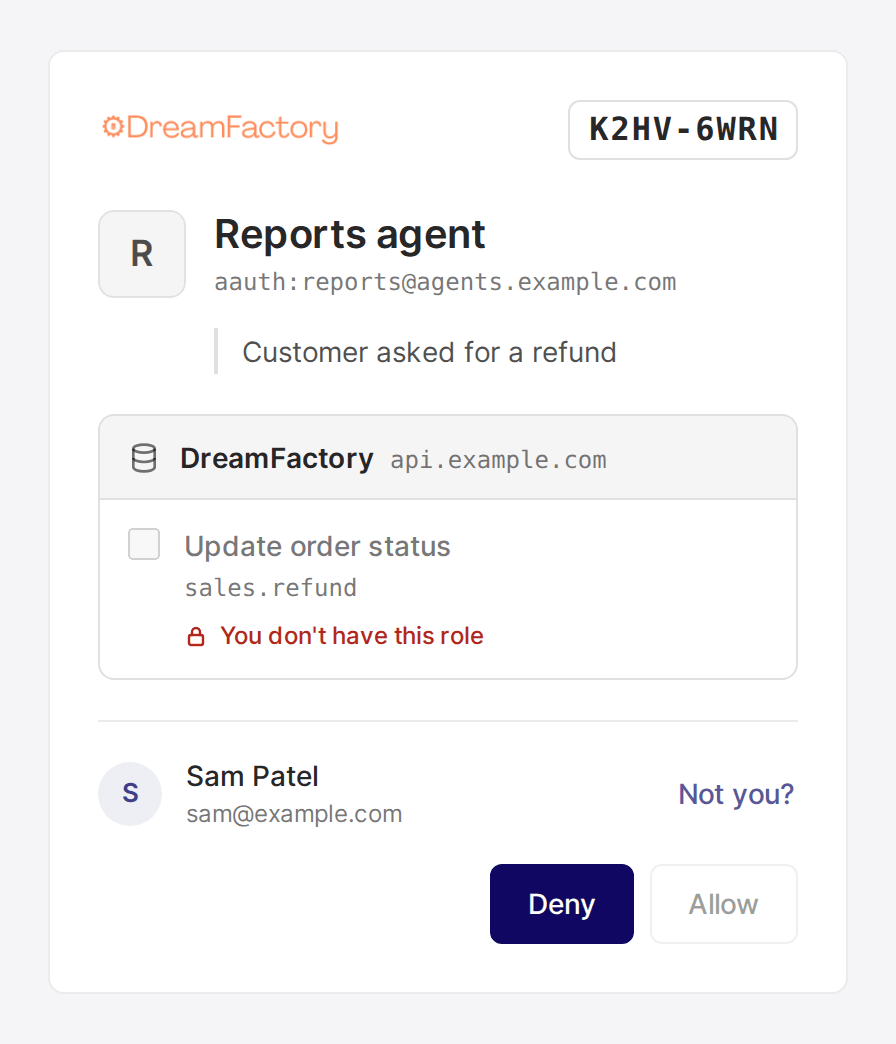
DreamFactory checks the person again on every request made with an auth token from its own person server:
| When | The agent's next request gets |
|---|---|
| The user is deactivated or deleted | 403 denied, The person this agent acts for is no longer active. |
| The user no longer holds the scope's role | 403 insufficient_scope, The person no longer holds the role behind scope sales.read. |
On the consent pages, a person token names one person. Scope requests the agent makes with it can be approved only by that person; anyone else who signs in on such a request is signed out and sees Sign in as the person this agent acts for.
An agent is not bound to one person. Any active user who signs in first on an agent's person-token link and clicks Continue as becomes the person the agent acts for, and can approve every scope whose role they hold. Agents must send links only to the intended person. Give approvers the checklist in What to tell approvers.
With an external person server, that server decides who may approve; see What changes with an external person server.
Person Servers
A person server is where people approve agents and where agents get person and auth tokens. DreamFactory accepts tokens only from the person servers listed and enabled on this tab.
Open the Person Servers tab.
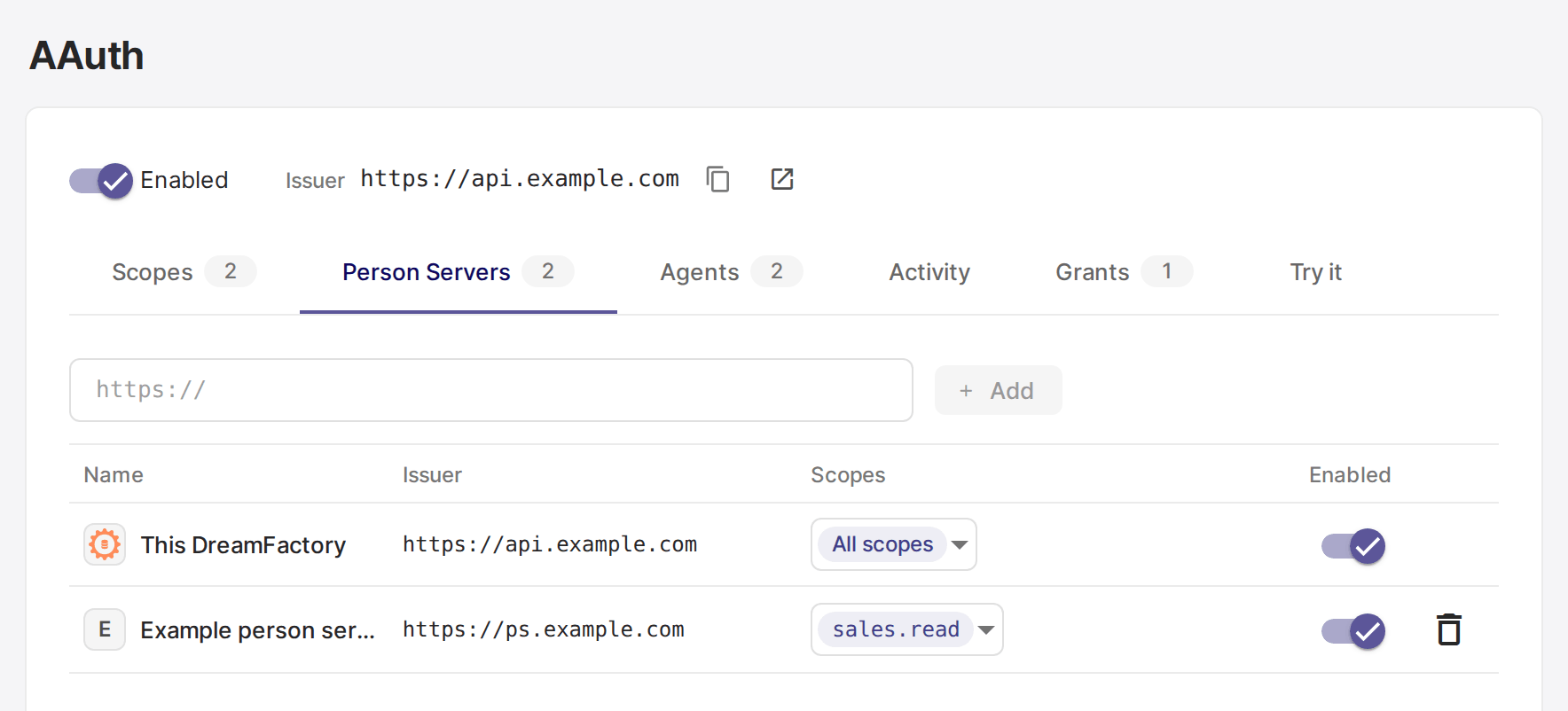
| Column | What it is |
|---|---|
| Name | This DreamFactory, or the name from an external server's metadata (its host when it has none) |
| Issuer | The person server's https origin |
| Scopes | The scopes it may vouch for: All scopes or a list. No scopes when none are chosen. |
| Enabled | Switch off to stop accepting its tokens |
| (remove icon) | Removes an external person server |
To change the Scopes column, open its list and choose All scopes or individual scopes. All scopes covers every enabled scope, including scopes you enable later; choosing a single scope clears All scopes, and choosing All scopes clears the single ones. The change is saved when the list closes. With no enabled scopes, the list reads No enabled scopes.
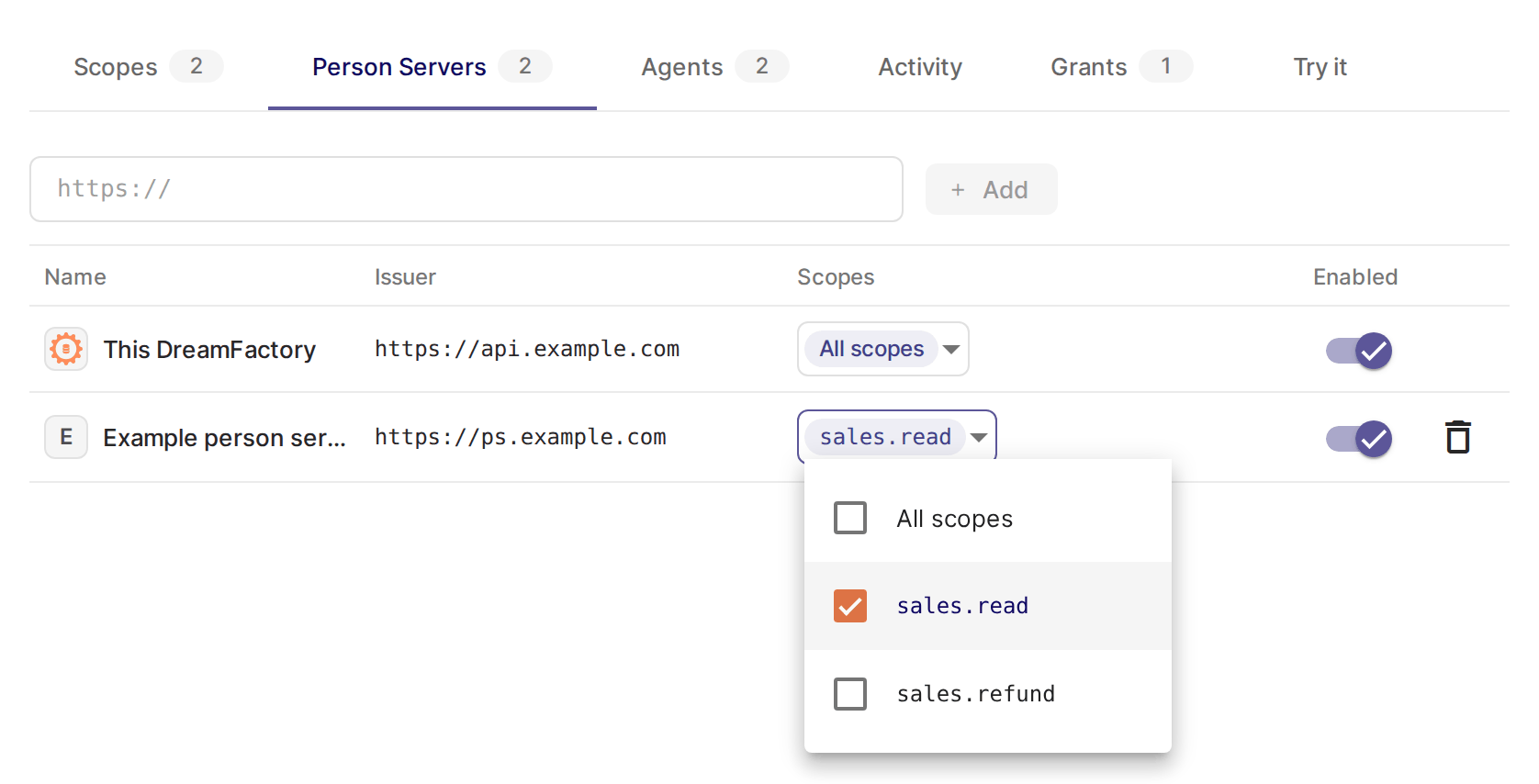
This DreamFactory
This DreamFactory is the built-in person server, where people sign in with their DreamFactory account (or a directory account or single sign-on, see Approving Agents with Company Sign-In). It is always listed first, and its Scopes column shows All scopes until you narrow it.
Switching it off makes the API refuse tokens issued by DreamFactory's own person server, with 401 invalid_jwt and The token issuer is not a person server trusted by this DreamFactory. The consent pages and the person server's token endpoints keep running, but the tokens they issue no longer work on this DreamFactory. To switch the built-in person server off completely, see ps_local_enabled in Settings stored in the database.
It can't be removed: the API answers The local person server cannot be removed. Turn it off instead.
Add an external person server
-
Type the server's issuer, for example
https://ps.example.com, in the field with thehttps://placeholder, and click Add.DreamFactory fetches
https://ps.example.com/.well-known/aauth-person.json. On success, a toast readsAdded Example person serverand a new row appears, switched on, with No scopes. -
Open the new row's Scopes list, choose the scopes it may vouch for, and close the list.
Until you choose, the server can't vouch for any scope, so its tokens are of no use yet.
If the server can't be added, the reason is shown:
| Message | Cause |
|---|---|
Enter the person server origin, like https://ps.example.com. | The issuer is not exactly https://host: no path, port, query, user name or upper-case letters. A trailing / is removed for you. |
This DreamFactory is already listed. | You entered this DreamFactory's own issuer. |
That person server is already listed. | The issuer is already on the tab. |
Could not read https://ps.example.com/.well-known/aauth-person.json: <reason> | The metadata could not be fetched or is not valid; the reason says why. Servers on internal networks must be admitted first, see Private networks and custom CAs. |
The person server metadata has no auth_token_endpoint. | The metadata lacks a required field: person_token_endpoint, auth_token_endpoint or jwks_uri. The message names the missing one. |
A person server on an internal network must be admitted before DreamFactory fetches its metadata: list its host in DF_AAUTH_PRIVATE_HOSTS (for example ps.corp.internal) or its network in DF_AAUTH_PRIVATE_NETWORKS, and set DF_AAUTH_CA_BUNDLE when its certificate comes from an internal CA. See Private networks and custom CAs.
What changes with an external person server
Trust an external person server when your organization already runs an AAuth person server that approves agents for many APIs, and you want DreamFactory to accept the person and auth tokens it issues. The agent decides which person server it uses; DreamFactory decides whether to accept that server's tokens and for which scopes. For agents approved there:
- The external person server decides who may approve. DreamFactory's rule that a person must hold the scope's role does not apply, because DreamFactory doesn't know the person. DreamFactory still enforces the scope's role on every request, and only for the scopes you allowed for that server.
- No DreamFactory user is attached. Requests run with the scope's role alone, so user lookups, per-user limits and filters on the user don't apply. Deactivating a DreamFactory user has no effect on these agents.
- Activity shows the external subject. The Person column reads
<sub>@ps.example.com, with the subject the external server put in the token. - Requests and blocks follow signing keys. The tokens don't name the agent, so DreamFactory lists their requests under the agent id that the signing key most recently presented in an agent token here, which the agent's provider chooses (see Which agent a request belongs to). A block applies to the signing keys DreamFactory has seen with the agent's agent token, and to a key's
jkt:row when you block that row; see Block an agent. - Grants live at the external server. The Grants tab lists only grants given on this DreamFactory's own person server.
- Untrusted servers are refused. Tokens from a person server that is not listed, or is switched off, get
401 invalid_jwtwithThe token issuer is not a person server trusted by this DreamFactory.
Remove an external person server
Click the remove icon on its row. The dialog Remove Example person server? warns Tokens from this Person Server will stop working. Click Remove; a toast reads Removed Example person server. Its tokens are refused from the next request on. To stop accepting a server for a while without losing its scope list, switch it off instead.
The tab has no "last used" column. The API returns last_used_at for each person server: the last time a verified request carried one of its tokens, whether or not the request was then allowed (GET /api/v2/system/aauth/person_servers).
Agents
An agent appears on the Agents tab the first time it sends a signed request to this DreamFactory: to an API under /api/v2, to the authorization endpoint /aauth/authorize, or to this DreamFactory's person server. An agent that has only called the person server so far is listed with 0 requests, and you can block it like any other.
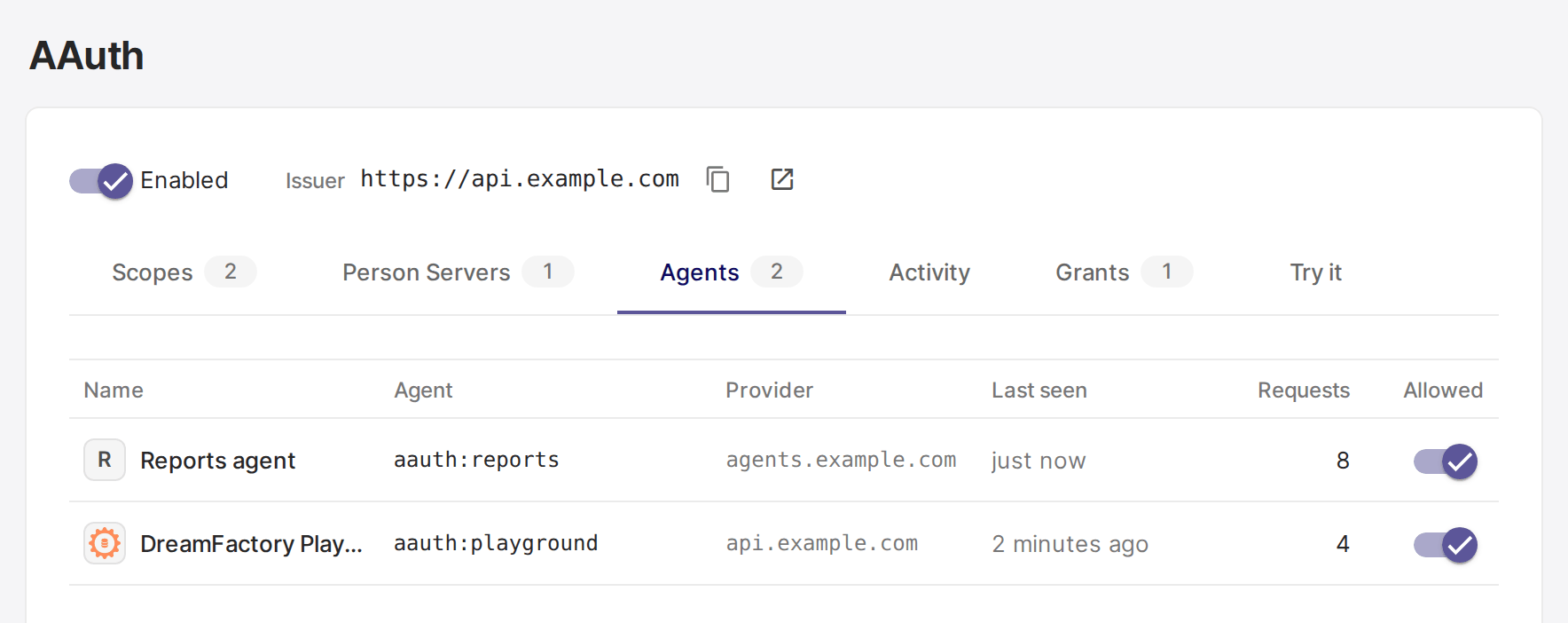
| Column | What it is |
|---|---|
| Name | The name in its agent provider's metadata, for example "Reports agent". Anyone can publish any name, so don't rely on it. |
| Agent | The agent id. When its host is the provider's host, only the part before @ is shown, for example aauth:reports for aauth:reports@agents.example.com; an agent id on any other host is shown in full. |
| Provider | The host of the agent provider that signed its agent token, for example agents.example.com |
| Last seen | When it last sent a signed request (hover for the exact time) |
| Requests | How many signed API requests (under /api/v2) that passed signature checks belong to it, including refused ones; see Which agent a request belongs to. Calls to the person server and to /aauth/authorize are not counted. |
| Allowed | On: the agent may call. Off: the agent is blocked. |
The built-in DreamFactory Playground agent that Try it uses is listed like any other agent, with the agent id aauth:playground@api.example.com. With no agents yet, the tab shows No agents yet and a Try it button.
An agent's name comes from metadata the agent's own provider publishes. Identify agents by their agent id together with their provider: DreamFactory verifies the agent token against the provider's keys, but df-aauth 0.1.0 does not check that the host in the agent id is that provider's host. An agent id shown in full on this tab (with a host other than Provider) was asserted by a provider for a domain it may not control. DreamFactory keeps agents, blocks and grants per agent id and provider, so such an agent is a separate row and cannot use another agent's grants. A block covers an agent id and the signing keys DreamFactory has seen it use; see What a block covers for what that means for an agent that controls an agent provider.
Which agent a request belongs to
Every signed request belongs to one agent. That agent's name appears in the request's Activity row, the request counts toward its Requests, and its block applies to the request:
| The request is signed with | It belongs to |
|---|---|
| An agent token | The agent id in the token. |
| A person or auth token from this DreamFactory's person server | The agent the token was issued for: the agent the person approved, or whose Always allow grant answered. This holds even when the agent's signing key has since presented an agent token for another agent id. |
| A person or auth token from an external person server | The agent id that the signing key most recently presented in an agent token here. These tokens don't name the agent, and the agent's provider decides what its next agent token says. A key that DreamFactory has never seen with an agent token is listed as a jkt: row of its own (see Block an agent). |
DreamFactory keeps a record of every person and auth token its person server issues, with the agent it was issued for, until an hour after the token expires. A token whose record can't be written is not issued. A request with one of its own tokens that it has no record of, for example after the system database was restored from a backup taken before the token was issued, is refused with 401 invalid_jwt and This DreamFactory has no record of issuing this token. Get a new one.; the agent then asks for a new token. The aauth command, the Node and Python clients and Try it do that by themselves.
Block an agent
-
On the Agents tab, switch the agent's Allowed switch off.
A toast reads
Blocked Reports agentand the agent's name turns red.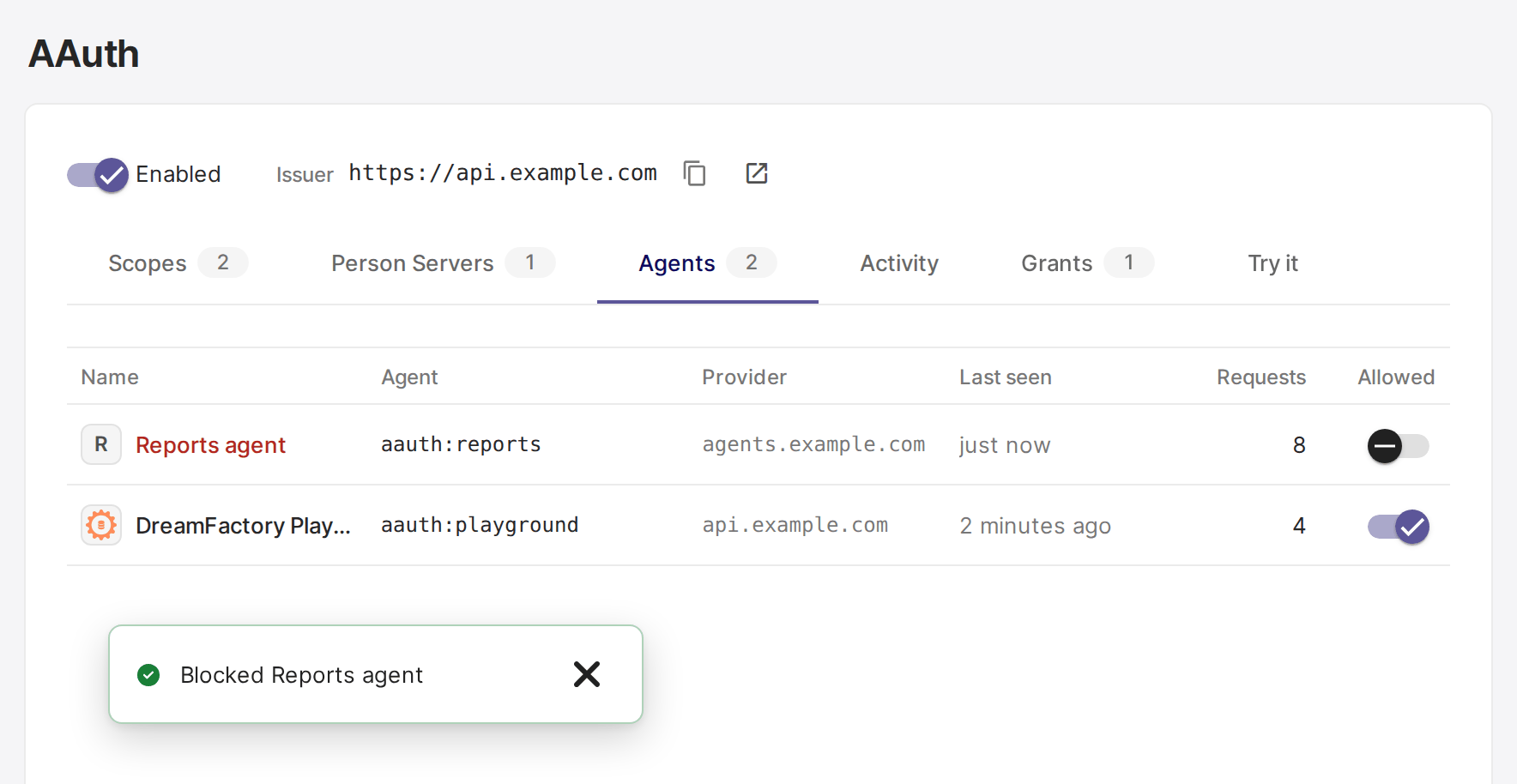
-
To unblock it, switch Allowed back on. A toast reads
Unblocked Reports agent.
A blocked agent gets 403 agent_blocked with This agent is blocked on this DreamFactory. on every request, whatever token it presents: at the APIs, at the authorization endpoint (/aauth/authorize), and at DreamFactory's own person server, which refuses to issue it tokens or let it collect pending ones. Activity records each refused API and authorization endpoint request as Blocked, under the blocked agent.
DreamFactory also remembers every agent id a signing key has presented an agent token for, and refuses the key while any of them is blocked. An agent token that names a new agent id, sent before or after the block, frees neither the key nor the person and auth tokens issued to it. Blocking the agent that holds an Always allow grant also stops a new key under that agent id: the person server refuses the new key's agent token with 403 agent_blocked, so the grant serves nothing. A new key under a new agent id is a new agent, and a person must approve it.
A signing key can present agent tokens for at most 20 agent ids at this DreamFactory. An agent token that names one more is refused with 403 too_many_agents and This signing key has already presented agent tokens for 20 agent ids at this DreamFactory. Use a new key for a new agent., and Activity records it as Error, without an agent. A real agent uses one agent id per key. See What a block covers.
Person and auth tokens from an external person server don't name the agent. A key that DreamFactory has never seen with an agent token is listed as jkt: followed by the first 12 characters of its key thumbprint. Block that row like any other; the block holds even if the key later presents an agent token.
Forget an agent
There is no button for this. DELETE /api/v2/system/aauth/agents/{id} removes the agent's row and the keys DreamFactory remembered for it; its Activity rows stay unless you add ?purge_activity=true. The agent reappears on its next signed request, allowed.
A blocked agent can't be forgotten, because forgetting it would unblock it: the API answers Unblock the agent before removing it; a removed agent is allowed again.
The AAuth Agents tab is separate from the Agents service in the sidebar, which registers agents that authenticate with their own API keys.
Activity
The Activity tab has one row for every signed request to an API under /api/v2, newest first. It is the first place to look when an agent fails.
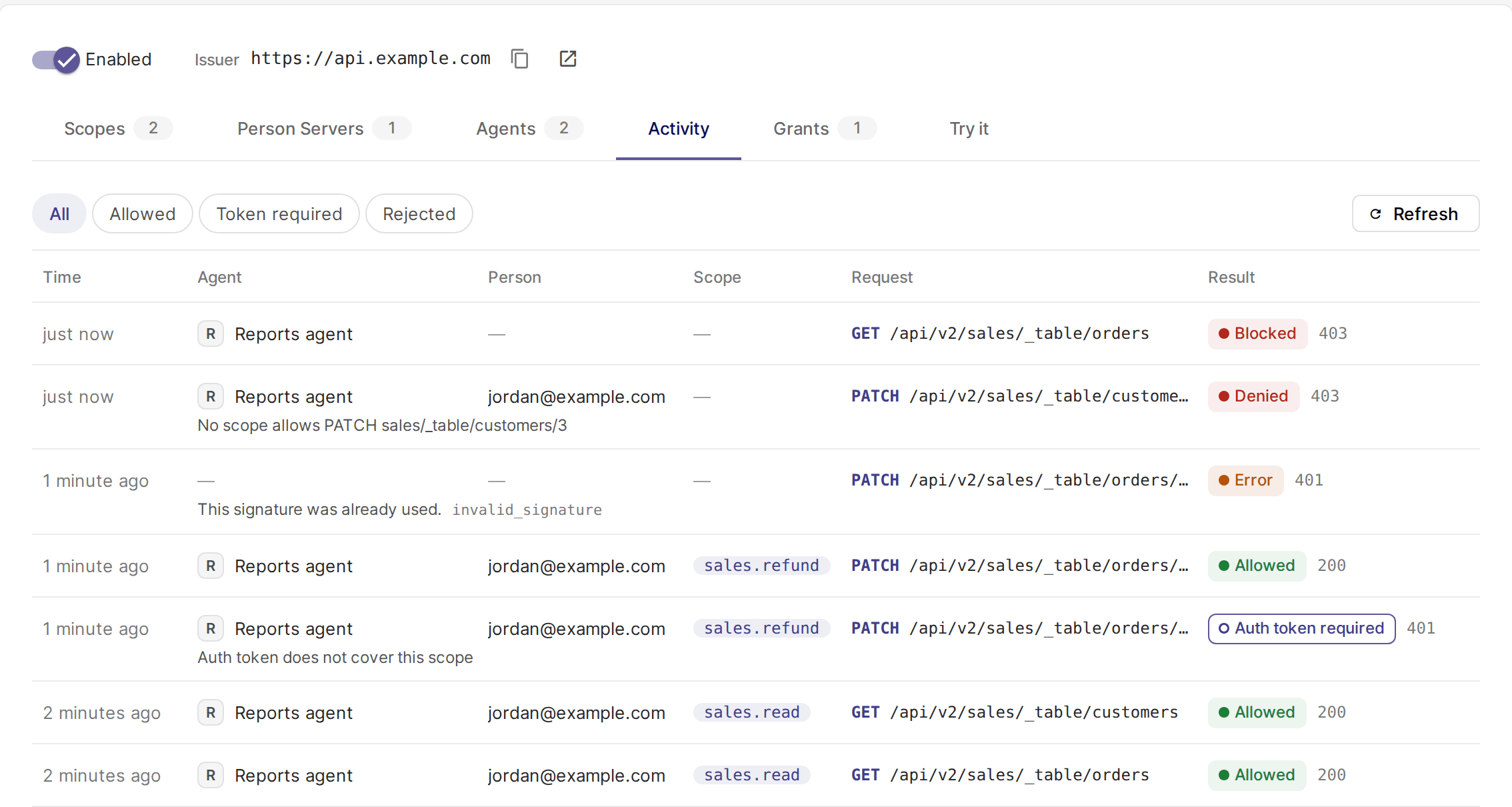
| Column | What it shows |
|---|---|
| Time | When the request arrived (hover for the exact time) |
| Agent | The agent the request belongs to (see Which agent a request belongs to): its name, or its agent id when it has none. Empty when the request was refused before DreamFactory knew the agent, for example because its signature did not verify. |
| Person | The DreamFactory user's email when the token came from this DreamFactory's person server, otherwise <sub>@<person server host>. Empty for requests made with the agent token alone. |
| Scope | The scope the request ran under, or the scope the agent was asked for |
| Request | Method and path, without the query string |
| Result | The outcome and the HTTP status the agent received |
Under a refused row, a line gives the reason.
| Result | Means |
|---|---|
| Allowed | The request ran under the scope's role. The status is DreamFactory's own response status, so a 404 or 400 from the service can appear here. |
| Person token required | The agent sent only its agent token and was asked for a person token. |
| Auth token required | The agent was asked for an auth token for a scope. The reason Auth token does not cover this scope marks a step-up to a further scope. |
| Denied | Refused after verification. Reasons: No scope allows <METHOD> <service>/<path>, Person is inactive or deleted, Person no longer holds this role, Role is unavailable. |
| Blocked | The agent is blocked. |
| Error | A signature or token did not verify. The reason shows the protocol error code and text, for example invalid_signature with This signature was already used. Also, without an agent: invalid_jwt with This DreamFactory has no record of issuing this token. Get a new one. for a person or auth token of this DreamFactory that it has no record of; status 403 and too_many_agents when a signing key presented an agent token for one agent id more than it may use; and status 503 with temporarily_unavailable and agent state unavailable when DreamFactory could not read or update the agent's state, or read the token's record, in its system database, so it could not rule out a block, and refused the request. |
The buttons above the list filter it:
| Filter | Shows |
|---|---|
| All | Every row |
| Allowed | Allowed |
| Token required | Person token required and Auth token required |
| Rejected | Denied, Blocked and Error |
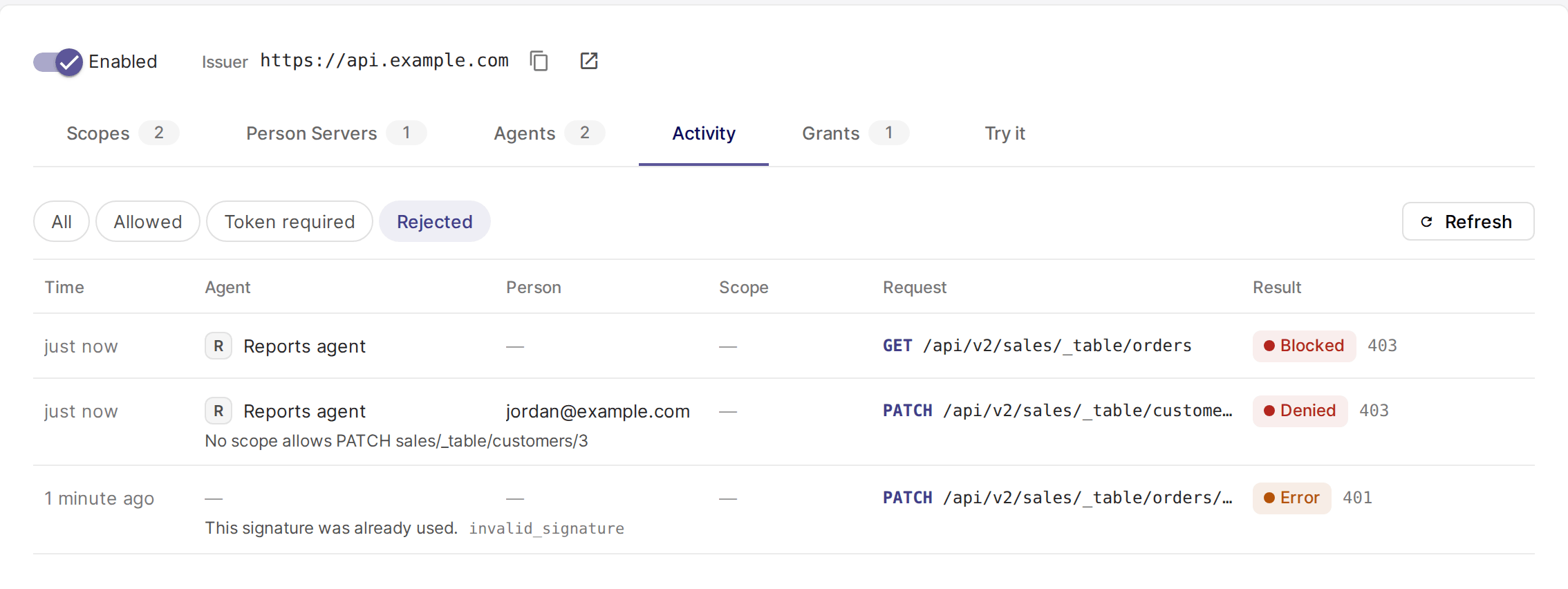
Refresh reloads the list, and Load more fetches the next 100 rows. Error codes and their fixes are listed in the error reference.
Good to know:
- Rows are kept for 30 days by default (
DF_AAUTH_ACTIVITY_RETENTION_DAYS, see the configuration reference). - Requests to the person server (
/aauth/person,/aauth/token,/aauth/pending/...) and to the consent pages are not listed. Requests to/aauth/authorizeare listed only when they are refused because the agent is blocked (Blocked), because DreamFactory has no record of the token or the signing key has used too many agent ids (Error), or because the agent's state could not be read or updated, or the token's record could not be read (Error,503). Other/aauth/authorizerequests are not listed, including those refused for other reasons. - Requests that fail before anything is verified are recorded at most 20 times a minute per client address, so junk requests can't flood the log.
- Activity is an operational log, not a complete audit record. A row can be missing when its database write fails (the request is still answered), rows are pruned after the retention period, and sys admins can delete an agent's rows (
DELETE /api/v2/system/aauth/agents/{id}?purge_activity=true). For audit purposes, export the rows to your own log store. - The API equivalent is
GET /api/v2/system/aauth/activity?limit=100&before_id=&outcome=allowed,denied; see Admin API.
Activity records each call with the person and the scope it ran under. DreamFactory does not keep a separate record of each approval decision (who approved which scope, and when). Grants are stored only for Always allow.
Grants
A grant is a person's Always allow. When the person ticks Always allow on the consent card, DreamFactory stores a grant for that person, that agent and that resource. The next time the agent asks DreamFactory's person server for an auth token for scopes the grant covers, on the same resource, it gets the token at once, without asking the person.
Open the Grants tab.
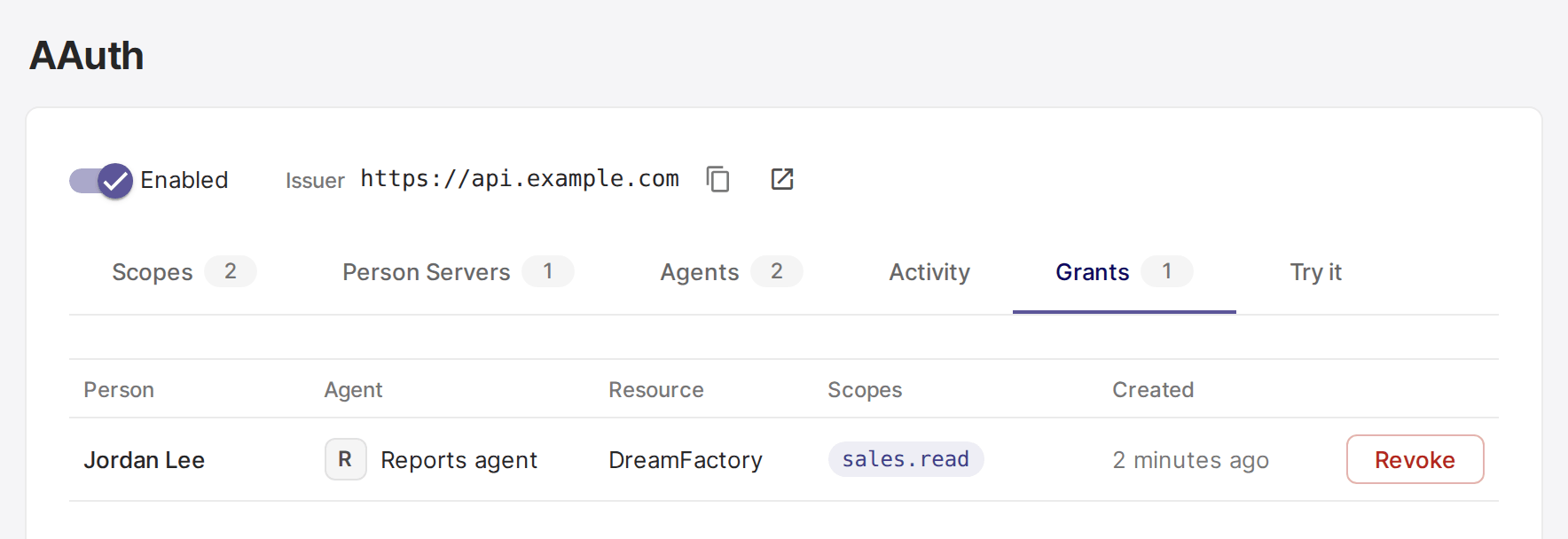
| Column | What it is |
|---|---|
| Person | Who gave the grant |
| Agent | The agent it was given to |
| Resource | The API it covers: DreamFactory for this instance |
| Scopes | The scopes it covers. A later Always allow by the same person for the same agent adds scopes to the same grant. |
| Created | When it was given |
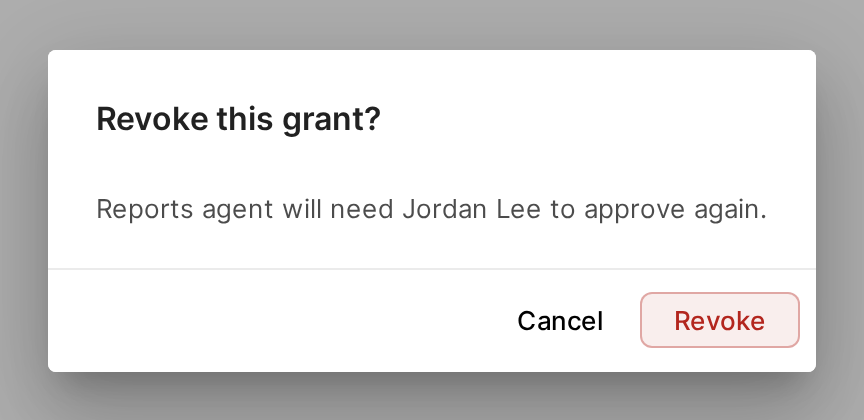
To revoke a grant, click Revoke. The dialog Revoke this grant? says Reports agent will need Jordan Lee to approve again. Click Revoke; a toast reads Grant revoked.
What a grant does and doesn't do:
- A grant answers only when it covers every scope the agent asks for and the person still holds the role behind each of them. Otherwise the request goes to the person as usual. If the person loses a scope's role, the auth tokens they approved for it stop working too.
- A grant never skips the person token step. When the agent's person token expires, after at most an hour, the person must open a new link and continue again; see Token lifetimes.
- Revoking a grant stops future automatic approvals. Auth tokens already issued under it keep working until they expire, at most one hour. To cut the agent off now, see Responding to an incident.
- Deleting a DreamFactory user deletes their grants. Deleting a role removes its scope name from grants, and deletes a grant left with no scope; see Good practice.
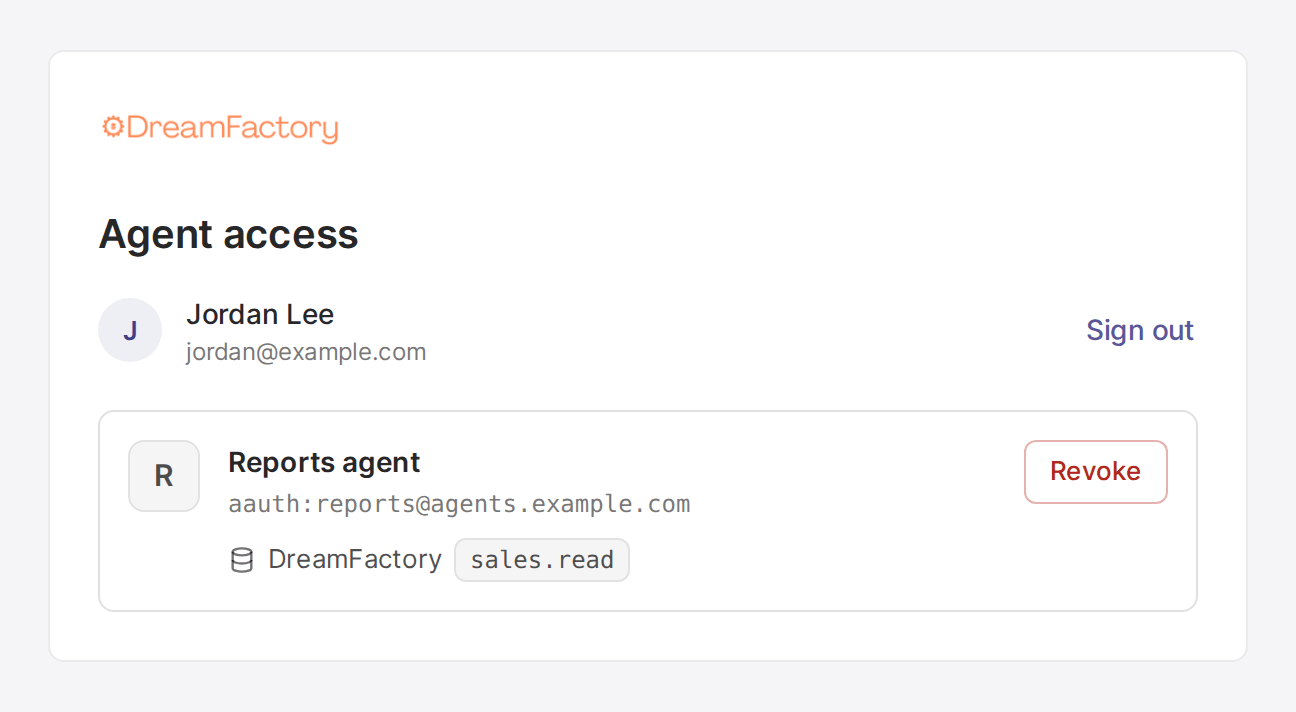
People see and revoke their own grants at https://api.example.com/aauth/grants. They sign in the same way as on the consent page and see the heading Agent access, each grant with a Revoke button, and Sign out. Without grants the page reads No agents have standing access.
Try it
Try it runs a built-in agent named DreamFactory Playground against your own API and draws every HTTP exchange across three lanes: Agent, API and Person Server. The agent is hosted by this DreamFactory's agent provider and uses the same protocol as any other agent, so a successful run shows that the issuer, your reverse proxy, your scopes and the consent pages all work. The quickstart walks through a first run.
| Control | What it does |
|---|---|
| Method | GET, POST, PATCH, PUT or DELETE |
| Path | The path after the issuer origin, starting with /. The default, /api/v2/sales/_table/orders?limit=5, assumes a service named sales; change it to one of your services. |
| Body | Shown for POST, PATCH and PUT. Must be JSON (The body isn't valid JSON). |
| Send | Starts a run. Disabled while AAuth is off or a run is in progress. |
| Forget tokens (circular arrow icon) | Discards your cached person and auth tokens. A toast reads Tokens forgotten. |
Each row of a run is one step:
| Row | Lane | What happened |
|---|---|---|
| Agent token | Agent | The Playground's agent token was issued, for the agent id aauth:playground@api.example.com |
| Cached tokens | Agent | The run reuses an auth or person token from an earlier run (Reuse auth token, Reuse person token) |
| Call | API | The signed request to your path. A 401 row shows what the agent was asked to get next. |
| Discovery | Person Server | GET /.well-known/aauth-person.json (Person server metadata) |
| Person token | Person Server | POST /aauth/person. 202 means a person must approve. |
| Auth token | Person Server | POST /aauth/token with the resource token. 202 means approval is needed; 200 means an Always allow grant answered. |
| Poll | Person Server | GET /aauth/pending/... until the person answers (Poll person token, Poll auth token) |
Click a row to see its Request, Response (headers and body) and Tokens. Each token is decoded into Header and Payload, with its expiry; Raw token shows the encoded JWT.
When a person must approve, a card reads Waiting for approval, with the code, a copy icon (tooltip Copy code) and Approve. Approve opens the consent page in a new browser tab. Try it checks the pending request every 2 seconds and carries on by itself after the decision. Screenshots of a whole run are in the quickstart.
When a run reuses cached tokens and the API no longer accepts them, Try it starts over once. If the first Call of such a run gets a 401 with a Signature-Error header and no new challenge, for example invalid_jwt with This DreamFactory has no record of issuing this token. Get a new one. or after the person signing key was revoked, Try it forgets your cached person and auth tokens and calls again with the agent token alone. The run then shows a second Call with 401 (a person token is required), Discovery and Person token, and waits for approval. A second such 401 ends the run, and so does any other 401.
A run is shown only while the AAuth page stays open. Switching between the AAuth tabs keeps it; leaving or reloading the page removes it from the screen, and you click Send to start again.
Any user who holds the scope's role can approve a Try it run. Click Forget tokens, then Send, and instead of clicking Approve, send them the code with the address https://api.example.com/aauth/interact. They click Continue as, and their page moves on to the scope request by itself. The first browser that acts on a code (signs in, presses a button on the card or types the code) owns the request, so don't do any of that yourself first. Without Forget tokens, a run that reuses your cached person token acts for you, and only you can approve its scopes.
The run ends with Response and the final status, or with Failed and a reason. For the reasons and their fixes, see Try it fails.
A request that needs another scope, such as a PATCH after a read, runs a step-up: the call is challenged for the further scope and the run waits for approval again (quickstart step 8).
Limits and requirements:
- A run makes at most 6 API calls (
Too many round trips.) and is kept on the server for 15 minutes. - Each admin has their own Playground key and their own cached person and auth tokens. A run reuses a cached token while more than 5 minutes of its lifetime (at most an hour) remain. Forget tokens clears only yours.
- Recorded response bodies are cut at 64 KB.
- The approver sees the reason
Try it: <METHOD> <path>, for exampleTry it: GET /api/v2/sales/_table/orders?limit=5. - Try it calls the issuer URL from the DreamFactory server itself. The server must resolve the issuer's host, reach it and trust its certificate; for an internal CA set
DF_AAUTH_CA_BUNDLE(see Private networks and custom CAs). - Try it runs real requests. A PATCH, PUT, POST or DELETE changes your data.
What people see
What to tell approvers
Give the people who approve agents this checklist:
- Open approval links only from an agent you expect to hear from.
- Check that the code at the top of the page matches the code the agent showed you.
- Check the agent id under the agent's name, such as
aauth:reports@agents.example.com. Anyone can choose a name. - If anything looks wrong, click Deny this request or Deny.
- If the page says the code was already used in another browser, another browser acted on that code first. If that wasn't you, ask the agent for a new code and tell your DreamFactory admin.
- Review and revoke your standing access at
https://api.example.com/aauth/grants.
The pages
The person who approves an agent doesn't need the admin app. They open the link the agent gives them, https://api.example.com/aauth/interact?code=7KQM-4D2P, or type the code at https://api.example.com/aauth/interact. Once a code is open, each page shows the DreamFactory logo and the code at the top, so the person can match it with the code the agent showed.
| Page | When it appears | What the person does |
|---|---|---|
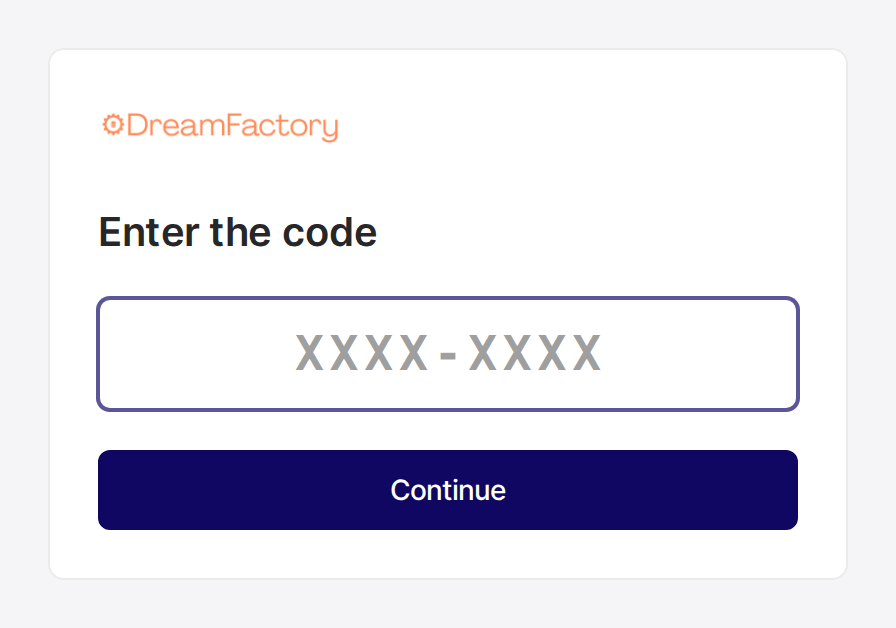
| Enter the code | /aauth/interact was opened without a code | Types the code (XXXX-XXXX) and clicks Continue |
| Sign in | The code is open and the person is not signed in | Signs in with their DreamFactory email and password, or with a directory account or single sign-on (see Approving Agents with Company Sign-In). Deny this request refuses without signing in. |
| Continue as | The agent asked for a person token (the identity step) | Clicks Continue as with their first name (for example Continue as Jordan) to confirm who the agent acts for, or Deny. Not you? signs them out. |
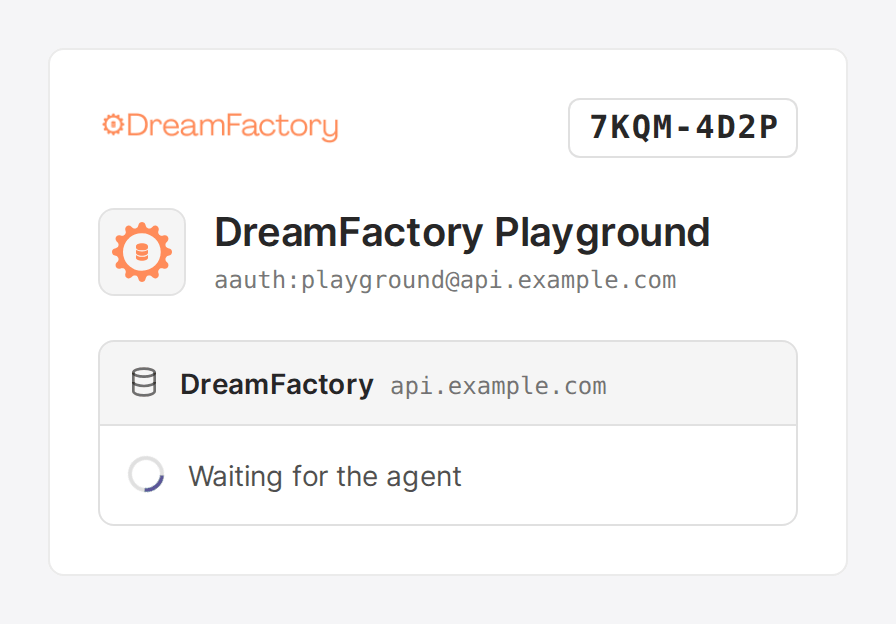
| Waiting for the agent | After Continue as, until the agent asks for a scope | Nothing: the page moves on by itself. After 2 minutes without the agent it reads Request expired and The agent did not follow up in time. Nothing more was shared. |
| Consent | The agent asked for an auth token | Keeps or clears each scope, optionally ticks Always allow, then clicks Allow or Deny |
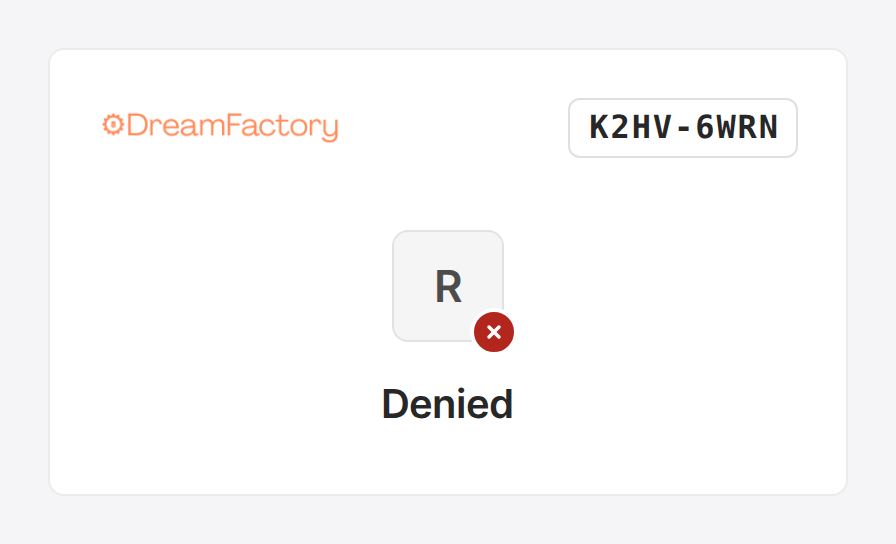
| Approved or Denied | After a decision | Nothing: the page shows only the outcome with the agent's tile. If the agent's link carried its registered callback address (&callback=), the browser goes there about a second later; otherwise the page stays, and the person closes the tab. |
The sign-in card, Continue as, the consent card and Approved are shown in quickstart step 5. The other pages:
Screenshots of the other pages
Enter the code
Waiting for the agent
Denied (here for Reports agent)
Good to know:
- Each card shows the agent's name, which the agent chose, and under it the agent id that its provider vouched for, such as
aauth:reports@agents.example.com. If the agent sent a reason, it is shown below, set off as a quote. Tell approvers to check the agent id, not the name. The card does not show the agent provider, and df-aauth 0.1.0 does not check that the agent id's host is the provider's host (see Agents), so approvers should also expect a link only from an agent they know about. - The consent card lists each requested scope with its description and scope name. On a step-up it lists every scope the agent asks for, the ones already approved and the new one, and Allow needs at least one new scope (
Select at least one new scope to allow, or deny.). - Always allow appears only when there is something new the person can approve.
- Signing in is never consent. After signing in, the person still chooses Continue as or Deny, and Allow or Deny.
- A code is single-use: the first browser that acts on it owns the request and its outcome. Acting means anything the browser sends from the page: signing in, starting single sign-on, typing the code, or any button on the card, such as Deny this request, Not you?, Continue as or Allow. The Waiting for the agent page claims the agent's next request for the same browser. Every other browser, also one that opened the link earlier, then gets
This code was already used in another browser. Ask the agent for a new code.Opening the link claims nothing, so chat link previews and mail link scanners that fetch it before the person do no harm. - A request and its code expire after 10 minutes by default (
DF_AAUTH_PENDING_TTL). Opening an expired or unknown code showsUnknown or expired code.; acting on a page that was opened before the request expired showsThis request has expired. Ask the agent for a new code. - After 10 wrong codes or 10 failed sign-ins from one address within 10 minutes, the page answers
Too many attempts. Try again in a few minutes.After 5 failed sign-ins on one request, the request fails for good:Too many failed sign-ins. Ask the agent to start again.All limits are listed in Built-in limits. - Any active DreamFactory user can sign in on these pages; admin rights are not needed. Which scopes they can approve depends on their roles.
Until the person acts, anyone who has the link or the code can act first: deny the request without signing in or, on an identity step, sign in with their own account and become the person the agent acts for. A scope request can be approved only by the person named in the agent's person token. An agent should show the link and the code only to the person it expects to approve, never in a shared channel.
Responding to an incident
| To | Do | Takes effect |
|---|---|---|
| Stop one agent | Block it on the Agents tab, and every agent id that shares a signing key with it (shares_key_with in the admin API; see What a block covers) | Its next request, with every key DreamFactory has seen it use |
| Cut off an agent you no longer trust, at once | Block it, and also switch off the scopes it holds, or deactivate the person it acts for or remove the role from them | The next request |
| Stop everything from a person server | Switch it off or remove it on the Person Servers tab | The next request carrying its tokens |
| Withdraw an Always allow | Revoke it on the Grants tab (or the person does, at /aauth/grants) | The agent's next auth token request. Tokens already issued keep working for up to an hour. |
| Stop one person's agents | Deactivate the user, or remove the role from them | The next request with a token from this DreamFactory's person server |
| Narrow what agents can do | Switch a scope off, or change its role's access | The next request |
| End every person and auth token this DreamFactory issued | Run php artisan df:aauth rotate-keys --purpose=person --revoke (If a key may have leaked) | At once at this DreamFactory. Every agent must ask its person again. |
| Stop all agent access | Switch Enabled off | At once |
AAuth 0.1.0 has no endpoint to revoke a single issued token. Apart from the actions above, an issued person or auth token stays valid until it expires, at most one hour after it was issued. Activity rows stay in place for the investigation; filter by Rejected or query /activity to see what an agent tried. If a signing key may have leaked, see Signing keys.
What a block covers
DreamFactory refuses a request when the agent it belongs to is blocked (see Which agent a request belongs to), and also when any agent id its signing key has presented in an agent token is blocked, whatever agent id a later agent token claims. Blocking an agent therefore stops every key DreamFactory has seen it use, and the person and auth tokens bound to those keys, at the APIs, at the authorization endpoint and at the person server, whether the key moved to another agent id before or after the block. With this DreamFactory's own person and auth tokens, moving the key to another agent id does not hide the agent that got the approval either: its requests are still listed and counted under it, and its block still applies. A new key under a blocked agent id is refused too, from the first agent token it presents here, so a blocked agent's Always allow grants serve no new key; until then, a key that only carries an external person server's tokens is a jkt: row of its own (see Block an agent).
What a block does not stop: an agent that controls an agent provider (its own, or any https origin it sets up) can come back with a new key under a new agent id. To DreamFactory that is a new agent. It has no grants, and a person must approve its identity step before it gets a person token. A compromised agent provider can mint any number of such agent ids, and df-aauth 0.1.0 has no control that blocks a whole agent provider.
With an external person server's tokens, the agent provider steers which agent a request is listed under: DreamFactory lists those requests under the agent id that the key most recently presented in an agent token, the provider can put any agent id in the key's next agent token, and the agent that the external person server approved need never be presented here. Block every agent id that key used, or its jkt: row (the block holds on the key), or stop trusting that person server.
In an incident, find every agent id involved with the admin API. Each agent record lists the other agents that share a signing key with it in shares_key_with, including a key's jkt: row; the Agents tab doesn't show this list. Find the agent's id with GET /api/v2/system/aauth/agents, then read its record:
curl -s https://api.example.com/api/v2/system/aauth/agents/14 \
  -H "X-DreamFactory-Session-Token: $DF_SESSION_TOKEN"
{
  "id": 14,
  "agent_id": "aauth:reports@agents.example.com",
  "issuer": "https://agents.example.com",
  "name": "Reports agent",
  "status": "allowed",
  "first_seen_at": "2026-11-16T18:44:02Z",
  "last_seen_at": "2026-11-16T18:47:31Z",
  "request_count": 8,
  "shares_key_with": [
    {"id": 31, "agent_id": "aauth:reports-tmp@agents.example.com", "issuer": "https://agents.example.com", "name": "Reports agent", "status": "allowed"}
  ],
  "shares_key_with_truncated": false
}
shares_key_with goes one hop: it names the agents that share a key with this agent, not the agents that share another key with those. Read the record of each agent it names (GET /api/v2/system/aauth/agents/31) and repeat until no new agent id appears. Then block each of them by its id (PATCH /api/v2/system/aauth/agents/{id} with {"status": "blocked"}, or the Allowed switch), including ids with 0 requests: an agent id that has only called the person server is listed with 0 requests. If the agent provider itself may be compromised, also block its other agent ids (the Provider column). Revoke their grants on the Grants tab. To cut off an agent you no longer trust, also switch off the scopes it holds, or act on the person it acts for, as in the table above. To end every token at once, revoke the person signing key.
Admin API
Everything on this page is also available under /api/v2/system/aauth, for sys admins only. Send a sys admin session token in X-DreamFactory-Session-Token (see the System API for signing in). JSON keys are snake_case, and the same operations are listed in the instance's API Docs under system.
| Request | What it does |
|---|---|
GET / | Overview: enabled, issuer, issuer_ok, urls (metadata and consent page addresses) and counts |
PATCH / {"enabled": true} | Switches AAuth on or off. 400 when the issuer is not configured. |
GET /scopes, GET /scopes/{role_id} | Every role (or one) with role_id, role_name, role_description, scope, description, enabled |
PATCH /scopes/{role_id} {enabled?, scope?, description?} | Configures a role's scope |
GET /person_servers, GET /person_servers/{id} | id, issuer, name, is_local, enabled, scopes, all_scopes, last_used_at |
POST /person_servers {"issuer": "https://ps.example.com"} | Adds an external person server (201), with no scopes |
PATCH /person_servers/{id} {enabled?, scopes?, all_scopes?} | Switches it on or off, or sets its scopes. {"all_scopes": true} trusts every enabled scope; {"scopes": [...]} sets a list. |
DELETE /person_servers/{id} | Removes an external person server |
GET /agents, GET /agents/{id} | id, agent_id, issuer, name, status, first_seen_at, last_seen_at, request_count, shares_key_with, shares_key_with_truncated. shares_key_with lists the other agents bound to one of its signing keys (and a key's jkt: row), each as {id, agent_id, issuer, name, status}, sorted by agent_id; it goes one hop (see What a block covers). The list names at most 20 of them per agent and sets shares_key_with_truncated to true when there are more; GET /agents/{id} names all of them. |
PATCH /agents/{id} {"status": "blocked"} | Blocks (blocked) or unblocks (allowed) an agent, and returns its record with every agent in shares_key_with |
DELETE /agents/{id}?purge_activity=true | Forgets an agent, and with purge_activity=true its Activity rows |
GET /activity?limit=&before_id=&outcome= | Activity, newest first, as {"resource": [...], "has_more": true}. limit 1 to 500 (default 100); before_id pages back; outcome is a comma-separated list of allowed, person_required, auth_required, denied, blocked, error. A limit above 500 is treated as 500. |
GET /grants, GET /grants/{id}, DELETE /grants/{id} | Lists grants; revokes one |
POST /playground {action, method?, path?, body?, run_id?} | Try it: action is send, advance or reset |
GET /keys, POST /keys {purpose?, revoke?} | Lists or rotates the signing keys; see Signing keys |
GET /status | Deployment readiness, the same report as php artisan df:aauth status |
Enable a role as a scope. First list the scopes to find the role id:
curl -s https://api.example.com/api/v2/system/aauth/scopes \
  -H "X-DreamFactory-Session-Token: $DF_SESSION_TOKEN"

curl -s -X PATCH https://api.example.com/api/v2/system/aauth/scopes/1 \
  -H "X-DreamFactory-Session-Token: $DF_SESSION_TOKEN" \
  -H "Content-Type: application/json" \
  -d '{"enabled": true, "scope": "sales.read", "description": "Read customers and orders"}'
{
  "role_id": 1,
  "role_name": "Sales read",
  "role_description": "Read customers and orders",
  "scope": "sales.read",
  "description": "Read customers and orders",
  "enabled": true
}
Block an agent (find its id with GET /agents), and unblock it later with {"status": "allowed"}:
curl -s -X PATCH https://api.example.com/api/v2/system/aauth/agents/14 \
  -H "X-DreamFactory-Session-Token: $DF_SESSION_TOKEN" \
  -H "Content-Type: application/json" \
  -d '{"status": "blocked"}'
List refused requests:
curl -s "https://api.example.com/api/v2/system/aauth/activity?outcome=denied,blocked,error" \
  -H "X-DreamFactory-Session-Token: $DF_SESSION_TOKEN"
{
  "resource": [
    {
      "id": 86,
      "created_at": "2026-11-16T18:45:52Z",
      "agent_id": "aauth:reports@agents.example.com",
      "agent_name": "Reports agent",
      "person": "jordan@example.com",
      "ps_issuer": "https://api.example.com",
      "scope": null,
      "method": "PATCH",
      "path": "/api/v2/sales/_table/customers/3",
      "status": 403,
      "outcome": "denied",
      "detail": "No scope allows PATCH sales/_table/customers/3"
    }
  ],
  "has_more": false
}
Messages the admin API returns
| Status | Message | Cause |
|---|---|---|
400 | No API Key provided. ... | A user session without an API key. DreamFactory refuses it before AAuth sees the call. |
403 | Access Forbidden. GET access to component 'aauth' of service 'system' is not allowed by this user's role. | A caller whose role has no access to system/aauth (the method in the message varies). DreamFactory refuses it before AAuth sees the call. |
403 | Only a system administrator can view AAuth settings. | A read by anyone but a sys admin (change for writes), when DreamFactory's own role check lets the call through |
503 | AAuth is not set up yet. Run: php artisan migrate | The package's tables are missing |
400 | Set DF_AAUTH_ISSUER to an https URL. | Switching on without a usable issuer |
400 | Turn AAuth on first. | POST /playground while AAuth is off |
400 | An id is required: system/aauth/agents/{id}. | A missing or non-numeric id |
400 | system/aauth/activity is a list; it takes no id. | An id on /activity, /keys or /status (the message names the resource you called) |
400 | status must be 'allowed' or 'blocked'. | Another value in PATCH /agents/{id} |
400 | outcome must be one or more of: allowed, person_required, auth_required, denied, blocked, error. | An unknown outcome filter |
400 | Unknown scope 'sales.reed'. | A person server scope list names a scope that doesn't exist |
400 | Unblock the agent before removing it; a removed agent is allowed again. | DELETE /agents/{id} on a blocked agent |
400 | The local person server cannot be removed. Turn it off instead. | DELETE on This DreamFactory |