Building an Agent with the AAuth Clients
This tutorial is for developers who write AI agents, or tools that agents use, that call DreamFactory APIs with AAuth. You build Reports agent, an agent with the id aauth:reports@agents.example.com that reads orders from the DreamFactory at https://api.example.com and later updates one. Jordan Lee, a DreamFactory user, approves what it does. You start with the aauth command line, call the same API from Node and Python code, and finish with what changes in production. For the concepts behind it (agent providers, person servers, scopes), see the overview.
The clients ship inside the df-aauth package on your DreamFactory server. They are not published to npm or PyPI.
| Client | Package and location | Requires | Gives you |
|---|---|---|---|
| Node | @dreamfactory/aauth-agent 0.1.0, in df-aauth/agent | Node.js 20 or later, no dependencies | The aauth command, the Agent library, identity files and agent provider helpers |
| Python | dreamfactory-aauth 0.1.0, in df-aauth/clients/python | Python 3.9 or later, requests and cryptography | The dreamfactory_aauth module and two example scripts |
Both clients read the same identity file and token cache, so a Node process and a Python process can be the same agent. You don't have to use them: any client that implements the AAuth drafts works with DreamFactory without DreamFactory-specific code. To write your own, see The AAuth HTTP Exchange.
Before you start
On the DreamFactory side:
- AAuth is on, and two roles are enabled as scopes: Sales read as
sales.read("Read customers and orders") and Sales refunds assales.refund("Update order status"). The quickstart shows how to enable a scope, and Managing AAuth covers the Scopes tab. - Jordan Lee (
jordan@example.com) holds both roles, so Jordan can approve both scopes. Sam Patel (sam@example.com) holds only Sales read. Both are DreamFactory users with a password, and neither is a sys admin. See Who can approve a scope.
Set up the approvers
- Under Admin Settings > Users, create a user for Jordan: Enter Email
jordan@example.com, Enter First NameJordan, Enter Last NameLee, Enter Display NameJordan Lee. The consent page greets the person by first name (Continue as Jordan). - Choose Set Password and fill in Enter Password and Confirm Password: Jordan signs in with this password on the consent page.
- Open the Roles panel and click + to add an App and Role row. DreamFactory allows one role per user per app, so put each role in a different app. You can create an app under API Keys only to carry the assignment: holding the role in any app is enough to approve its scope. Give Jordan Sales read in one app and Sales refunds in another, then click Create.
- Create Sam Patel (
sam@example.com, first nameSam) the same way, with only Sales read.
On the agent side:
- A machine with Node.js 20 or later. The Python section also needs Python 3.9 or later.
- An https origin you control for the agent provider, here
https://agents.example.com. Any static https host works, oraauth servebehind a TLS reverse proxy. The origin is a bare host: no port and no path.
DreamFactory fetches your agent provider's documents over https, and only from public addresses. If agents.example.com resolves to a private address, the DreamFactory admin adds it to DF_AAUTH_PRIVATE_HOSTS on the DreamFactory server, and also sets DF_AAUTH_CA_BUNDLE if its certificate comes from an internal CA. See Private networks and custom CAs.
How agent identity works
An agent is identified by its agent id, aauth:<name>@<host>. The host is the agent's agent provider: an https origin that vouches for the agent by publishing /.well-known/aauth-agent.json and a JWKS with its public key. aauth init creates two Ed25519 key pairs for the agent:
| Key | Signs | Who sees the public half |
|---|---|---|
Provider key (ap) | Agent tokens (aa-agent+jwt): iss is the provider, sub is the agent id, cnf.jwk is the request key | Everyone, in the provider's jwks.json |
Request key (agent) | Every HTTP request, as an RFC 9421 message signature | DreamFactory, inside each token's cnf.jwk |
When DreamFactory receives an agent token, it fetches https://agents.example.com/.well-known/aauth-agent.json, checks that its issuer equals the token's iss byte for byte, fetches the JWKS that the document names and verifies the token. It then verifies the request's signature with the key in cnf.jwk. The person token and auth token that DreamFactory issues later are bound to the same request key, so a token copied from a log is useless without the private key.
The agent's display name comes from aauth-agent.json. Anyone can write any name there, so the consent page shows the agent id from the signed agent token under it. Nothing is registered in DreamFactory beforehand: the agent appears under Security > AAuth > Agents on its first signed request to DreamFactory, an API call or a request to its person server.
1. Get the clients
On the DreamFactory server the clients are in /opt/dreamfactory/vendor/dreamfactory/df-aauth: the Node client in agent/ and the Python client in clients/python/. Copy that directory to the machine your agent runs on:
# From a DreamFactory server you can reach over SSH
ssh <user>@<dreamfactory-server> "tar -C /opt/dreamfactory/vendor/dreamfactory -czhf - df-aauth" | tar -xzf -

# From a DreamFactory Docker container
docker cp -L <container>:/opt/dreamfactory/vendor/dreamfactory/df-aauth ./df-aauth
Install the Node client globally to get the aauth command, then check it:
npm install --global ./df-aauth/agent
aauth --version
The second command prints 0.1.0.
Install from your own copy, not straight from the vendor directory on the server: npm changes the file mode of cli.mjs and pip builds in the source tree, so both fail on a read-only directory. npm also installs a directory as a link to it, so the aauth command keeps running from ./df-aauth/agent. Keep that directory where it is, or install from a tarball instead: npm pack ./df-aauth/agent writes dreamfactory-aauth-agent-0.1.0.tgz, which you can install with npm install --global or add to a project.
A project that imports the library depends on the directory or the tarball. For example, npm install ../df-aauth/agent adds "@dreamfactory/aauth-agent": "file:../df-aauth/agent" to the project's package.json. The clients are covered by the DreamFactory Terms of Use, like the rest of df-aauth; each client directory has the LICENSE file.
2. Create the agent identity
Create the identity of Reports agent and the two files its agent provider publishes. This tutorial adds --callback, which gives the agent provider a page where a person's browser can land after approving; --open in step 4 uses it. Leave it out if your agent has no page the person should return to.
aauth init --issuer https://agents.example.com --name "Reports agent" --id reports --callback
Expected output:
✓ created ~/.config/aauth/agent.json
  agent    aauth:reports@agents.example.com
  name     Reports agent
  provider https://agents.example.com

Publish these files over https (any static host), or run aauth serve behind TLS:
  https://agents.example.com/.well-known/aauth-agent.json  <-  ~/.config/aauth/public/.well-known/aauth-agent.json
  https://agents.example.com/jwks.json                     <-  ~/.config/aauth/public/jwks.json

Then: aauth whoami --check
| Option | Meaning |
|---|---|
--issuer <url> | The agent provider's https origin, which serves the two files. Required for a new identity. |
--name <name> | The name people see on the consent page. |
--id <name> | The local part of the agent id: letters, digits and . _ + -. Without it the name is lowercased and other characters become -, so "Reports agent" would give aauth:reports-agent@agents.example.com. |
--callback | Adds callback_endpoint https://agents.example.com/callback to the provider metadata: a page where the person's browser lands after a decision, when the agent sends the person to the consent page with that callback. Use it when your agent has a page the person should return to, such as a web app. aauth serve serves a simple one. |
--public <dir> | Where to write the two public files. Default: public/ next to the identity file. |
The identity file holds the agent id, the provider origin, the name, the callback and both private keys. The published aauth-agent.json looks like this:
{
  "issuer": "https://agents.example.com",
  "jwks_uri": "https://agents.example.com/jwks.json",
  "name": "Reports agent",
  "callback_endpoint": "https://agents.example.com/callback"
}
jwks.json holds the provider's public key with the members kty, crv, x, alg (Ed25519) and kid.
Running aauth init again reuses the existing identity (✓ using ~/.config/aauth/agent.json) and rewrites the two public files. For a second agent on the same machine, give it its own identity file with --config <file> or AAUTH_CONFIG; aauth init refuses to put a different issuer into an existing identity file.
~/.config/aauth/agent.json (mode 600) holds the private keys of the agent and of its agent provider. Whoever has the file can act as Reports agent. Keep it out of source control, give each agent its own file, and in production keep the provider key in a separate service (see Running agents in production).
3. Publish the agent provider
DreamFactory must be able to fetch both files from https://agents.example.com. Choose one way.
Option A: a static https host. Copy the two files to exactly these URLs:
| URL | Local file |
|---|---|
https://agents.example.com/.well-known/aauth-agent.json | ~/.config/aauth/public/.well-known/aauth-agent.json |
https://agents.example.com/jwks.json | ~/.config/aauth/public/jwks.json |
Because the identity has a callback, also serve a page at https://agents.example.com/callback. Any page works: it is only where the person's browser lands after approving.
Option B: aauth serve behind TLS. Run the built-in agent provider on the machine that holds the identity file:
aauth serve --port 8799
Expected output:
Reports agent agent provider https://agents.example.com on http://127.0.0.1:8799
  https://agents.example.com/.well-known/aauth-agent.json and /jwks.json must reach this port over https
aauth serve listens on 127.0.0.1 unless you pass --host. It serves both documents, /callback, /healthz and a small home page. Put a TLS reverse proxy in front of it, for example Caddy on the same machine:
agents.example.com {
	reverse_proxy 127.0.0.1:8799
}
Then check what DreamFactory will see:
aauth whoami --check
Expected output, with your key id and thumbprint in place of the placeholders:
  agent        aauth:reports@agents.example.com
  name         Reports agent
  provider     https://agents.example.com
  signing key  <kid> (Ed25519, published in https://agents.example.com/jwks.json)
  request key  <thumbprint>… (Ed25519 thumbprint)
  identity     ~/.config/aauth/agent.json
  tokens       ~/.config/aauth/tokens.json

  ✓ issuer is a bare https origin
  ✓ agent id uses the issuer host
  ✓ aauth-agent.json issuer matches
  ✓ JWKS has key <kid>
  ✓ published key matches the local signing key
The command exits with status 0 when every check passes and 1 when one fails. It fetches the files from your machine, so it can't tell whether the DreamFactory server can reach them. The first call in step 4 proves that: if DreamFactory can't fetch them, the call fails with 401 and Signature-Error: error=unknown_key, and the detail starts with Discovery failed: (see Discovery failures).
DreamFactory refuses an agent provider when:
- The issuer is not exactly the origin.
issuerinaauth-agent.jsonmust equalhttps://agents.example.com: https, a lowercase host, no port, no path and no trailing slash. - The signing key lacks
algor the rightkid. DreamFactory picks the key in the JWKS whosekidequals thekidin your agent token's header; a token withoutkidworks only when the JWKS holds exactly one key. That key needsalg, eitherEd25519orES256(the genericEdDSAis refused), and it must match the token header'salg.aauth initsets both members. - The files are slow, large or redirected. By default DreamFactory waits 3 seconds per fetch and reads at most 256 KB, and it never follows redirects, so serve the files directly at those URLs. Make sure your host serves the
.well-knowndirectory; some static hosts and web server configurations hide paths that start with a dot.
By default DreamFactory caches the documents it fetched for 5 minutes, and it remembers a failed fetch for 60 seconds (the error detail then ends in (cached)). After you fix a fetch failure, such as a wrong URL or an unreachable host, wait a minute before you try again. A document that DreamFactory fetched successfully but refused, such as an aauth-agent.json with the wrong issuer, stays cached for up to 5 minutes. A JWKS is fetched again at once, at most once a minute, when a token names a kid it doesn't hold.
4. Make the first call
Ask for five orders, with a reason the approver will read:
aauth request GET 'https://api.example.com/api/v2/sales/_table/orders?limit=5' --why "Weekly sales report"
Quote the URL so that your shell leaves ? alone. The command prints its progress on stderr:
GET api.example.com/api/v2/sales/_table/orders?limit=5
  as aauth:reports@agents.example.com
  401  person token required
  ! approval needed: sign in to identify the person
      open  https://api.example.com/aauth/interact?code=R9TW-2HXC
      code  R9TW-2HXC
  ✓ person token
  401  consent required for sales.read
  ! approval needed: allow sales.read
      open  https://api.example.com/aauth/interact?code=W6CJ-3NPF
      code  W6CJ-3NPF
  ✓ auth token  sales.read  expires in 60 min
  ✓ 200 OK  scope sales.read  ·  5 records  ·  21.4 s
While it waits, a terminal shows a ticking waiting for the person… 12s line that disappears when the person acts; when stderr is not a terminal, a plain waiting for the person… line stays in the output instead. The response body goes to stdout, so you can pipe it: add | jq '.resource' to the command to print only the records.
The command needs Jordan twice: once to say who the agent acts for (the identity step), once to allow the scope. Send Jordan the first link, or the code, which Jordan can type at https://api.example.com/aauth/interact (the page asks to Enter the code).
Opening the link doesn't use up the code, so chat link previews and mail link scanners do no harm. The first browser that acts on the page (signs in, presses a button on the card, or types the code) owns the request, though, and on the identity step whoever signs in first becomes the person the agent acts for. Send the link and the code to the person directly, never to a shared channel.
On Jordan's side:
-
Jordan opens the link. The sign-in card names the agent, shows its verified id
aauth:reports@agents.example.comand the reason "Weekly sales report", and has the same code at the top as the command printed. Jordan can refuse right away with Deny this request.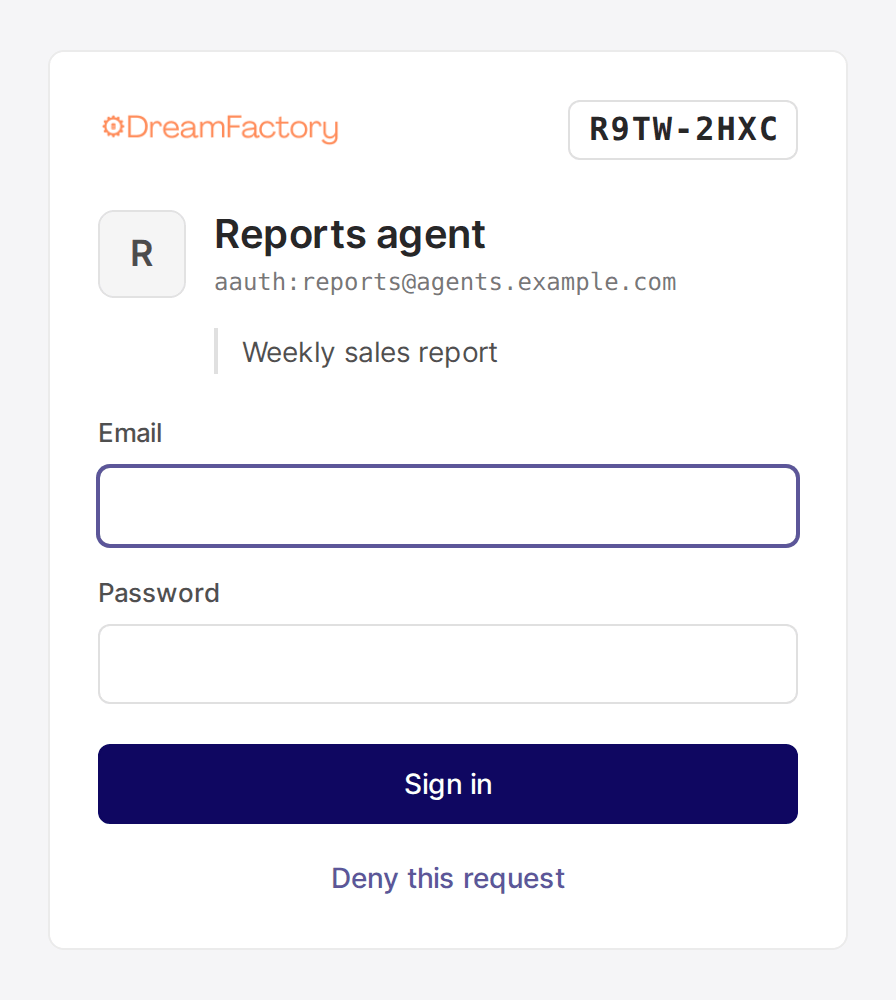
-
Jordan signs in with their DreamFactory email and password and clicks Continue as Jordan. Signing in alone never approves anything.
-
The page shows Waiting for the agent and then moves on by itself to the scope: "Read customers and orders" (
sales.read). Jordan leaves Always allow unticked and clicks Allow. If Jordan closed the tab, the second link the command printed opens the same card in the same browser. -
The page shows Approved, and the command finishes with
200 OK.
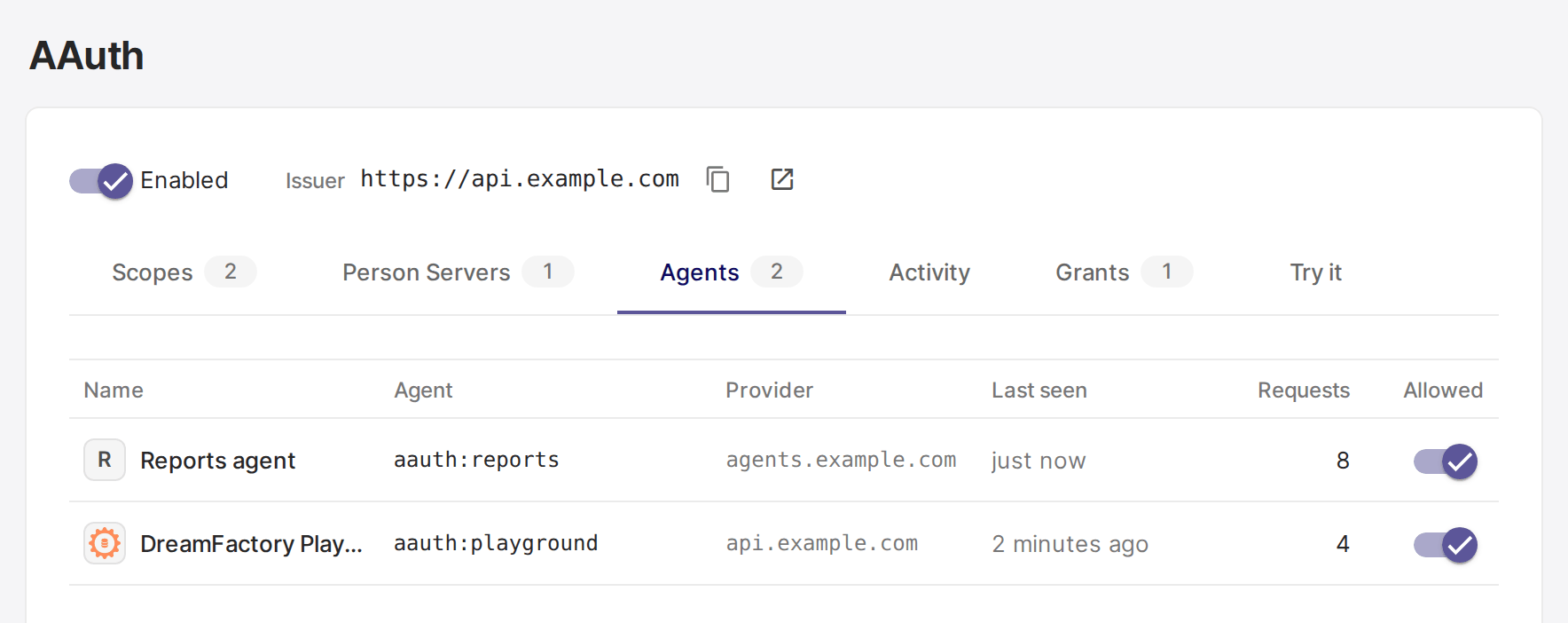
The request ran with the Sales read role, for Jordan. Reports agent now appears on the Agents tab with the name from its aauth-agent.json, its agent id, its provider, when it was last seen and how many requests it made:
Add --open to open each link in your default browser. The opened links carry the identity's callback, so after each step the browser goes to https://agents.example.com/callback instead of waiting on the consent page, and the command opens the second link as well. The links the command prints carry no callback.
5. Call again
Run the same command again. It returns at once, without a link:
GET api.example.com/api/v2/sales/_table/orders?limit=5
  as aauth:reports@agents.example.com
  ✓ 200 OK  scope sales.read  ·  5 records  ·  0.4 s
The person token and auth token are cached in ~/.config/aauth/tokens.json (mode 600), next to the identity file. The command reuses them for every request the scope allows, for example GET .../_table/customers, until they are within 5 minutes of expiring. They last at most one hour. aauth whoami lists them under signed in at.
To drop cached tokens, run aauth logout https://api.example.com for one API or aauth reset for all of them; each prints how many it forgot, for example ✓ forgot 2 tokens for https://api.example.com. --fresh forgets the cached tokens for that API, as aauth logout does, before it calls, so the person approves again. When DreamFactory refuses a cached token outright, for example after an admin switched off its person server or revoked a signing key, or with This DreamFactory has no record of issuing this token. Get a new one., the command drops the cached tokens and starts again with the agent token, so the person gets a new link.
There are no refresh tokens. Person tokens and auth tokens last at most one hour, and an auth token never outlives the person token it was issued for. When they expire, the next call prints a new link, and the person has to open it and continue again. Plan for one person interaction per hour of continuous work. Always allow (step 7) skips only the scope consent, never the identity step.
6. Step up to sales.refund
Now ask Reports agent to mark order 5 as refunded. That needs sales.refund, which the cached auth token does not carry:
aauth request PATCH https://api.example.com/api/v2/sales/_table/orders/5 -d '{"status":"refunded"}' --why "Customer asked for a refund"
PATCH api.example.com/api/v2/sales/_table/orders/5
  as aauth:reports@agents.example.com
  401  more access needed for sales.read sales.refund
  ! approval needed: allow sales.read sales.refund
      open  https://api.example.com/aauth/interact?code=M4XD-8PQT
      code  M4XD-8PQT
  ✓ auth token  sales.read sales.refund  expires in 52 min
  ✓ 200 OK  scope sales.refund  ·  9.8 s
The response body, {"id": 5}, goes to stdout. DreamFactory first answered 401 insufficient_scope with a resource token for sales.read sales.refund: what the auth token already has plus what this PATCH needs. The command asked the person server again, and Jordan got a consent card that lists both scopes, both ticked:
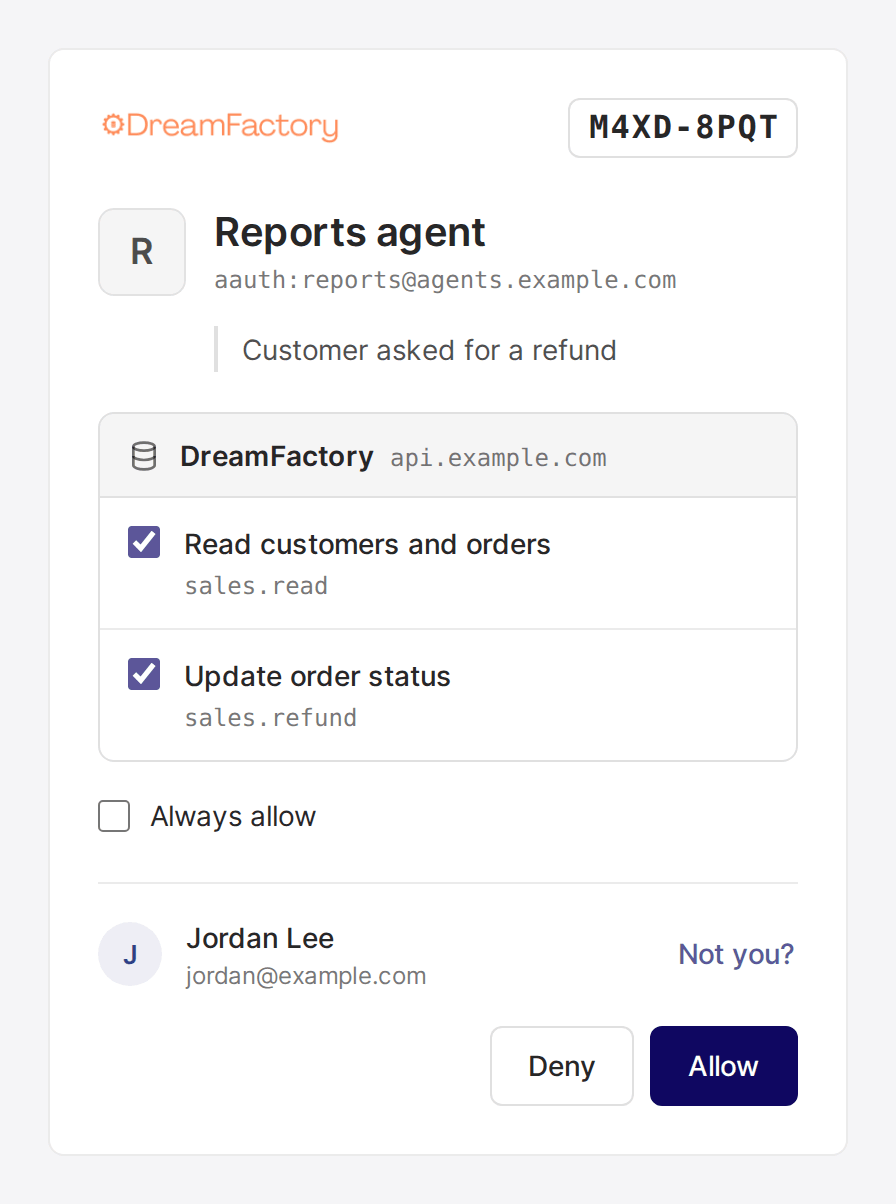
When Jordan clicks Allow, the new auth token carries the scopes Jordan left ticked. Allow needs at least one new scope ticked; otherwise the page says "Select at least one new scope to allow, or deny." The new auth token expires when the old one would have, because it can't outlive the token presented to get it. With both scopes in the token, DreamFactory uses sales.read for reads and sales.refund for this PATCH, and says which in the AAuth-Scope response header.
Only the person the agent acts for can approve a step-up. If someone else signs in on that link, the page asks them to "Sign in as the person this agent acts for."
-s (or --scope) asks for scopes before the API call, through DreamFactory's authorization endpoint, so the command skips the 401 challenges: aauth request PATCH ... -s sales.refund. The command adds the scopes of a cached auth token, so after step 5 it asks for sales.read sales.refund and the progress shows ✓ resource token for sales.read sales.refund instead of the 401 more access needed line. With no cached tokens it gets the person token first, without a 401 line, and asks for sales.refund alone. A scope that is not enabled, or that the person server may not vouch for, fails with 400 invalid_scope (Unknown or unavailable scope: <scopes>) and exit status 1.
Suppose the agent acts for Sam Patel instead: after aauth reset, you run the same PATCH, Sam opens the first link and approves the identity step, and the page moves on to the scope. Sam can't grant sales.refund, because Sam doesn't hold the Sales refunds role. The scope is locked with "You don't have this role" and Allow is disabled:
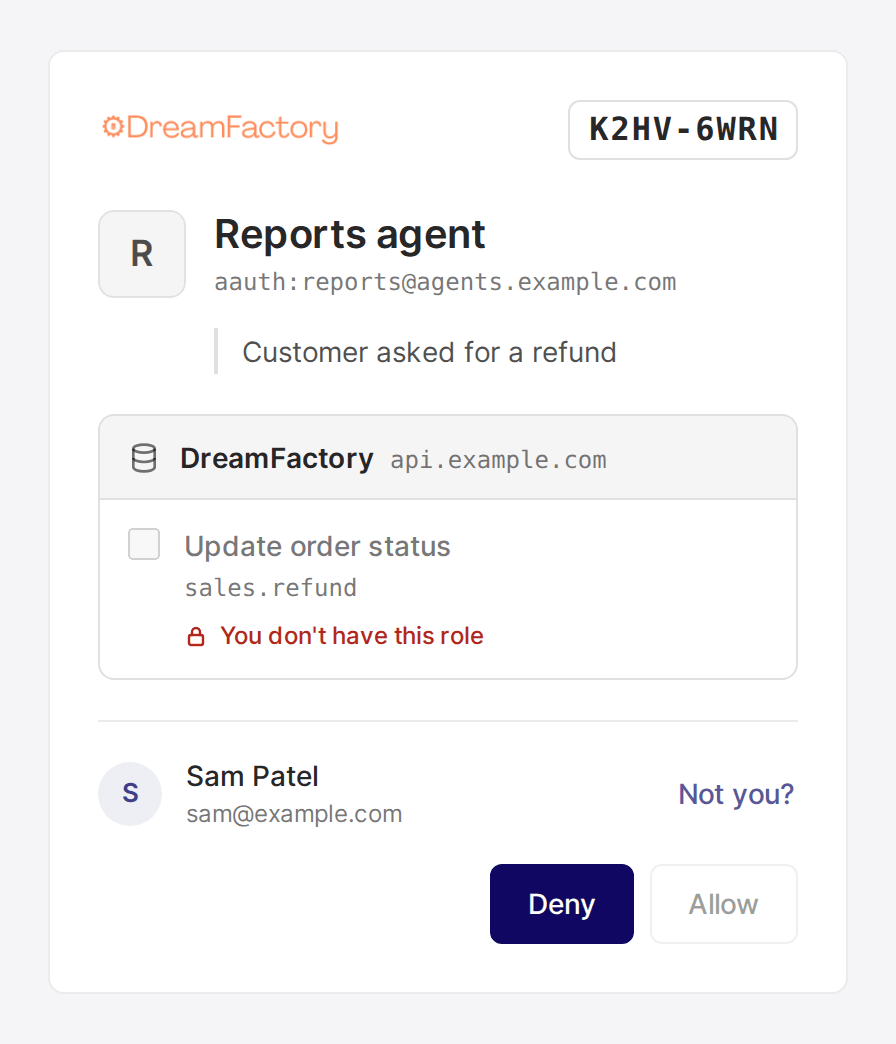
Sam can only click Deny, and the command ends with exit status 3:
✗ not approved: denied (The person denied the request.)
7. Always allow
On a consent card, the person can tick Always allow before clicking Allow. DreamFactory then saves a standing grant: this person, this DreamFactory, this agent id, these scopes. The next time the agent asks for an auth token that the grant covers, the person server answers at once, without the consent card, as long as the person still holds the roles behind those scopes. The progress shows the difference:
  401  consent required for sales.read
  ✓ auth token  sales.read  expires in 60 min, standing grant
What a grant does and doesn't do:
- It covers a request only when it includes every requested scope. A step-up to
sales.refundshows the consent card again; ticking Always allow there addssales.refundto the grant. - It never skips the identity step. Each new person token still needs the person to open a link and click Continue as.
- It belongs to the agent id, not to a key, so it also applies to a new request key of the same agent.
- The grant appears on the Grants tab, where an admin can revoke it (see Grants). The person can revoke it at
https://api.example.com/aauth/grants. Revoking stops future answers; an auth token already issued keeps working until it expires.
8. Denied and blocked
If the person clicks Deny on the consent card, or Deny this request on the sign-in card, the command prints the denial and exits with status 3:
✗ not approved: denied (The person denied the request.)
An admin can block an agent at any time: on the Agents tab, switch the agent's Allowed switch off. A toast reads "Blocked Reports agent".
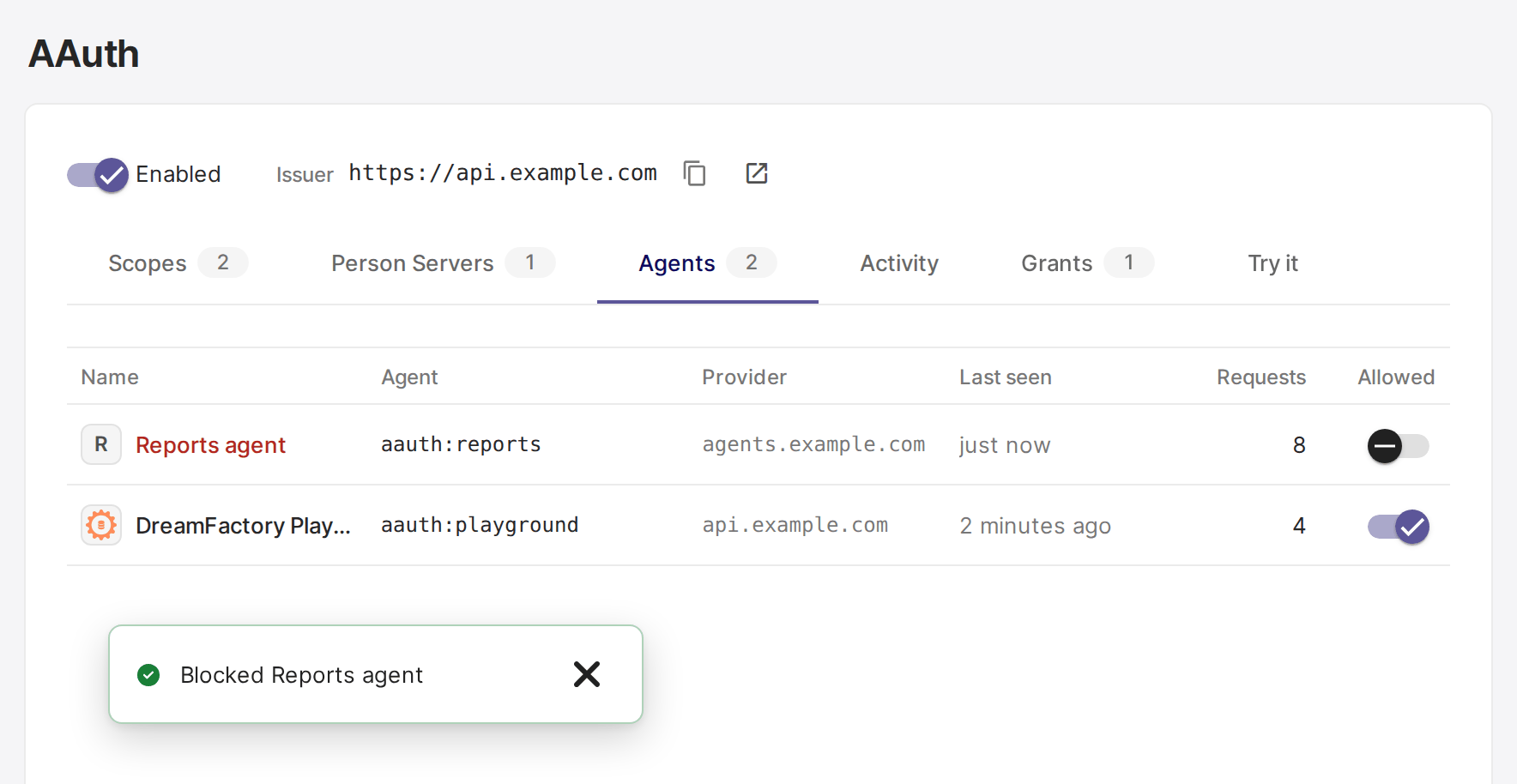
The block applies at once to the agent's tokens, cached ones included, and the person server stops issuing new ones. The next call gets 403 agent_blocked and exits with status 1:
GET api.example.com/api/v2/sales/_table/orders?limit=5
  as aauth:reports@agents.example.com
  ✗ 403 Forbidden  agent_blocked: This agent is blocked on this DreamFactory.  0.3 s
Switching Allowed back on unblocks the agent ("Unblocked Reports agent"). A block applies to the agent id and to every request key DreamFactory has seen it use, whatever agent id a later agent token for that key names, and to every person and auth token DreamFactory issued for the agent. What it does not stop, and how to cut off an agent you no longer trust, is in Responding to an incident.
The exit status tells a script what happened:
| Exit status | Meaning |
|---|---|
0 | The API answered with a 2xx status |
1 | The API answered with an error status, or the flow failed (for example agent_blocked, a signature or discovery error) |
2 | Usage error in the command line |
3 | Not approved: denied, expired, or the person did not act before --timeout |
130 | Interrupted. The first Ctrl-C withdraws the pending request; a second one quits at once. |
Calling DreamFactory from Node
The clients pass your interaction handler a ready-made link, userUrl in Node and user_url in Python, that carries the identity's callback. With that link, the person's browser leaves the consent page after the identity step and lands on your callback page (which aauth serve renders as Done and "Return to your terminal.") although the scope consent still needs a second link. Send the consent page address with the code instead, as the samples below do. The person then stays on one page, which moves on to the scope consent by itself; it is also the link the aauth command prints. Your handler is still called once per request, so it prints a second link for the scope; the person needs it only if they closed the first page. Deliver it through a channel only the person sees, such as a direct chat message or email (see step 4). Printing it, as the samples do, is for trying things out.
Add the client to your project (see step 1), then call the API. This module uses the identity and token cache that aauth init created:
// report.mjs
import { createAgent, loadIdentity } from '@dreamfactory/aauth-agent/config';

const agent = createAgent(loadIdentity()); // ~/.config/aauth/agent.json, tokens cached in tokens.json

const r = await agent.request('GET', 'https://api.example.com/api/v2/sales/_table/orders?limit=5', {
  why: 'Weekly sales report',
  // purpose is 'person' (identify the person) or 'auth' (allow a scope)
  onInteraction: ({ purpose, url, code }) =>
    console.log(`Please approve (${purpose}): ${url}?code=${encodeURIComponent(code)} code ${code}`),
});
if (r.failed || r.cancelled) throw new Error(`not approved: ${r.error}`);
console.log(r.status, r.headers['aauth-scope'], r.body);
agent.request(method, url, options) runs the whole flow, waits for the person when needed and resolves to { status, headers, body, text, steps, interactions }. headers has lowercase names and body is the parsed JSON. When a token request was refused or the person did not approve, the result has failed: true with error (for example denied, expired or timeout) and detail; when the request was withdrawn, it has cancelled: true. API errors such as 403 or 404 come back as ordinary statuses. When the client can't read DreamFactory's metadata, or a token fails one of the client's own checks, the promise rejects with an AAuthError that has error and detail.
| Option | Meaning |
|---|---|
body | Request body: an object (sent as JSON) or a string. Covered by Content-Digest. |
headers | Extra request headers |
scope | Scopes to ask for up front, for example 'sales.read sales.refund' |
why | The reason shown to the person on the consent page |
onInteraction(i) | Called with { purpose, userUrl, url, code, location } before polling. Return 'cancel' to withdraw the request. |
onStep(step) | Called for every discovery, request and poll, for logging: { kind, title, status, request, response } |
signal | An AbortSignal. Aborting while waiting withdraws the pending request. |
fresh | Forget the cached tokens for this API before the call, so the person approves again |
ps | The person server to use. Default: the API's own. |
pollTimeoutMs | How long to wait for the person. Default 600000 (10 minutes). |
url is the consent page and code the code; userUrl is the consent page link with the code and, when the identity has a callback, the callback (see the warning above).
A step-up from code is the same call with a body:
const r = await agent.request('PATCH', 'https://api.example.com/api/v2/sales/_table/orders/5', {
  body: { status: 'refunded' },
  why: 'Customer asked for a refund',
  onInteraction: ({ url, code }) => console.log(`Please approve: ${url}?code=${encodeURIComponent(code)}`),
});
Without an identity file, build the agent from keys you load yourself. apKey and agentKey are private JWKs:
import { Agent } from '@dreamfactory/aauth-agent';

const agent = new Agent({ issuer: 'https://agents.example.com', sub: 'aauth:reports@agents.example.com', apKey, agentKey });
Tokens are then cached in memory. Pass cache: fileCache(path) (also exported by @dreamfactory/aauth-agent) to keep them in a file. Unlike createAgent, new Agent adds the callback https://agents.example.com/callback to userUrl by default; pass callback: false to leave it out, or a URL to use another one. DreamFactory ignores a callback that doesn't match the callback_endpoint your agent provider publishes.
Calling DreamFactory from Python
Install the client, preferably into a virtual environment:
pip install ./df-aauth/clients/python
It reads the same identity file as the Node client. Without Node, create one with the example script; it writes the identity and the two public files, which you publish as in step 3. The script has no callback option, so its identity has no callback:
python3 df-aauth/clients/python/examples/create_identity.py --issuer https://agents.example.com --name "Reports agent" --id reports
Call the API:
from dreamfactory_aauth import AgentIdentity, NotApproved

agent = AgentIdentity.load().agent()  # ~/.config/aauth/agent.json; tokens cached beside it
try:
    r = agent.get(
        "https://api.example.com/api/v2/sales/_table/orders",
        params={"limit": 5},
        justification="Weekly sales report",
        on_interaction=lambda i: print(f"Please approve ({i.purpose}): {i.url}?code={i.code} code {i.code}", flush=True),
    )
except NotApproved as e:
    raise SystemExit(f"not approved: {e.error}")
print(r.status_code, r.headers.get("AAuth-Scope"), r.json())
Keep flush=True when you print the link: when output is not a terminal (a pipe, a service manager or container logs), Python buffers it, and the person would not see the link until the wait has timed out.
agent.request(method, url, ...) and the shortcuts get, post, put, patch and delete return the API's requests.Response. They take params, json, data, headers, scope, ps, justification, on_interaction, on_step, fresh and poll_timeout (default 600 seconds). on_interaction receives an Interaction with purpose ("person" or "auth"), user_url, url, code and scope; return "cancel" to withdraw the request. As in Node, user_url includes the identity's callback; f"{i.url}?code={i.code}" is the one-page link without it (see the warning above).
API errors such as 403 or 404 come back as responses. When the flow itself fails, the client raises:
| Exception | When |
|---|---|
NotApproved | The person denied, the request expired, or the wait timed out |
Cancelled | Your on_interaction returned "cancel" |
InvalidToken | A token from DreamFactory failed the client's checks |
AAuthError | Any other flow failure. All four have .error, .detail, .status and .response. |
Pressing Ctrl-C while the client waits for the person withdraws the pending request and raises KeyboardInterrupt.
The example script aauth_request.py works like aauth request. The step-up with an up-front scope:
python3 df-aauth/clients/python/examples/aauth_request.py PATCH https://api.example.com/api/v2/sales/_table/orders/5 \
    --data '{"status": "refunded"}' --scope sales.refund --why "Customer asked for a refund"
It exits with 0 on success, 1 on an error response or a failed flow, 3 when the request was not approved or was withdrawn, and 130 after Ctrl-C.
Running agents in production
For one developer, one identity file with both keys is enough. For a fleet of agent instances:
- Keep the provider key in one service. That service is your agent provider. Give each agent instance only its own request key.
- Mint agent tokens in the provider. An instance sends its public key to your agent provider, authenticated the way you already authenticate workloads. The provider answers with an agent token from
mintAgentToken()(Node,@dreamfactory/aauth-agent/provider) ormint_agent_token()(Python). The instance passes a function that fetches it:agentToken: async (ps) => ...in Node,agent_token=lambda ps: ...in Python. - Keep agent tokens at an hour or more. Agent tokens last at most 24 hours, and the mint functions refuse longer lifetimes; their default, like the
aauthcommand's, is one hour. Person tokens and auth tokens never outlive the agent token they were issued for, so a 10-minute agent token means a person interaction every 10 minutes. - Use each request key for one agent id. DreamFactory remembers every agent id a request key has presented in an agent token, and a block of any of them refuses the key. One key may present agent tokens for at most 20 agent ids at a DreamFactory; an agent token that names one more gets
403 too_many_agents. - Keep each instance's request key for its lifetime. Tokens are bound to the request key, so every instance needs its own person token, and the person approves the identity step for each instance. An instance that creates a new key at every start loses its tokens, and the person has to sign in again.
- Rotate the provider key without downtime. Publish the new key in the JWKS a few minutes before you sign with it, and keep the old key there (
previousKeys) until the agent tokens it signed have expired.
The agent provider service, in Node. apKey is the provider's private JWK from your secret store, and app stands for your own routes:
import http from 'node:http';
import { createProviderHandler, mintAgentToken } from '@dreamfactory/aauth-agent/provider';

const issuer = 'https://agents.example.com';
const provider = createProviderHandler({ issuer, name: 'Reports agent', apKey, previousKeys: [] });
// serves /.well-known/aauth-agent.json, /jwks.json, /callback, /healthz and a home page at /
// (pass home: false to keep / for your app); anything else goes to your app
http.createServer((req, res) => provider(req, res) || app(req, res)).listen(8799, '127.0.0.1');

// in your app, after authenticating an agent instance:
const token = mintAgentToken({ issuer, apKey, sub: 'aauth:reports@agents.example.com', agentJwk: instancePublicJwk, ps: 'https://api.example.com' });
An agent instance, in Node. requestAgentToken stands for your call to the provider:
import { Agent, generateJwk, publicJwk } from '@dreamfactory/aauth-agent';

const agentKey = generateJwk(); // this instance's request key; it never leaves the instance
const agent = new Agent({
  issuer: 'https://agents.example.com',
  sub: 'aauth:reports@agents.example.com',
  agentKey,
  agentToken: async (ps) => requestAgentToken(publicJwk(agentKey), ps),
});
The same instance in Python:
from dreamfactory_aauth import Agent, generate_jwk, public_jwk

agent_key = generate_jwk()  # this instance's request key
agent = Agent(
    "https://agents.example.com",
    agent_id="aauth:reports@agents.example.com",
    agent_key=agent_key,
    agent_token=lambda ps: request_agent_token(public_jwk(agent_key), ps),
)
Both clients check that the token they get back is bound to their own request key. Every instance shares the agent id, so the Agents tab, a block and Always allow grants apply to the whole fleet.
Command reference
| Command | What it does |
|---|---|
aauth request <METHOD> <URL> [options] | Calls an API. The person approves when needed. aauth GET <URL> is short for aauth request GET <URL>. |
aauth whoami [--check] | Shows this agent's identity and cached tokens. --check also checks the published provider files. |
aauth logout [<URL>] | Forgets cached tokens for one API, or for all of them |
aauth reset | Forgets every cached token of this agent |
aauth init --issuer <url> --name <name> | Creates an agent identity and its provider files |
aauth serve [--port <n>] [--host <h>] | Serves the provider files. Default port 8799, host 127.0.0.1, or the PORT and HOST environment variables. Put TLS in front. |
aauth agent-token [--ps <url>] | Prints a fresh agent token |
aauth decode <jwt> | Prints a token's header and claims. Reads the token from stdin when you leave it out. |
Options of aauth request:
| Option | Meaning |
|---|---|
-d, --data <json|@file|@-> | JSON body, inline, from a file, or from stdin. Signed with Content-Digest. |
-s, --scope <scopes> | Ask for these scopes up front, for example "sales.read sales.refund" |
-H, --header "Name: value" | Extra request header. Repeatable. The signature headers and Content-Digest are set by the agent. |
-w, --why <text> | The reason shown to the person on the consent page |
-i, --include | Print the response status line and headers before the body |
-v, --verbose | Show every protocol step: requests, challenges and tokens |
-q, --quiet | Print only the response body, and any approval prompt |
--json | Print {status, headers, body, steps} as JSON |
--open | Open each approval link in the default browser |
--fresh | Forget the cached tokens for this API, then call. The person approves again. |
--ps <url> | The person server to use. Default: the API's own. |
--timeout <seconds> | How long to wait for the person. Default 600. |
Options of aauth init: --issuer <url>, --name <name>, --id <name>, --callback and --public <dir>, described in step 2. Options for every command: -c or --config <file> (the identity file), --insecure (allow http:// servers, for local testing only), --no-color, -h or --help, and --version.
Environment variables:
| Variable | Meaning |
|---|---|
AAUTH_CONFIG | The identity file to use |
AAUTH_HOME | Directory for agent.json and tokens.json. Default $XDG_CONFIG_HOME/aauth or ~/.config/aauth. |
AAUTH_TOKENS | The token cache file |
AAUTH_AGENT_ID, AAUTH_AGENT_ISSUER, AAUTH_AGENT_NAME | Override the identity's agent id, agent provider and name |
AAUTH_PS | The person server. Default: the API's own, when it publishes aauth-person.json. |
AAUTH_KEYS | A bare keys file with the members ap and agent. The issuer then comes from AAUTH_AGENT_ISSUER. |
NO_COLOR, FORCE_COLOR | Plain or forced color output |
AAUTH_DEBUG | Print stack traces on errors |
The command looks for the identity in this order: --config or AAUTH_CONFIG, then AAUTH_KEYS, then agent.json in AAUTH_HOME (by default ~/.config/aauth/agent.json). Without an identity it asks you to run aauth init. The Python client reads AAUTH_CONFIG, AAUTH_HOME, AAUTH_TOKENS, AAUTH_AGENT_ISSUER and AAUTH_AGENT_ID the same way.
Testing your agent
- Compare with Try it. The Try it tab in the admin app runs DreamFactory's own agent, DreamFactory Playground, through the same flow and shows every request, response and token (see Try it). Run your agent with
-vand compare the steps. - Read Activity. The Activity tab lists your agent's signed API requests (to
/api/v2) with their results, and for a refused request the reason; requests to the person server endpoints are not listed (see Activity). - Decode tokens.
aauth agent-token | aauth decodeshows the agent token your agent presents.aauth decodealso prints how long a token has left and which key it is bound to. - Develop locally. A development DreamFactory with
DF_AAUTH_ALLOW_INSECURE=trueaccepts http identifiers and private addresses, so an agent provider on your laptop works; pass--insecuretoaauthforhttp://URLs. Never set it in production. - Look up errors. Every error your agent can get is listed in Troubleshooting AAuth.