The AAuth HTTP Exchange
This page specifies every request an agent sends to DreamFactory under AAuth, and every answer it gets back. It is for developers who write their own AAuth client, in any language, instead of using the Node and Python clients that ship with df-aauth (see Building an Agent with the AAuth Clients). DreamFactory implements the three-party person-server ("PS") authorization mode of draft-hardt-oauth-aauth-protocol-11, with draft-hardt-httpbis-signature-key-09 for the Signature-Key header (see Standards status). A client that follows those drafts needs no DreamFactory-specific code.
The examples use these names:
- DreamFactory, as resource and person server (the issuer):
https://api.example.com - Your agent provider:
https://agents.example.com - Your agent's id:
aauth:reports@agents.example.com
Tokens, digests and signatures are shortened in the samples (eyJ..., <agent token>). Codes such as 7KQM-4D2P are illustrative.

What an agent needs
-
A request key. An Ed25519 key pair, or an ECDSA P-256 key pair for ES256. The private key never leaves the agent; every request is signed with it. Its public JWK must carry
alg, either"Ed25519"or"ES256". DreamFactory refuses the generic"EdDSA". -
An agent provider. An https origin you control that vouches for your agents. It serves
https://agents.example.com/.well-known/aauth-agent.json:{
"issuer": "https://agents.example.com",
"jwks_uri": "https://agents.example.com/jwks.json",
"name": "Reports agent",
"callback_endpoint": "https://agents.example.com/callback"
}issuermust equal the origin byte for byte.nameis what people see on the consent page; it is self-asserted, so DreamFactory also shows the agent id.callback_endpointis optional: an https URL the person's browser returns to after approving. The JWKS ({"keys": [...]}) holds the public keys that sign agent tokens. DreamFactory uses the key whosekidequals thekidin the agent token's header (a token withoutkidworks only when the JWKS holds exactly one key); that key needsalg,Ed25519orES256, equal to the token header'salg. DreamFactory must reach both documents over https on a public address, or on one the DreamFactory admin admitted (see Private networks and custom CAs). -
An agent token. A JWT with
typaa-agent+jwt, signed by the agent provider's key, that binds the agent id to the request key:header {"alg": "Ed25519", "typ": "aa-agent+jwt", "kid": "<provider key id>"}
payload {
"iss": "https://agents.example.com",
"dwk": "aauth-agent.json",
"sub": "aauth:reports@agents.example.com",
"cnf": {"jwk": {"kty": "OKP", "crv": "Ed25519", "x": "<request public key>", "alg": "Ed25519"}},
"ps": "https://api.example.com",
"jti": "<random>",
"iat": 1794312000,
"exp": 1794315600
}dwknames the well-known document,aauth-agent.json, that DreamFactory reads at theissorigin to find the issuer's keys. The agent id isaauth:<name>@<agent provider host>, with letters, digits and. _ + -before the@. DreamFactory's person server refuses an agent token whosesubhas another form (401 invalid_jwt). It checks the form only: df-aauth 0.1.0 does not check that the host after the@is the host of the agent provider iniss, so use your own provider's host as the protocol intends.ps, the person server the agent uses, is optional. The protocol capsexpat 24 hours afteriat, and DreamFactory refuses aniatmore than 60 seconds in the future. -
A person server the DreamFactory admin trusts. Usually that is DreamFactory itself:
https://api.example.com/.well-known/aauth-person.json. It can also be your organization's own person server, once an admin trusts it (see What changes with an external person server). -
The person the agent acts for: on DreamFactory's person server, someone with a DreamFactory account who holds the role behind the scope the agent needs.
There is no client registration. DreamFactory lists the agent under Security > AAuth > Agents on its first signed request, to /api/v2, to /aauth/authorize or to DreamFactory's person server.
Endpoints
Everything is on the issuer origin. Everything except /api/v2 answers 404 while AAuth is off, and the person server endpoints also while DreamFactory's own person server is off: the JSON endpoints with not_found, the consent page and the grants page with the page "Agent sign-in is not available." A known /aauth path called with the wrong method answers 405 method_not_allowed with an Allow header, even while AAuth is off.
| Endpoint | Signed with | Purpose |
|---|---|---|
GET /.well-known/aauth-resource.json | Not signed | Resource metadata |
GET /.well-known/aauth-person.json | Not signed | Person server metadata |
GET /.well-known/aauth-agent.json | Not signed | Metadata of the built-in Try it agent's provider |
GET /aauth/jwks/resource.json, person.json, agent.json | Not signed | Public keys |
Any /api/v2/... | Agent, person or auth token | The APIs |
POST /aauth/authorize | Person or auth token | A resource token for named scopes |
POST /aauth/person | Agent token | Person token request |
POST /aauth/token | Agent token | Auth token request |
GET /aauth/pending/{id} | Agent token, same key as the request | Poll a pending request |
DELETE /aauth/pending/{id} | Agent token, same key as the request | Cancel a pending request |
/aauth/interact | Not signed (the person's browser) | Consent pages |
/aauth/grants | Not signed (the person's browser) | The signed-in person's standing grants |
The metadata, JWKS, authorization and person server endpoints answer OPTIONS and send Access-Control-Allow-Origin: *, so a browser-based agent can call them. They allow the request headers Content-Type, Content-Digest, Signature, Signature-Input, Signature-Key, Prefer and AAuth-Capabilities, and expose AAuth-Requirement, Signature-Error, Accept-Signature-Scheme, Accept-Signature-Alg, Location and Retry-After.
For /api/v2 calls from a browser, DreamFactory's own CORS configuration applies (see CORS and SSL Configuration). Add an entry for the agent's origin with:
- Methods: the methods the agent uses;
- Headers:
Signature,Signature-Input,Signature-Key,Content-DigestandContent-Type, plus any headers of your own; - Exposed Headers:
AAuth-Requirement,Signature-Error,AAuth-Scope,LocationandRetry-After.
DreamFactory also adds the AAuth headers in these lists (all but Content-Type) to whichever entry matches a request, so an entry for the agent's origin that lists only Content-Type and your own headers works as well. Without a matching entry, /api/v2 answers carry no CORS headers, and the browser blocks the agent's calls.
Signing requests
Every request to DreamFactory except the metadata and JWKS fetches is an RFC 9421 HTTP message signature with the label sig. The Signature-Key header carries one of the agent's tokens:
Signature-Key: sig=jwt;jwt="<agent token | person token | auth token>"
Signature-Input: sig=("@method" "@authority" "@path" "signature-key" "@query");created=1794312000
Signature: sig=:<standard base64 of the raw signature bytes>:
| Rule | Detail |
|---|---|
Signature-Key | sig=jwt;jwt="<token>". Only the jwt scheme is accepted; any other gets unsupported_scheme with Accept-Signature-Scheme: jwt. |
| Covered components | Always @method, @authority, @path and signature-key. With a body, also content-type and content-digest. On /api/v2 and /aauth/authorize, also @query when the URL has a query string. The resource metadata lists the optional ones in additional_signature_components. A missing component gets invalid_input with required_input=(...) in Signature-Error. Cover each component once, in lowercase, without component parameters. |
@authority | The issuer host, api.example.com: lowercase, no port. DreamFactory takes the value from the Host header it receives. A request whose Host is not the issuer host gets invalid_signature "Use https://api.example.com"; a signature over another @authority value gets "HTTP message signature is invalid". |
@path, @query | Exactly as sent on the wire: the raw, still-encoded path, and ? followed by the raw query. Covering @query on a URL without a query signs ?. |
created | Current Unix time, as an integer. Accepted within the signature window of the server clock: 60 seconds by default, published as signature_window in the resource metadata. More than the window in the past gets invalid_signature; more than the window in the future gets clock_skew. expires is optional and honored. DreamFactory ignores alg and keyid; the key comes from the token's cnf.jwk. |
| Signature bytes | The request key's algorithm. Ed25519: the 64-byte signature. ES256: raw r‖s (64 bytes), not DER. |
Content-Digest | sha-256=:<standard base64 of SHA-256(body)>: over the exact body bytes (RFC 9530). DreamFactory also accepts sha-512. |
| Replays | A signed request with any method other than GET or HEAD is accepted once. DreamFactory remembers what was signed, the request key and the signature base, not the signature bytes, so another signature over the same base (such as the second valid form of an ES256 signature) is a replay too. Two identical requests signed with the same token within the same second have the same base, so the second is refused. Sign each request afresh. |
Not allowed on /api/v2 | Method overrides (X-HTTP-Method, X-HTTP-Method-Override, X-Method-Override, or anything else that changes the method), multipart/form-data bodies (send JSON), and a DreamFactory API key or session token in the same request. Each gets 400 invalid_request. |
The signature base for the request above, a GET of /api/v2/sales/_table/orders?limit=5:
"@method": GET
"@authority": api.example.com
"@path": /api/v2/sales/_table/orders
"signature-key": sig=jwt;jwt="eyJ..."
"@query": ?limit=5
"@signature-params": ("@method" "@authority" "@path" "signature-key" "@query");created=1794312000
The lines follow the order of Signature-Input, joined with \n, with no trailing newline. You choose the order; DreamFactory rebuilds the base in the order you sent.
Sign the raw, still-encoded path and query that your HTTP library sends. A library that re-encodes, normalizes or reorders the URL after you sign it breaks verification, and the request fails with "HTTP message signature is invalid". The same happens when a reverse proxy rewrites the path, the query or the Host header, or changes the body.
The flow, request by request
Every request in this section except the metadata fetch is signed. Signature-Input and Signature are shown only in step 2. Error bodies are application/problem+json with the members error and detail; signature and token errors also carry type (urn:ietf:params:sig-error:<code>) and a Signature-Error header.
0. Discover
GET /.well-known/aauth-resource.json HTTP/1.1
Host: api.example.com

HTTP/1.1 200 OK
Content-Type: application/json
Cache-Control: max-age=60, public
Access-Control-Allow-Origin: *

{"issuer":"https://api.example.com",
 "jwks_uri":"https://api.example.com/aauth/jwks/resource.json",
 "name":"DreamFactory",
 "access_mode":"auth-token",
 "authorization_endpoint":"https://api.example.com/aauth/authorize",
 "scope_descriptions":{"sales.read":"Read customers and orders","sales.refund":"Update order status"},
 "signature_window":60,
 "additional_signature_components":["@query","content-type","content-digest"]}
Check that issuer equals the origin you fetched. scope_descriptions lists the enabled scopes with the descriptions people see.
While AAuth is on, DreamFactory's 400 or 401 answer to an API request that carries neither AAuth headers nor DreamFactory credentials also points here, without changing its status or body: Link: <https://api.example.com/.well-known/aauth-resource.json>; rel="aauth-resource". A 401 answer also carries AAuth-Requirement: requirement=agent-token.
The person server's document is /.well-known/aauth-person.json:
{
  "issuer": "https://api.example.com",
  "jwks_uri": "https://api.example.com/aauth/jwks/person.json",
  "person_token_endpoint": "https://api.example.com/aauth/person",
  "auth_token_endpoint": "https://api.example.com/aauth/token",
  "scopes_supported": ["profile", "email"],
  "claims_supported": ["sub", "name", "email"],
  "name": "DreamFactory",
  "accept_signature_algs": ["Ed25519", "ES256"]
}
1. Call with the agent token
GET /api/v2/sales/_table/orders?limit=5 HTTP/1.1
Host: api.example.com
Signature-Key: sig=jwt;jwt="<agent token>"

HTTP/1.1 401 Unauthorized
Content-Type: application/problem+json
AAuth-Requirement: requirement=person-token
Cache-Control: no-store

{"error":"person_token_required","detail":"Get a person token from your person server and sign with it."}
DreamFactory fetched your agent provider's metadata and JWKS (or took them from its cache), verified the agent token and the signature, and recorded the agent. An agent token alone never reaches an API: DreamFactory needs to know which person the agent acts for.
2. Ask for a person token
POST /aauth/person HTTP/1.1
Host: api.example.com
Content-Type: application/json
Content-Digest: sha-256=:<digest of the body>:
Signature-Key: sig=jwt;jwt="<agent token>"
Signature-Input: sig=("@method" "@authority" "@path" "signature-key" "content-type" "content-digest");created=1794312001
Signature: sig=:<signature>:

{"resource":"https://api.example.com","capabilities":["interaction"],"justification":"Weekly sales report"}

HTTP/1.1 202 Accepted
Content-Type: application/json
Location: https://api.example.com/aauth/pending/Xq3...
Retry-After: 2
Cache-Control: no-store
AAuth-Requirement: requirement=interaction; url="https://api.example.com/aauth/interact"; code="7KQM-4D2P"

{"status":"pending","code":"7KQM-4D2P"}
| Body member | Rule |
|---|---|
resource | The resource's server identifier: an https origin. Otherwise 400 invalid_request "resource must be a server identifier (https origin)." |
capabilities | Must include "interaction": this person server always has to reach the person. Otherwise 403 user_unreachable. |
justification | Optional. Shown to the person as a quote. Longer text is cut at 1000 characters. |
mission_s256 | Not supported: 400 invalid_request. |
The person server also checks that the agent token's sub is an agent id, and otherwise answers 401 invalid_jwt "The agent token sub is not an agent identifier (aauth:name@domain)." It refuses sub-agent tokens. It also limits pending requests: at most 30 new ones per agent and 60 per client address each minute, and 20 waiting at once per agent. Over a limit it answers 429 rate_limited with Retry-After: 60. A person token request always needs the person; nothing answers it at once.
3. Send the person to the consent page
Show or open https://api.example.com/aauth/interact?code=7KQM-4D2P: the url and code from AAuth-Requirement. The person can also open https://api.example.com/aauth/interact and type the code. The first browser that acts on a code (signs in, starts single sign-on, presses any button on the card, or types the code) owns the request and its outcome; every other browser then gets "This code was already used in another browser". Opening the link claims nothing and does not change the request, so chat link previews and mail link scanners that fetch it first do no harm.
Until the person acts, anyone who has the link or the code can act first: deny the request, or, on a person token request, sign in with their own account and become the person your agent acts for. Show the link and the code to the person you expect to approve, never in a shared channel.
If your agent provider publishes a callback_endpoint, you may append &callback= and that URL, URL-encoded. DreamFactory uses it only when its scheme, host and path match callback_endpoint (a query is allowed), and it must be https. The browser then goes there after the person decides: to the URL as given when approved, with error=access_denied added to its query when denied, and with error=interaction_expired when the request had expired. After the identity step, a browser with a callback shows "Approved" and goes there instead of waiting for the scope consent, so the person needs the link of the next request too. The callback carries no token: the result always comes from polling. Without error, it means only that the browser came back, not that your request was approved.
4. Poll
Poll the Location URL, signed with the agent token and the same request key that created the request. Wait Retry-After seconds between polls.
GET /aauth/pending/Xq3... HTTP/1.1
Host: api.example.com
Signature-Key: sig=jwt;jwt="<agent token>"

HTTP/1.1 202 Accepted
Retry-After: 2
AAuth-Requirement: requirement=interaction; url="https://api.example.com/aauth/interact"; code="7KQM-4D2P"

{"status":"interacting","code":"7KQM-4D2P"}
status is pending until a browser first acts on the consent page (signs in, starts single sign-on, presses any button on the card, or types the code, or, for a scope request, the page that approved the identity step moves on to it), and interacting after. Opening the link does not change it. Once the person signs in and chooses Continue as:
HTTP/1.1 200 OK
Content-Type: application/json
Cache-Control: no-store

{"person_token":"eyJ...","expires_in":3542}
| Answer | error and detail | Means |
|---|---|---|
202 | Still waiting. Poll again after Retry-After. | |
200 | The token. It is delivered once; later polls get 410. | |
403 | denied "The person denied the request." | The person said no |
408 | expired "The request expired before the person answered." | No answer within 10 minutes |
410 | invalid_code "This pending request is finished." | Already delivered, reported or cancelled, or ended by too many failed sign-ins |
404 | invalid_request "Unknown pending request." | Unknown id, or polled with a different key |
DELETE on the same URL, signed the same way, cancels a waiting request and answers 204. The person token (typ aa-person+jwt) has iss = the person server, aud = the resource, sub = a stable pseudonymous identifier for this person at this resource (the same for every agent), cnf.jwk = your request key, jti, iat and exp. Check iss, aud and cnf.jwk before you use it.
5. Call with the person token
GET /api/v2/sales/_table/orders?limit=5 HTTP/1.1
Host: api.example.com
Signature-Key: sig=jwt;jwt="<person token>"

HTTP/1.1 401 Unauthorized
Content-Type: application/problem+json
AAuth-Requirement: requirement=auth-token; resource-token="eyJ..."
Cache-Control: no-store

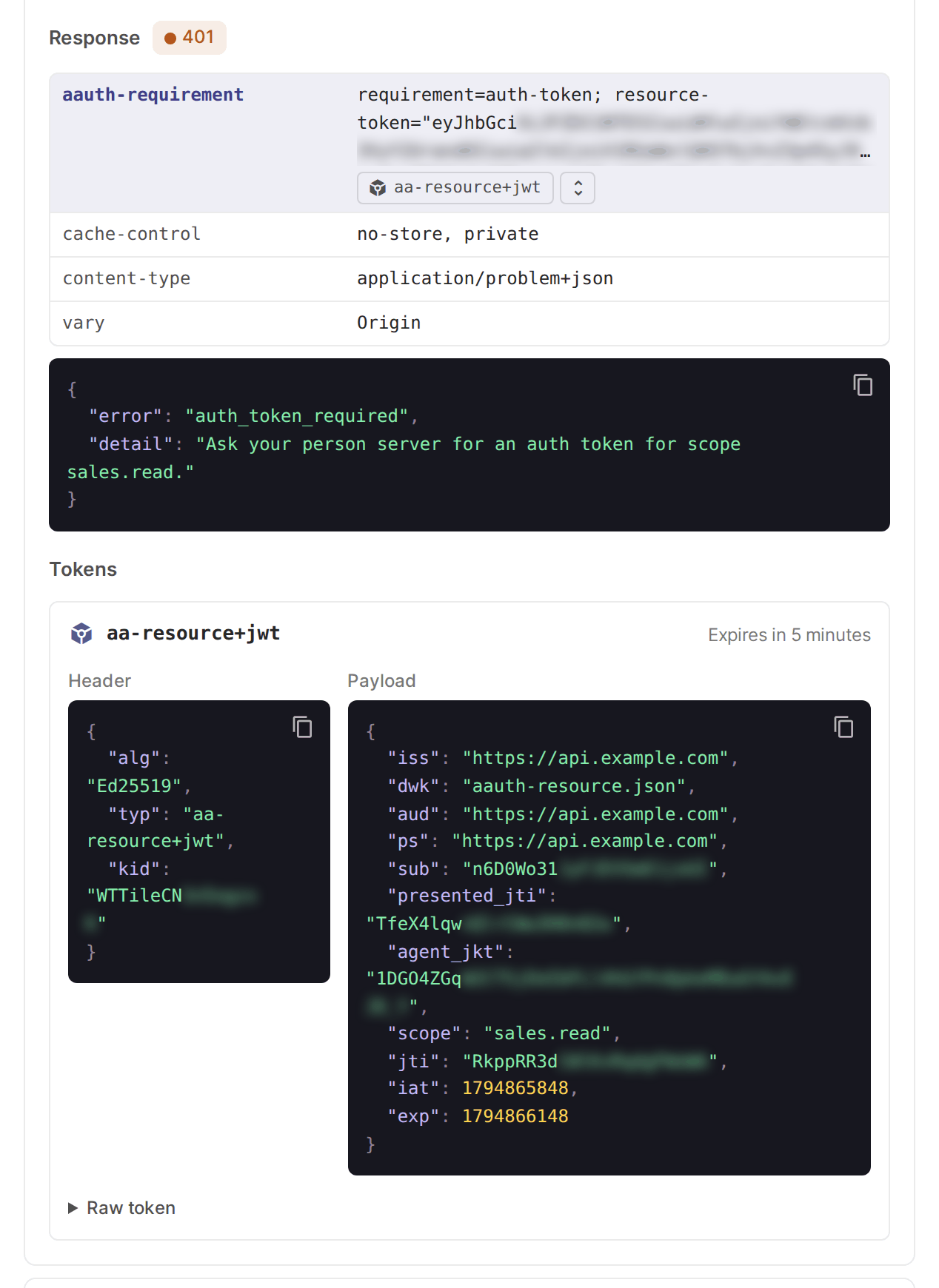
{"error":"auth_token_required","detail":"Ask your person server for an auth token for scope sales.read."}
DreamFactory picked the least privileged enabled scope that allows this request, sales.read (see How DreamFactory picks a scope). When no enabled scope allows it, the answer is 403 insufficient_scope "No scope allows GET sales/_table/orders" without AAuth-Requirement; asking again won't help.
The resource token (typ aa-resource+jwt, valid 5 minutes) is signed with the resource key and has these claims:
| Claim | Value |
|---|---|
iss | The resource, https://api.example.com |
aud, ps | The person server that issued your person token |
sub, presented_jti | The sub and jti of the token you presented |
agent_jkt | The RFC 7638 thumbprint of your request key |
scope | The scope (or space-separated scopes) to ask for |
jti, iat, exp | Its own id and times |
Before you forward it, verify its signature against the resource's JWKS and check that iss is the resource you called, agent_jkt is your key's thumbprint, aud and ps are your person server, sub and presented_jti match the token you presented, and exp is in the future.
In the admin app, Try it shows the same exchange step by step. Expanding the 401 row shows the AAuth-Requirement header and the decoded resource token:
Instead of this round trip, you can ask for a resource token up front. Sign the request with the person token (or a current auth token):
POST /aauth/authorize HTTP/1.1
Host: api.example.com
Content-Type: application/json
Content-Digest: sha-256=:<digest of the body>:
Signature-Key: sig=jwt;jwt="<person token>"

{"scope":"sales.read"}

HTTP/1.1 200 OK
Content-Type: application/json
Cache-Control: no-store

{"resource_token":"eyJ..."}
The resource token asks for exactly the scopes you name. When you sign with an auth token, name the scopes it already carries as well ("sales.read sales.refund"), or the new auth token carries only the new ones. scope is required (400 invalid_request "scope is required."). A scope that is not enabled, or that your person server may not vouch for, gets 400 invalid_scope (Unknown or unavailable scope: <scopes>). Signed with an agent token, the endpoint answers 401 person_token_required "Sign this request with a person token." A blocked agent gets 403 agent_blocked here as on the APIs.
6. Ask for an auth token
Requests to the person server are always signed with the agent token. The person token goes in the body:
POST /aauth/token HTTP/1.1
Host: api.example.com
Content-Type: application/json
Content-Digest: sha-256=:<digest of the body>:
Signature-Key: sig=jwt;jwt="<agent token>"

{"resource_token":"eyJ...","presented_token":"<person token>","justification":"Weekly sales report"}

HTTP/1.1 202 Accepted
Content-Type: application/json
Location: https://api.example.com/aauth/pending/Bv8...
Retry-After: 2
Cache-Control: no-store
AAuth-Requirement: requirement=interaction; url="https://api.example.com/aauth/interact"; code="R9TW-2HXC"

{"status":"pending","code":"R9TW-2HXC"}
The person server checks that the resource token is addressed to it, names it as ps and is bound to the key that signed this request, and that the presented token is one it issued, for the same resource, key, sub and jti. A resource token is used once. A retry with the same resource token and the same key, while the request is still waiting, returns the same pending request, so you can retry safely after a lost response.
What happens next:
- If the person gave this agent Always allow for every requested scope and still holds the roles behind them, the answer is
200 {"auth_token":"eyJ...","expires_in":...}at once. - Otherwise the person approves on the consent page, and you poll as in step 4 until
200 {"auth_token":"eyJ...","expires_in":...}. When the person approved the identity step in the same browser, without a callback, the consent page waits up to 2 minutes for this request and moves on to it by itself. You can still show the new link and code. - Only the person in the presented token can approve. Anyone else who signs in on the link is asked to "Sign in as the person this agent acts for."
The auth token (typ aa-auth+jwt) has iss and ps = the person server, aud = the resource, sub, cnf.jwk = your request key, and the granted scope. The person may grant fewer scopes than you asked for. Check that iss is the resource token's aud, aud is the resource, cnf.jwk is your key and sub matches the token you presented.
7. Call with the auth token
GET /api/v2/sales/_table/orders?limit=5 HTTP/1.1
Host: api.example.com
Signature-Key: sig=jwt;jwt="<auth token>"

HTTP/1.1 200 OK
Content-Type: application/json
AAuth-Scope: sales.read

{"resource":[...]}
DreamFactory runs the request with the role behind the scope it used and names that scope in AAuth-Scope. When the token comes from DreamFactory's own person server, the request also runs as the person's DreamFactory user, never with sys admin rights, and DreamFactory checks on every request that the person is still active and still holds the role. Otherwise the answer is 403 denied "The person this agent acts for is no longer active." or 403 insufficient_scope "The person no longer holds the role behind scope sales.read."
Reuse the auth token for every request its scopes allow until it expires, and sign each request afresh.
Step-up
When a request needs a scope that the auth token does not carry, DreamFactory challenges again and the agent asks for more:

PATCH /api/v2/sales/_table/orders/5 HTTP/1.1
Host: api.example.com
Content-Type: application/json
Content-Digest: sha-256=:<digest of the body>:
Signature-Key: sig=jwt;jwt="<auth token with scope sales.read>"

{"status":"refunded"}

HTTP/1.1 401 Unauthorized
Content-Type: application/problem+json
AAuth-Requirement: requirement=auth-token; resource-token="eyJ..."
Cache-Control: no-store

{"error":"insufficient_scope","detail":"Scope sales.refund is needed for PATCH sales/_table/orders/5."}
- The new resource token asks for the scopes the auth token already has plus the new one:
sales.read sales.refund. - Send it to
/aauth/tokenas in step 6, with the current auth token aspresented_token. - The consent page lists every requested scope, the ones already granted and the new one, each with its description. Scopes the person can grant are ticked. Allow needs at least one new scope ticked; otherwise the page says "Select at least one new scope to allow, or deny." A scope whose role the person doesn't hold is locked with "You don't have this role", and when no new scope is grantable, Allow is disabled.
- Poll as in step 4. The new auth token carries the scopes the person allowed. It expires when the presented auth token would have, because an auth token never outlives the token presented to get it.
- Send the PATCH again, signed afresh with the new auth token. The answer carries
AAuth-Scope: sales.refund.
An Always allow grant answers a step-up at once only when it covers every requested scope. A 403 insufficient_scope without AAuth-Requirement is not a step-up: no enabled scope allows the request.
Token lifetimes
| Token | Lifetime (defaults) |
|---|---|
| Agent token | Set by your agent provider. The protocol caps it at 24 hours. |
| Person token | At most 1 hour, and never past the agent token's exp |
| Auth token | At most 1 hour, and never past the agent token's exp or the presented token's exp |
| Resource token | 5 minutes. Used once at the person server; a retry with the same key gets the same pending request back. |
| Pending request and its code | 10 minutes |
DreamFactory refuses a person or auth token whose exp is more than one hour after its iat ("Token lifetime exceeds 1 hour"), whichever person server issued it. The DreamFactory admin can change these defaults, but not lift person and auth tokens above one hour (see Configuration reference).
There are no refresh tokens. Because an auth token never outlives the person token it was issued for, renewing an auth token with the same person token does not extend the session; it helps only when the admin set auth tokens shorter than person tokens. When the person token nears its expiry, ask for a new one (step 2): the person has to open the link and continue again, and with an Always allow grant the auth token request that follows is answered at once. Plan for one person interaction per hour of continuous work in df-aauth 0.1.0.
Errors
The challenges and the refusals a client most often meets:
| Status | error | Means | Do |
|---|---|---|---|
401 | person_token_required | Signed with an agent token only | Get a person token (step 2) |
401 | auth_token_required | Signed with a person token; the challenge carries a resource token | Get an auth token (step 6) |
401 | insufficient_scope with AAuth-Requirement | Step-up | Get an auth token for the new resource token |
401 | Any, with a Signature-Error header | The signature or a token did not verify | See the codes below |
403 | insufficient_scope without AAuth-Requirement | No enabled scope allows the request, the person no longer holds the role, or the role is unavailable | Ask the DreamFactory admin; don't retry |
403 | agent_blocked | An admin blocked this agent, or another agent id your request key has presented here. A new agent id in your agent token does not change that. A request with DreamFactory's own person or auth token belongs to the agent the token was issued for. | Stop |
403 | too_many_agents | Your request key has already presented agent tokens for 20 agent ids at this DreamFactory. From the APIs, /aauth/authorize and the person server. | Use one request key per agent id |
403 | denied | The person is no longer active, or (when polling) the person declined | Stop, or ask again |
403 | user_unreachable | capabilities lacks "interaction" | Declare it |
400 | invalid_request | Malformed body, API key or session token mixed with AAuth, method override, multipart body, mission_s256 | Fix the request |
400 | invalid_resource_token, invalid_presented_token, expired_resource_token, expired_presented_token | The person server's checks failed | Call the API again for a fresh resource token |
400 | invalid_scope | /aauth/authorize got a scope that is not available | Use a scope from scope_descriptions |
408, 410 | expired, invalid_code | The pending request ended | Start that step again |
429 | rate_limited | Too many pending requests (Retry-After: 60) | Back off |
503 | temporarily_unavailable | DreamFactory could not check whether your agent is blocked (from the APIs, /aauth/authorize and the person server), or which agent one of its own tokens was issued for (from the APIs and /aauth/authorize). Retry-After: 30. | Retry after Retry-After |
404 | not_found | From /aauth/* or /.well-known/aauth-*: AAuth, or DreamFactory's own person server, is off | Stop. While AAuth is off, signed API calls get DreamFactory's normal "no API key" error. |
Signature-Error codes: invalid_signature (a missing header, wrong host, bad signature, replay, stale created or a body that doesn't match Content-Digest), invalid_input with required_input=(...) (a required component is not covered), clock_skew (created or iat in the future), unsupported_scheme (with Accept-Signature-Scheme: jwt), unsupported_algorithm (with Accept-Signature-Alg: Ed25519, ES256), invalid_key, unknown_key (also when your agent provider's documents can't be fetched), issuer_missing, issuer_mismatch, invalid_jwt (also for a person or auth token from a person server this DreamFactory doesn't trust, and with "This DreamFactory has no record of issuing this token. Get a new one." for one of its own tokens it has no record of: drop that token and get a new one) and expired_jwt.
Every message, with its cause and fix, is in the error reference.
Client checklist
- Agent provider metadata and JWKS served over https, without redirects;
issuerequals the origin; the signing key hasalgand thekidyour tokens name. - Agent id
aauth:<name>@<agent provider host>; agent token withtypaa-agent+jwt,dwkaauth-agent.jsonandcnf.jwkwithalg. - Label
sig;@authorityis the issuer host;@querycovered when there is a query;content-typeandcontent-digestcovered with a body; a freshcreatedfor every request; the raw path and query signed. -
401handling forrequirement=person-token,requirement=auth-token(including step-up), andSignature-Error. -
202handling: show the link and code, honorRetry-After, pollLocationwith the same key, stop on403,408and410, back off on429. - Resource token, person token and auth token checks before use.
- Tokens cached per resource and person server, reused until shortly before they expire, and dropped when a request with them gets a
401without anauth-tokenchallenge (for exampleinvalid_jwtorexpired_jwt). - One request key per agent id.
- A plan for the hourly person interaction: a way to reach the person with a new link.